
Meta CAPI Deduplication: How to Fix Duplicate Pixel and Conversions API Events
Meta CAPI deduplication explained: why the Facebook Pixel and Conversions API create duplicate events, how event_id matching works, and a 7-step fix.
 Tagioo teamUpdated 10 min read
On this page
- Why do the Pixel and the Conversions API create duplicate events?
- How does Meta deduplicate Pixel and server events?
- What is the deduplication window?
- What should you use as the event_id?
- Where do duplicates actually come from?
- How do you check Meta CAPI deduplication? (7-step checklist)
- What does each result mean?
- Why does deduplication matter so much?
- Does Meta deduplicate automatically?
- How does Tagioo handle deduplication?
- Sources and further reading
- Related questions
You switched on the Conversions API last week. Since then, Meta shows more purchases than your store has orders.
That's a nice-looking ROAS. It's also wrong.
So what happened? Is Meta counting every sale twice? Is it the plugin, the Pixel or the server? And how do you prove which one?
Let's find out, one order at a time.
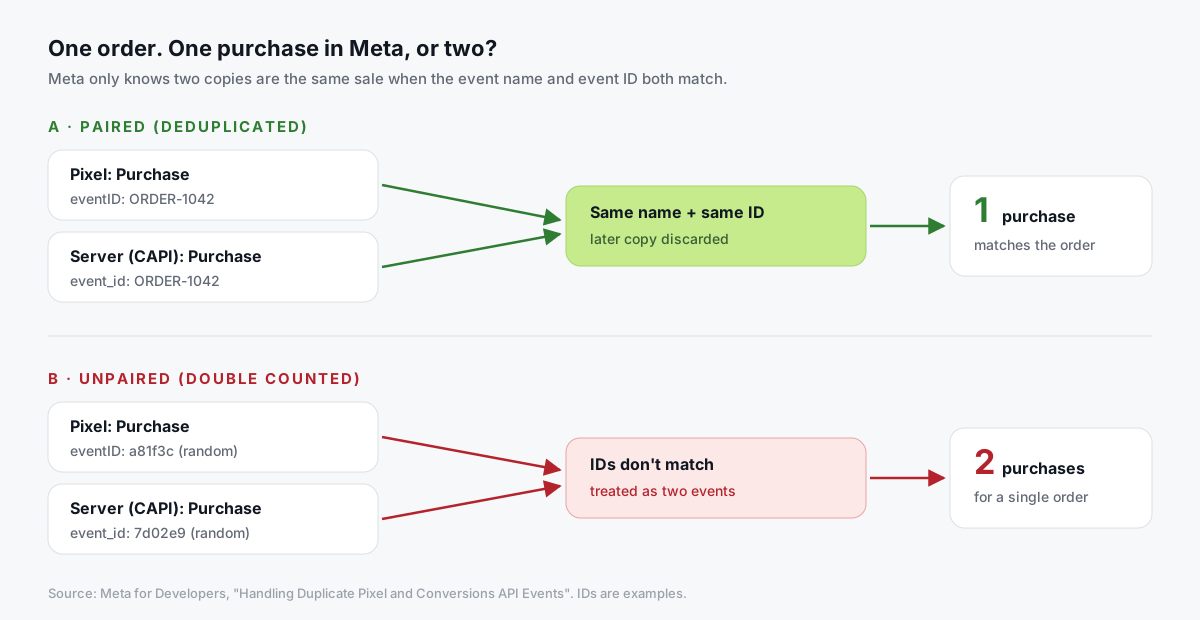
What is Meta CAPI deduplication? Meta CAPI deduplication is how Meta recognizes that a Pixel event from the browser and a Conversions API event from your server describe the same action, and keeps only one. It works when both copies share the same event name and the same event ID (eventID on the Pixel, event_id on the server), within 48 hours.
Sending both copies is the right setup. Meta recommends it.
The problem is only when Meta can't tell the copies belong together. Then one sale becomes two purchases, and your campaigns learn from fake conversions.
In this guide, you'll find out exactly how Meta matches events, why duplicates happen, and a 7-step checklist to test one real order end to end. We'll also answer the questions people ask most, like "Does Meta deduplicate automatically?" and "Can I reuse an event ID?"
So, why the wait? Let's begin.
Why do the Pixel and the Conversions API create duplicate events?
Because you're sending every event twice, on purpose.
Meta's best practices recommend a redundant setup: the Pixel sends the event from the browser, and the Conversions API sends the same event from a server. If one path fails, the other still gets through.
That's great for reliability. But it means Meta receives two copies of every purchase that both paths deliver.
Deduplication is the step that turns those two copies back into one.
Meta says it plainly in its deduplication guide: if you send the same events through both channels, you need deduplication. If you never send the same event both ways, you don't.
How does Meta deduplicate Pixel and server events?
There are two methods. One is recommended. The other is a fallback with a catch.
| Event ID + event name (recommended) | fbp or external_id (fallback) | |
|---|---|---|
| Browser key | eventID and the event name | event name + fbp and/or external_id |
| Server key | event_id and event_name | event_name + fbp and/or external_id |
| Order of arrival | Either order | Browser must arrive first |
| Time limit | Within 48 hours of the first event with that ID | Browser event within the past 48 hours |
| Server-only repeats | Same event_id + event_name: Meta keeps the first copy | Two identical server events are both kept |
| Reliability | High, when IDs are shared correctly | Lower; misses server-first events |
A few details from Meta's documentation are worth knowing:
- The Pixel's ID goes in the fourth argument of the
fbqcall:fbq('track', 'Purchase', {...}, {eventID: 'ORDER-1042'}). - When the copies don't differ meaningfully, Meta says it generally keeps the one it received first.
- Retries are safe with a stable ID. Meta's Conversions API guide says that if it receives the same
event_idandevent_namemore than once, it keeps only the first copy. So resending a failed batch doesn't double count.
What is the deduplication window?
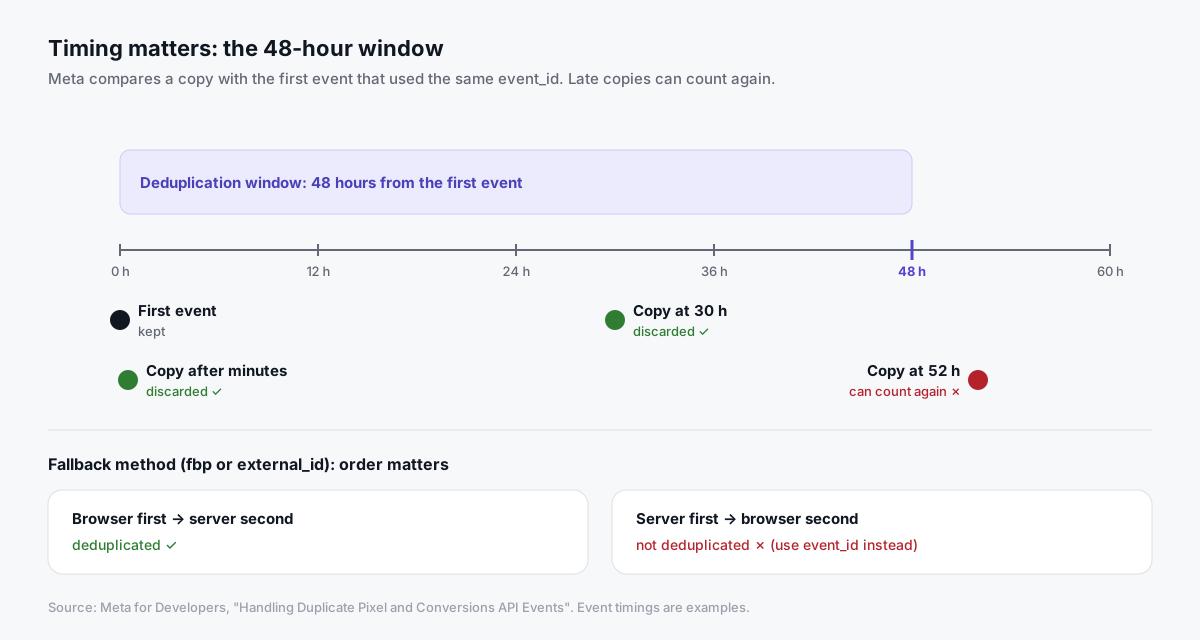
It's 48 hours, counted from the first event Meta received with that event_id.
A matching copy that arrives two minutes later? Discarded. Thirty hours later? Still discarded.
But a copy that arrives on day three can count again.
When does this bite in real life?
- Delayed batches. A server that queues events and sends them days later can land outside the window.
- Late order confirmations. Bank transfers or cash-on-delivery orders confirmed days after checkout.
- Old orders re-sent after a plugin migration.
If you send events in real time, as Meta recommends, the 48-hour window is rarely a problem.
What should you use as the event_id?
The ID has one job: be the same on both copies of one action, and different for every other action.
Here's what works, and what doesn't:
| Event | Good event_id | Why | Avoid |
|---|---|---|---|
| Purchase | The order ID (e.g. ORDER-1042) | Unique, stable on refresh and retry, known to browser and backend | A random ID made separately on each side |
| Lead | The form submission or lead ID | Same on the thank-you page and in your CRM | The page URL or timestamp |
| AddToCart, ViewContent | One ID generated in the browser or data layer, then passed to both paths | Pixel and server read the same value | A fixed value reused on every page |
| PageView | A per-page-load ID | Each view is a separate event | One ID for the whole session |
One more rule: don't reuse an ID across different actions. If two separate purchases somehow share an ID, Meta can merge them into one.
Where do duplicates actually come from?
In our experience, the event ID logic is rarely broken on its own. Duplicates usually come from around it.
Here are the five usual suspects:
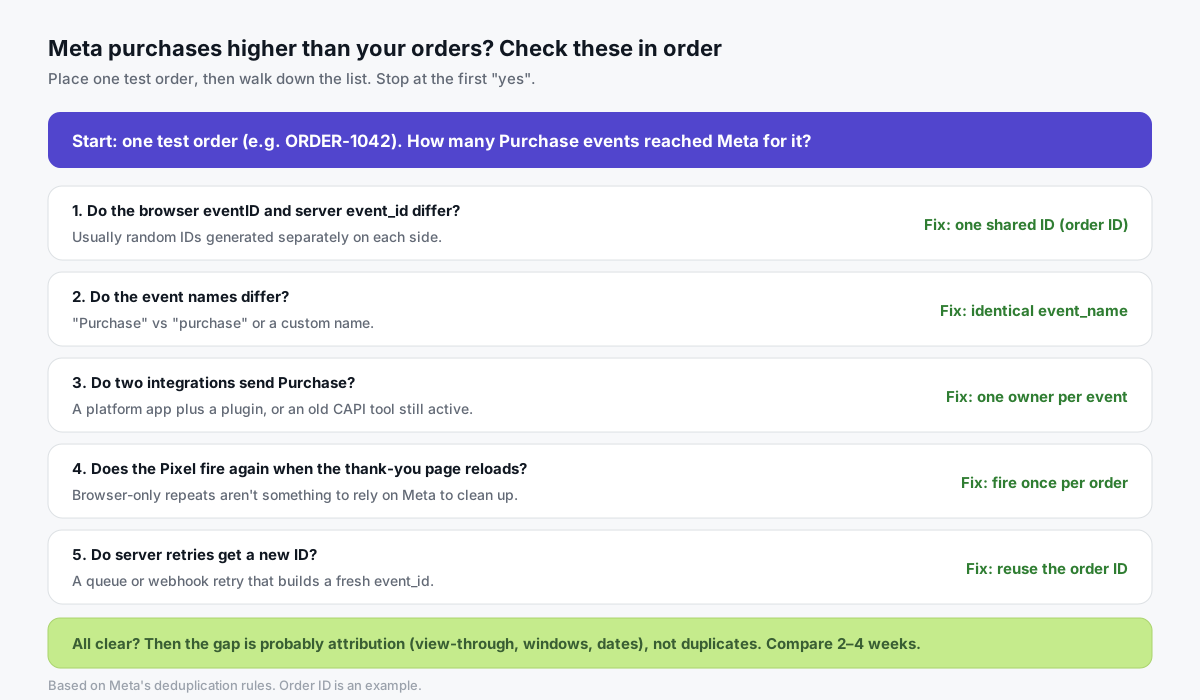
- Random IDs on each side. The Pixel and the server each generate their own ID, so they never match.
- Mismatched names.
Purchaseon the Pixel andpurchaseor a custom name on the server. - Two integrations. A platform's built-in Meta app and a plugin or server GTM tag, each sending its own Pixel-plus-CAPI pair.
- Pixel firing twice. The thank-you page fires Purchase again on every reload or revisit. Meta's fallback doesn't deduplicate two browser events, so don't count on it to clean this up.
- Retries with new IDs. A webhook or queue retry that builds a fresh
event_ideach time.
How do you check Meta CAPI deduplication? (7-step checklist)
Use one real, controlled test order. Write down what you find as you go.
Step 1: List every integration that sends Purchase
Before you test anything, map who sends what:
- Browser: the Pixel code, a platform app, a plugin, a GTM web tag.
- Server: a CAPI plugin, a platform's server integration, a server GTM tag, the CAPI Gateway.
If two different tools each send their own pair, decide which one owns Purchase. Turn the other off for that event.
Step 2: Place a controlled test order
Use a real checkout with a low-value product or a 100% discount code, and note the order ID.
Open Meta's Test Events tool first, and add its test_event_code to your server events while testing. Meta notes these test events aren't dropped, so remove the code afterwards.
Step 3: Check the browser event
Use the Meta Pixel Helper extension or your browser's network tab. Find the Purchase request and note its eid (event ID) and event name.
Step 4: Check the server event
In server GTM preview, your platform's logs or Test Events, find the server Purchase. Note its event_id and event_name.
Step 5: Compare them character for character
ORDER-1042 and 1042 are not the same. Neither are Purchase and purchase.
| Field | Browser (Pixel) | Server (CAPI) | Match? |
|---|---|---|---|
| Event name | Purchase | Purchase | ✓ |
| Event ID | ORDER-1042 | ORDER-1042 | ✓ |
| Value / currency | 89.00 USD | 89.00 USD | ✓ |
fbp | present | present | ✓ |
Step 6: Repeat the risky actions
Refresh the thank-you page. Revisit it from the order email. Trigger a documented backend retry if you have one.
Does each attempt keep the same ID, or fire a new event? The answer tells you whether reloads could inflate your count.
Step 7: Check deduplication in Events Manager
Give it a day, then follow Meta's verification guide:
- Open your dataset's Overview.
- Click Event Details for Purchase.
- Open the Event Deduplication tab.
You'll see the rate of events deduplicated and the rate of deduplication key usage for each source. Meta shows a warning when the rate is too low. Low overlap usually means the keys aren't unique, or only one source sends them.
What does each result mean?
| What you see | What it usually means | What to do |
|---|---|---|
| Two Purchase events in Test Events with different IDs | IDs generated separately | Use the order ID on both sides |
| Same ID, but still double counted | Event names differ, or arrived more than 48 hours apart | Match names exactly; send in real time |
| Three or more Purchases for one order | Two integrations, or Pixel fires on reload | One owner per event; fire once per order |
| Low "deduplication key usage" for one source | That source doesn't send event_id | Add the ID to that path |
| Dedup looks fine, Meta still above orders | Attribution (view-through, windows, dates) | Compare 2–4 weeks; see our discrepancies guide |
| Meta far below orders | Missing events, not duplicates | Check coverage and blocked or missing events |
PixelYourSite shows how to test CAPI events in Events Manager here:

Why does deduplication matter so much?
Because Meta's delivery system learns from your conversions.
If one sale is reported as two, Meta thinks the people who bought are twice as valuable as they are. Your reported ROAS looks better than reality, and budget decisions follow the wrong signal.
The opposite mistake hurts too. If you "fix" duplicates by turning off the server path, you lose the reliability CAPI was meant to add.
So the goal isn't fewer events. It's one event per real action, from whichever path got there first.
Does Meta deduplicate automatically?
Only when you give it something to match on.
Some setups handle the ID for you. Meta says its Conversions API Gateway generates and passes the event_id automatically. Many platform integrations do the same.
But if you combine tools, or build your own server tags, nothing is automatic. You have to share the ID yourself.
How does Tagioo handle deduplication?
Tagioo's Setup Assistant generates Web and Server GTM container files where the browser Pixel and the server-side Meta CAPI tag share the same event_id. For purchases, the event_id is the order ID. Upper-funnel events (ViewContent, AddToCart, InitiateCheckout) carry an ID too, so the browser and server copies can be paired.
You still need to verify. If your site also runs a platform's own Meta app or an older CAPI plugin, those won't share Tagioo's IDs. Use Step 1 above to pick one owner.
Then use Event Logs and Purchase Inspector to confirm your test order reached the server container with the right order ID and value, and Run tracking test to check your Meta CAPI credentials.
Plans start free with 15,000 events per 30 days, no card needed. See pricing, our documentation, or scan your current tags with the free Website Tracking Checker.
Sources and further reading
- Meta for Developers: Handling duplicate Pixel and Conversions API events
- Meta for Developers: Using the Conversions API (batching and retries)
- Meta for Developers: Verifying your setup
- Meta for Developers: Conversions API best practices
- Meta for Developers: Conversions API Gateway
- Meta for Developers: Server event parameters
Related questions
What happens if I don't deduplicate Pixel and CAPI events?
Meta can count the same action twice. Your purchases, conversion value and ROAS look inflated, and Meta's optimization learns from conversions that didn't happen.
You can spot it when Meta reports more purchases than your store recorded for the same period.
Does Meta deduplicate automatically without an event_id?
Partly. Meta can fall back to matching on event name plus fbp or external_id, but only when the browser event arrives before the server event.
Server-first events, and repeated browser-only events, aren't covered. An event_id is far more reliable.
How long is Meta's deduplication window?
48 hours from the first event Meta received with a given event_id. Matching copies that arrive later can be counted again.
Can I use the same event_id for different event types?
Meta matches on event name and event ID together, so AddToCart and Purchase with the same ID aren't merged with each other.
Still, it's cleaner to give each action its own ID. Never reuse one ID for two separate purchases.
Why does Events Manager say my deduplication rate is low?
Usually one source isn't sending the key, or the keys don't overlap. Check that both the browser and the server send an event_id for that event, and that the values match exactly.
Does the Conversions API Gateway handle deduplication?
According to Meta, yes. The Gateway generates the event_id and passes it to both the Pixel and the Conversions API.
If you also run another integration for the same events, that one won't share the Gateway's IDs.
Should I remove the Pixel to stop duplicates?
No. Removing the Pixel loses browser context like the _fbp and _fbc cookies and your backup path.
Fix the IDs instead, so both copies pair up and count once.
See your own events, server-side.
Tagioo hosts your server-side GTM container on your own domain and generates the GA4, Google Ads, Meta and TikTok setup for you. Free for 15,000 events a month, no card needed.
Keep reading
Conversion Tracking Discrepancies: Why GA4, Google Ads, Meta and Your Store Never Match
Not every reporting gap is a broken tag. How to tell normal attribution differences from missing or duplicate conversions.
What Is Server-Side Tracking? How It Works, Benefits & Setup (2026)
How server-side tracking works, how it compares to browser tags, what it can and can't fix, and how to decide if you need it.