
Conversion Tracking Discrepancies: Why GA4, Google Ads, Meta and Your Store Never Match
Conversion tracking discrepancies explained: why GA4 and Google Ads conversions differ, why Shopify orders don't match Facebook purchases, and how to fix it.
 Tagioo teamUpdated 12 min read
On this page
- Why does every tool show a different number?
- Why are GA4 and Google Ads conversions different?
- Why don't Shopify orders match Facebook purchases?
- How big a conversion tracking discrepancy is normal?
- How do you find out what's actually wrong?
- Which number should you trust?
- Can server-side tracking reduce discrepancies?
- How does Tagioo help you investigate?
- Sources and further reading
- Related questions
Your store shows 100 orders this week. GA4 says 84 purchases. Google Ads says 62. And Meta? Meta says 91.
Four tools. Four numbers. One week of sales.
So which one is lying? Is something broken? Or is this just how it works?
Ahh, so many questions. Let's sort them out.
What are conversion tracking discrepancies? Conversion tracking discrepancies are the differences between the conversions your store records and the numbers shown in GA4, Google Ads, Meta or TikTok for the same period. Some gaps are normal, because each tool counts, credits and dates conversions differently. Others point to missing, blocked or duplicated events.
Here's the good news. Most of the gap usually has an explanation you can check.
The trick is telling reporting differences (normal) apart from data problems (fixable), before you change budgets or rip out your tracking.
In this guide, you'll find out why every tool shows a different number, how GA4 and Google Ads differ, why Shopify and Meta never agree, and a step-by-step way to find real bugs. We'll also answer the questions people ask most, like "Which number should I trust?" and "How big a gap is normal?"
So, why the wait? Let's begin.
Why does every tool show a different number?
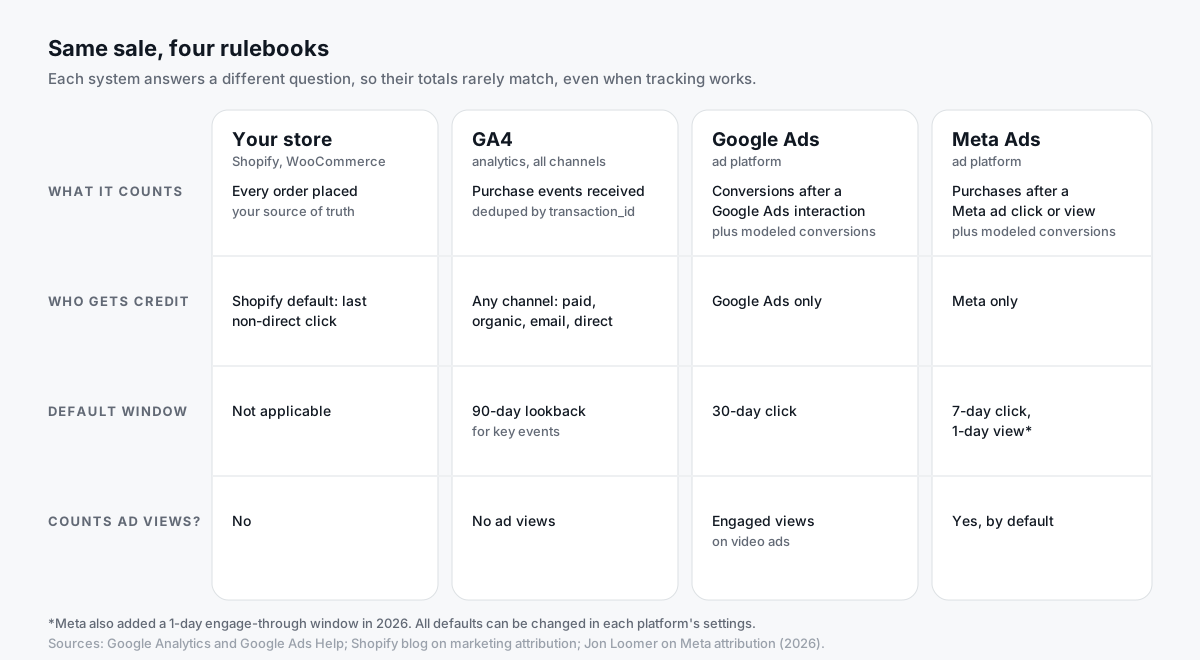
Because they're not measuring the same thing.
Your store answers: "How many orders did we get?"
GA4 answers: "How many purchase events reached us, and which channel gets credit?"
Google Ads, Meta and TikTok each answer: "How many conversions can we credit to our ads?"
Those are three different questions. Here are the main reasons the answers diverge:
| Reason | What happens | Makes ad numbers… |
|---|---|---|
| Attribution scope | Each ad platform only counts sales it can tie to its own ads | Lower than store |
| Overlapping credit | Google, Meta and TikTok can all claim the same sale | Higher in total than store |
| Date assignment | Some reports date a conversion by the ad click, not the order | Shifted between days |
| Attribution windows | Each platform looks back a different number of days | Higher or lower |
| View-through | Meta (and video ads) can credit people who saw but didn't click | Higher |
| Modeled conversions | Platforms estimate conversions they can't observe | Higher |
| Blocked or lost events | Ad blockers, consent choices, pages that never load | Lower |
| Duplicates | Pixel and server both count the sale, or a tag fires twice | Higher |
| Value definitions | Tax, shipping, discounts, refunds, currency | Revenue differs |
Notice that the first seven are normal. Only the last three are usually things you fix.
Why are GA4 and Google Ads conversions different?
This is the most common question we see. Here are the five big reasons.
1. They date conversions differently
Google Ads' standard columns report a conversion on the day of the ad click. GA4 reports it on the day it happened.
Google's own help page says Google Ads "has always reported conversions by the date your ad was clicked." It added "by conv. time" columns that report conversions when they happened, which makes comparisons with your own sales numbers easier.
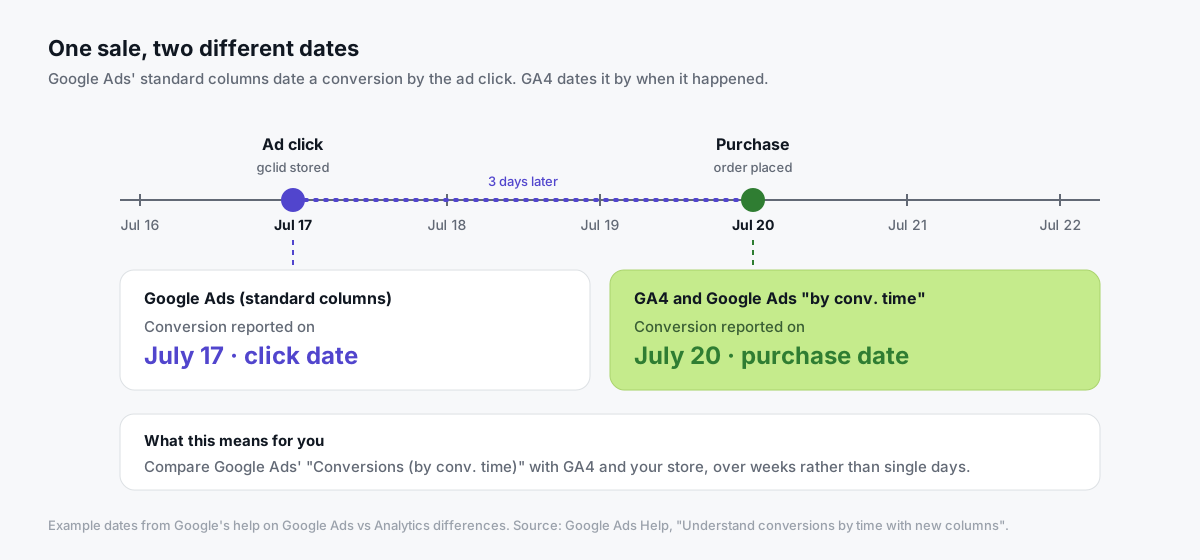
So a click on July 17 and a purchase on July 20 show up on different days. Nothing was lost. It just moved.
2. They give credit differently
Google Ads only credits Google Ads.
GA4 credits every channel: organic search, email, direct, social and paid. If a shopper clicks your ad, then comes back through a newsletter and buys, GA4 may credit the email while Google Ads still claims the sale.
GA4's attribution settings also matter. For conversions shared with Google Ads, you can choose Google paid channels or Paid and organic channels, and that choice changes what GA4 hands over.
3. They use different windows
Google Ads' default click-through conversion window is 30 days (Google's conversion window help).
GA4's default lookback window for key events (other than first visits) is 90 days (GA4 attribution settings).
Different windows, different totals.
4. They count differently
Google Ads can count Every conversion or One conversion per ad click, set per conversion action (Google's counting help). A lead action set to "One" will show fewer conversions than GA4's event count.
GA4, meanwhile, deduplicates purchases that share a transaction_id on web streams (GA4's duplicate key events help).
5. Google Ads can model conversions
When Google can't observe a conversion directly, for example because of consent choices or browser limits, Google Ads can report modeled conversions (Google's conversion modeling explainer).
GA4 has its own modeling, used differently, so this is one more reason the two can drift apart.
Here's the whole picture in one table:
| GA4 | Google Ads | |
|---|---|---|
| Dated by | When the conversion happened | Ad click (standard columns) |
| Who gets credit | Any channel | Google Ads only |
| Default window | 90 days (key events) | 30 days (click-through) |
| Counting | Events; purchases deduped by transaction_id | Every or One, per action |
| Data delay | Processing can take 24–48 hours (Google) | Varies by source |
Google Analytics' own channel explains attribution reports and data-driven attribution here:

Why don't Shopify orders match Facebook purchases?
Shopify and Meta disagree for some of the same reasons, plus a few of their own.
1. Meta counts ad views. Meta's default attribution for website conversions is 7-day click and 1-day view, and in 2026 Meta added a separate 1-day engage-through window for non-link interactions (Jon Loomer's 2026 attribution guide). Someone who scrolled past your ad yesterday and bought today can count as a Meta purchase. Shopify doesn't know that view happened.
2. Shopify uses a different model. Shopify's default attribution model is last non-direct click (Shopify's guide to marketing attribution). It credits the last marketing channel the buyer clicked, not an ad they saw.
3. Meta can model conversions. When it can't observe a sale directly, for example after an iOS opt-out, Meta can estimate it. Those estimates show up in Ads Manager, not in your order list.
4. Not every purchase reaches Meta. If your setup only uses the browser Pixel, ad blockers and lost thank-you pages can drop events. On Shopify, the Facebook & Instagram app's Standard data-sharing level uses only the Pixel; Enhanced and Maximum add the Conversions API (Shopify's data-sharing help).
5. Some purchases get counted twice. If the Pixel and the Conversions API don't share an event_id, one order can become two Meta purchases.
6. Revenue is defined differently. Your store's sales report may exclude tax, shipping, discounts or refunds. The purchase value sent to Meta may include them.
So which direction is "normal"?
| What you see | Usually means |
|---|---|
| Meta slightly below Shopify | Normal. Not every order came from Meta ads |
| Meta slightly above Shopify | Often view-through or overlapping credit; check before panicking |
| Meta roughly double Shopify | Likely duplicates. Check Pixel + CAPI deduplication |
| Meta far below, and GA4 low too | Collection problem: tags blocked or not firing |
How big a conversion tracking discrepancy is normal?
Honestly? There's no official number.
You'll find blog posts saying 5–15%, 10–30% or "a fifth to a third." None of those come from Google or Meta, and they depend heavily on your traffic, your channel mix and how many of your buyers clicked an ad at all.
A better test is stability:
- A steady gap that moves with your sales is usually reporting differences.
- A sudden change after a site update, plugin install or theme change usually means something broke.
- A reversed gap (an ad platform suddenly above your real orders) usually means double counting.
Track the ratio for a few weeks. Then you'll know your normal.
How do you find out what's actually wrong?
Use a structured investigation. It's slower than guessing, but it works.
Step 1: Agree on what you're comparing
Pick the same date range and timezone in every tool. A store on Eastern Time and an ad account on Pacific Time will never agree on daily numbers.
Then decide what counts. All orders? Paid orders only? Purchases credited to ads? Write down how refunds, cancellations, tax and shipping are handled in each report.
Step 2: Use comparable columns
- Google Ads: add Conversions (by conv. time) for your purchase action.
- GA4: use purchases (or your key event) with
transaction_idfor the same dates. - Meta: note your attribution setting. Consider comparing with 7-day click only, without views, for a cleaner comparison.
- Store: export orders with ID, value, status and timestamp.
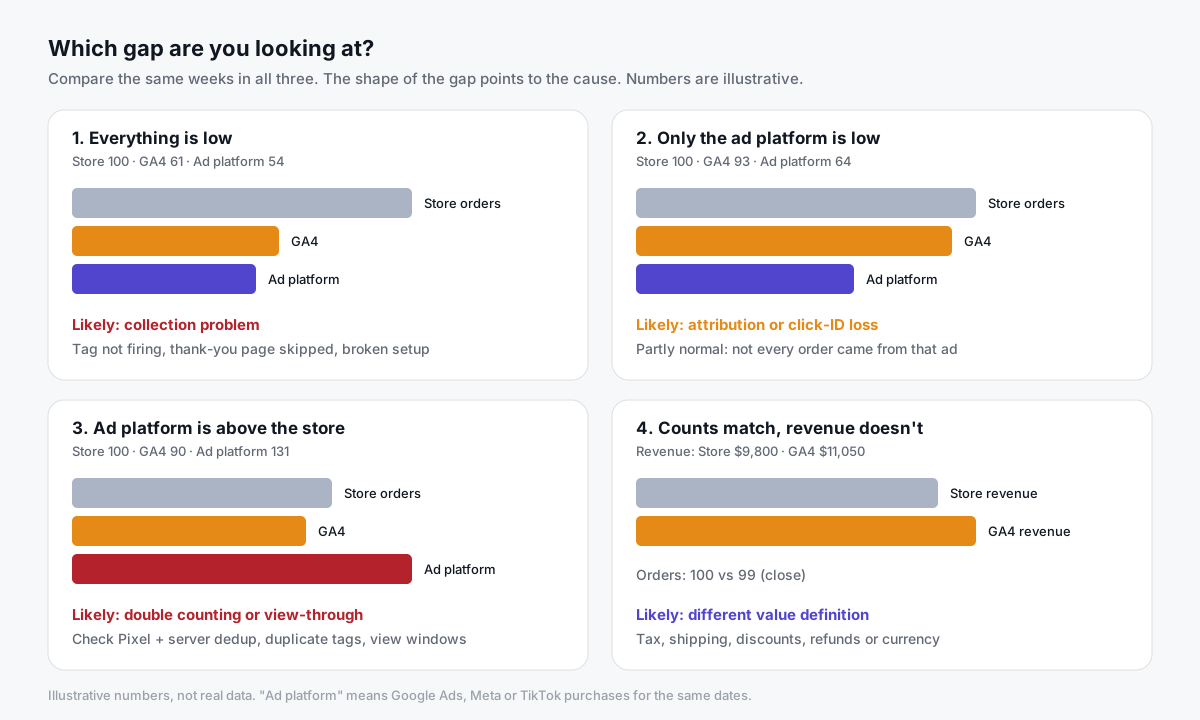
Step 3: Read the pattern
| What you see | What it usually means | Start here |
|---|---|---|
| GA4 and ad platforms all far below store | Collection problem | Tag firing, thank-you page, consent setup, broken plugin |
| GA4 close to store, ad platform low | Attribution, consent or click-ID loss | Click ID cookies, server-side tracking, enhanced conversions |
| Ad platform above store | Double counting or view-through | Deduplication, duplicate tags, attribution settings |
| Counts close, revenue different | Value definition | Tax, shipping, discounts, currency |
| Gap jumped on a specific day | Something changed | Site deploys, plugin updates, tag edits that day |
Step 4: Trace a few specific orders
Pick five orders that look "missing" from an ad platform or GA4.
For each one, ask:
- Did the event fire? Check GA4's
transaction_id, or your server container's logs. - Did it reach the server? If you use server-side tracking, look for the request.
- Did the tag send it? Use GTM preview to check the client, event and destination tags.
- Did the platform accept it? Check the platform's own diagnostics.
Put the results in a simple table: order ID, browser result, server result, tag result, platform result. Mark unknowns honestly. "Unknown" is more useful than guessing "recovered."
Step 5: Rule out duplicates
Search for orders that appear twice. Compare transaction IDs, never amounts or rough timestamps. Two different $49 orders are two sales; one order sent twice is one.
Common causes:
- Pixel and server sending the same event with different IDs.
- Two integrations, like a platform app plus a plugin.
- Thank-you page reloads firing purchase again.
Step 6: Fix one thing, then measure again
Change one thing at a time. Then repeat the same comparison for the same length of time.
Note what else changed: campaigns, traffic, promotions, seasonality. More reported conversions may reflect better measurement, not more sales.
Analytics Playbook covers the GA4 vs Google Ads side in more depth:

Which number should you trust?
All of them, for different jobs.
| Use this number | For this job |
|---|---|
| Store orders | Revenue, profit, inventory, the truth about what sold |
| GA4 | Cross-channel comparison, on-site behavior, funnels |
| Google Ads / Meta / TikTok | Comparing campaigns within that platform, and feeding its bidding |
| Blended ROAS (store revenue ÷ total ad spend) | Whether your advertising as a whole pays off |
Don't add up conversions from every ad platform and expect them to equal your orders. They overlap.
And don't "fix" an ad platform until it matches your store exactly. Some of the gap is supposed to be there.
Can server-side tracking reduce discrepancies?
It can reduce the fixable part. It won't remove attribution differences, and it shouldn't try to.
Server-side tracking sends events through a server container on your own subdomain. That can help with:
- Blocked scripts. Requests to your own domain are less exposed to blocklists. See ad blocker tracking loss.
- Short cookie lifetimes. Server-set first-party cookies can last longer than JavaScript cookies in Safari. See Safari ITP and iOS tracking.
- Lost thank-you pages. A backend purchase hit can still record an order when the confirmation page never loads.
It does not override consent. If a visitor declines tracking, no tag should send their data, browser or server.
How does Tagioo help you investigate?
Tagioo gives you a dedicated server GTM container on your own tracking subdomain, so you can see what actually arrived before it went anywhere else.
- Event Logs show every request that reached your server container.
- Purchase Inspector lets you check a specific order's ID and value.
- Run tracking test checks that your GA4 server container is published and your Meta CAPI credentials work.
- On WooCommerce, the Tagioo plugin sends a server-side purchase hit, deduplicated on
transaction_id, so orders can be recorded even if the thank-you page tag never fires.
That turns "which tool is wrong?" into a question you can answer with evidence.
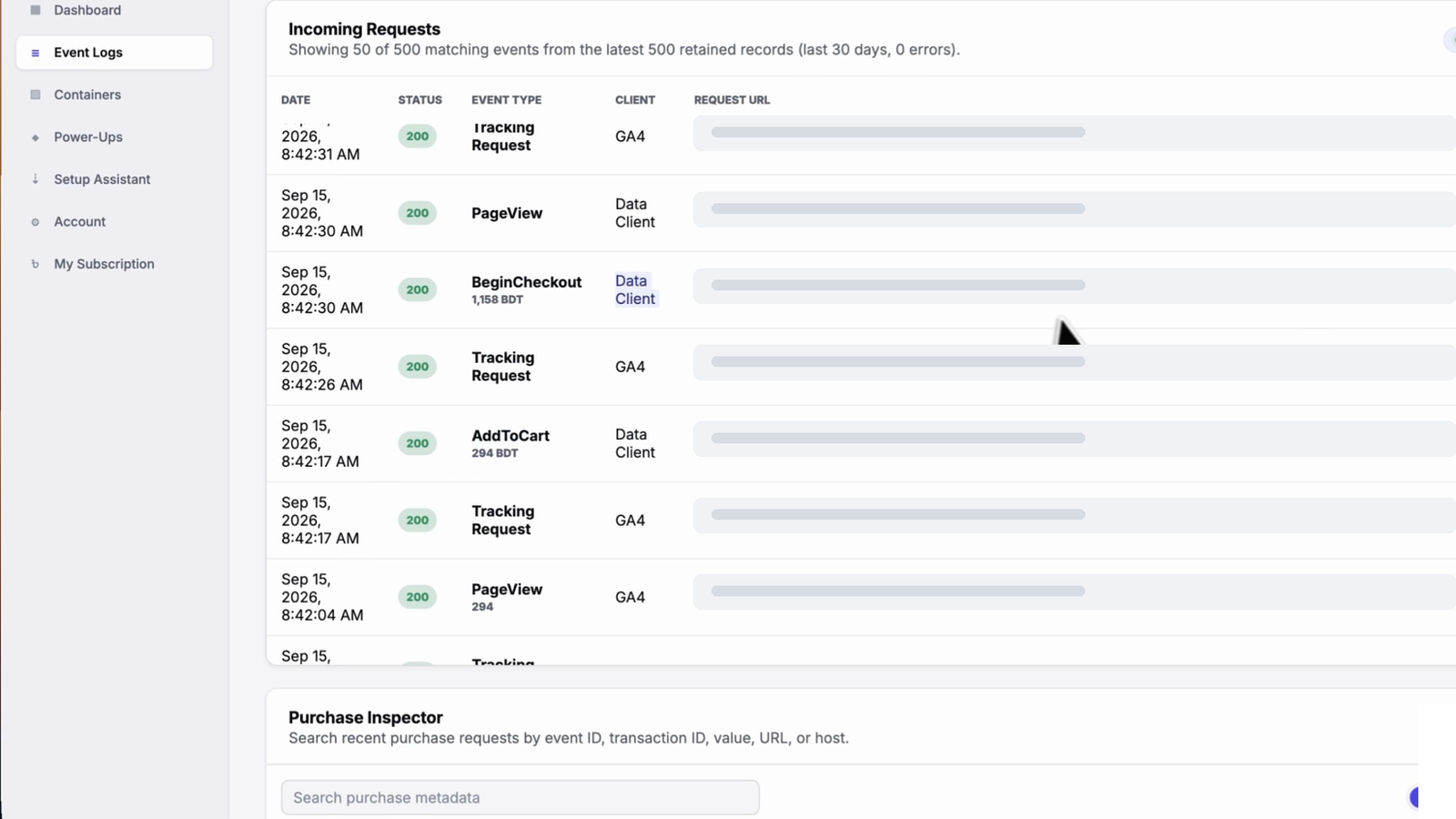
Start with the free Website Tracking Checker to see which tags your site runs today. The free plan includes 15,000 events per 30 days with no card; see pricing, or use the setup checklist and WooCommerce purchase checklist to test one full journey.
Sources and further reading
- Google Ads Help: Understand conversions by time with new columns
- Google Ads Help: About conversion windows
- Google Ads Help: About conversion counting options
- Google Ads Help: About modeled conversions
- Google Analytics Help: Select attribution settings
- Google Analytics Help: Attribution models
- Google Analytics Help: Minimize duplicate key events with transaction IDs
- Google Analytics Help: Data freshness
- Shopify: Marketing attribution and insights
- Shopify Help Center: Facebook data sharing
- Jon Loomer: How Meta Ads attribution works in 2026
Related questions
Why does GA4 show fewer conversions than Google Ads?
Usually because GA4 credits other channels for some sales Google Ads also claims, because Google Ads can include modeled conversions, and because the two date conversions differently.
Compare Google Ads' "Conversions (by conv. time)" column with GA4 over a few weeks before assuming something is broken.
Why does Facebook show more purchases than Shopify?
Meta counts purchases within its attribution window after a click or a view, and it can model conversions it can't observe. Shopify only records actual orders and credits the last non-direct click by default.
If Meta shows close to double your orders, check for duplicate Pixel and Conversions API events.
Which is more accurate, Ads Manager or Shopify?
For what was actually sold, your store. Shopify's order list is the record of real transactions.
Ads Manager is useful for comparing campaigns inside Meta and for feeding Meta's optimization. It isn't an order ledger.
Why is GA4 revenue different from Shopify revenue?
Usually because of value definitions. GA4 receives whatever value your tag sends, which may include tax and shipping, while your sales report may net out discounts and refunds.
Missing or duplicated purchase events also change the total, so check counts first, then values.
What is a normal discrepancy between GA4 and Google Ads?
There's no official threshold. What matters is that the gap is stable over time and moves with your sales.
A sudden jump after a site change, or Google Ads conversions above your real orders, is worth investigating.
Why don't Google Ads conversions match my orders?
Not every order came from a Google ad, and Google Ads dates conversions by click in its standard columns. Lost click IDs, blocked tags and consent choices can also reduce what Google Ads sees.
If Google Ads shows more than your orders for a purchase action, look for duplicate conversion actions or a tag firing twice.
Can server-side tracking fix discrepancies?
It can reduce data loss from blocked scripts, short cookie lifetimes and confirmation pages that never load. It won't make platforms agree on attribution, and it never overrides a visitor's consent.
How long should I compare data before deciding?
At least two to four weeks, with the same date range and timezone in every tool. Single days are too noisy because of click-date reporting and data processing delays.
See your own events, server-side.
Tagioo hosts your server-side GTM container on your own domain and generates the GA4, Google Ads, Meta and TikTok setup for you. Free for 15,000 events a month, no card needed.
Keep reading
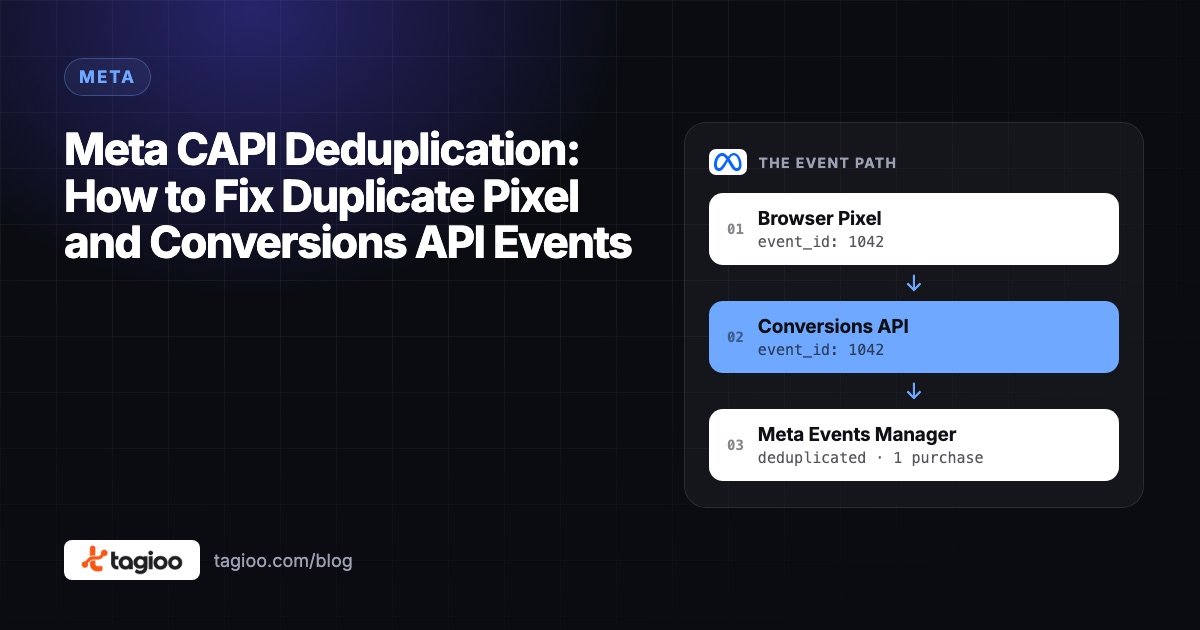
Meta CAPI Deduplication: How to Fix Duplicate Pixel and Conversions API Events
Why Pixel + CAPI can double count purchases, how Meta's event_id matching works, and a 7-step checklist to prove each sale counts once.
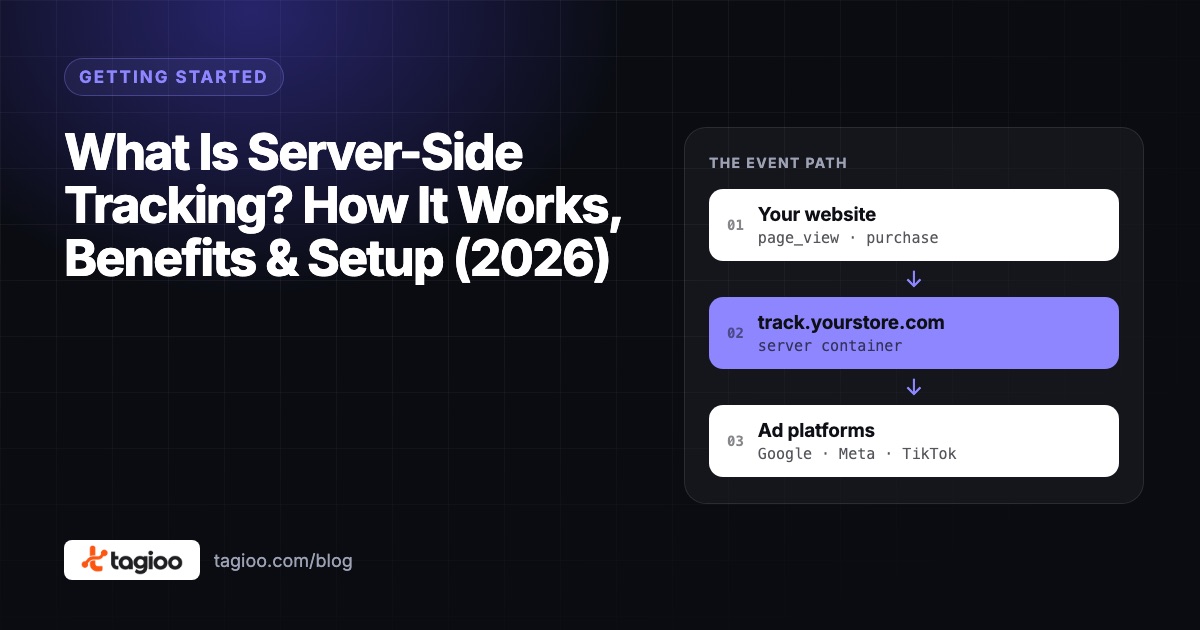
What Is Server-Side Tracking? How It Works, Benefits & Setup (2026)
How server-side tracking works, how it compares to browser tags, what it can and can't fix, and how to decide if you need it.