What Is Server-Side Tracking? How It Works, Benefits & Setup (2026)
What is server-side tracking? Learn how it works, server-side vs client-side tracking, cookies, benefits, limits, consent, cost and how to start.
 Tagioo teamUpdated 16 min read
On this page
- What is server-side tracking?
- Server-side tracking vs server-side tagging: is there a difference?
- How does server-side tracking work?
- What's the difference between client-side and server-side tracking?
- Does server-side tracking still use cookies?
- What are the benefits of server-side tracking?
- What can't server-side tracking do?
- Is server-side tracking legal? Consent and privacy
- What are the different ways to do server-side tracking?
- How much does server-side tracking cost?
- Do you need server-side tracking?
- How do you get started with server-side tracking?
- Sources and further reading
- Related questions
Your store shows 40 orders this week. Meta shows 31. GA4 shows 35.
So which one is right?
Did nine buyers never see an ad? Did a blocker eat the Pixel? Or did a Safari cookie quietly expire before the customer came back?
Ahh, so many questions. Let's start with the one everybody asks first.
What is server-side tracking? Server-side tracking is a way of collecting website events, like page views, add-to-carts and purchases, by sending them first to a server you control, usually on your own subdomain, instead of straight from the visitor's browser to Google, Meta or TikTok. That server then decides what to forward, to which platform, and in what shape.
Some of that 40-vs-31 gap is normal. Platforms attribute sales differently, and not every buyer clicked an ad.
But part of it is often plain data loss. A script that never loaded, a cookie that expired early, or a thank-you page the customer never saw.
In this guide, you'll find out how server-side tracking works, how it compares with the classic browser setup, what happens to cookies, what it costs and whether you actually need it. We'll also answer the questions people ask most, like "Is server-side tracking legal?" and "Does it bypass ad blockers?"
So, why the wait? Let's begin.
What is server-side tracking?
Think of classic tracking as a dozen couriers who each walk into your shop and carry whatever they like back to head office. Server-side tracking puts one person at the door who decides what each courier gets.
In technical terms:
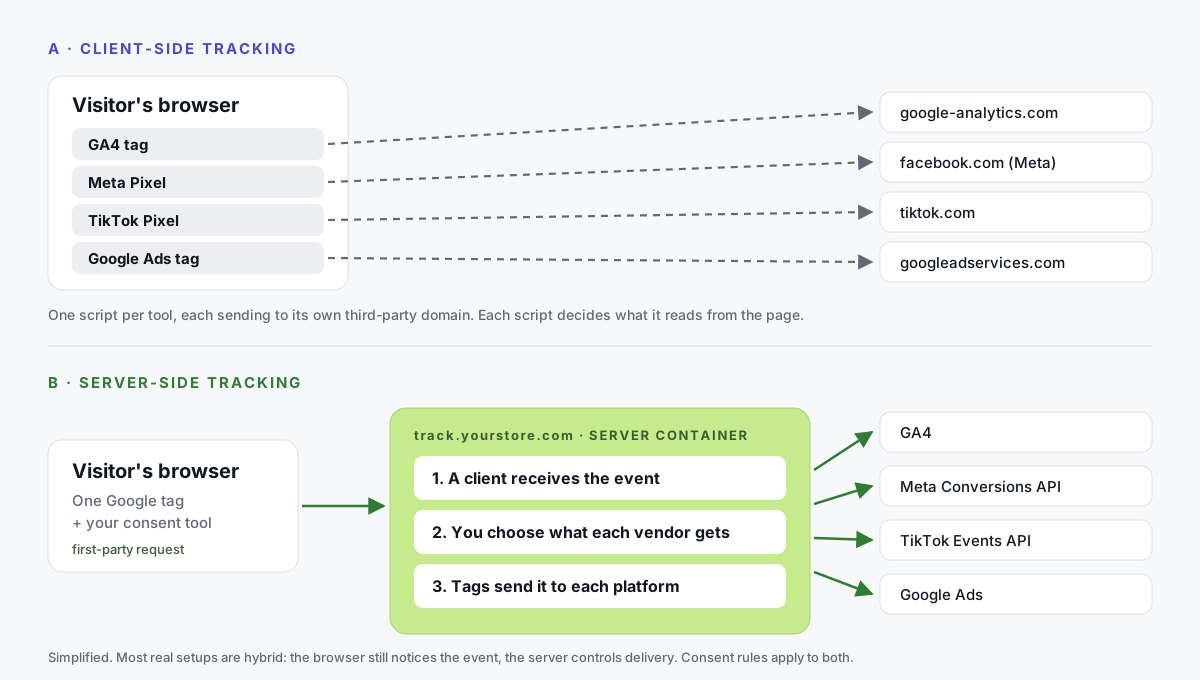
- Client-side tracking loads a separate script for each tool: the GA4 tag, the Meta Pixel, the TikTok Pixel, the Google Ads tag. Each runs in the visitor's browser and sends data straight to its vendor.
- Server-side tracking sends events to one endpoint first: a tagging server on a subdomain of your website. That server processes the event and forwards it using each platform's server API, such as the Meta Conversions API or the TikTok Events API.
Google describes server-side tagging as processing data "on a server you control" (Google's introduction to server-side tagging). The same page adds that only you have access to that data until you choose to send it on.
Here's the part most explainers skip: server-side tracking rarely replaces the browser completely.
Something on the page still has to notice that a visitor clicked "Add to cart". The difference is that the browser now sends that event to you, not to six different vendors.
Server-side tracking vs server-side tagging: is there a difference?
In everyday use, they mostly mean the same thing: a server-side Google Tag Manager setup.
If you want to be precise:
| Term | What people usually mean | Example |
|---|---|---|
| Server-side tagging | Running your tags on a server instead of in the browser | Meta CAPI and GA4 tags inside an sGTM server container |
| Server-side tracking | Collecting or sending events from a server in general | A server container, or your backend calling an API directly |
| Server-to-server (S2S) | No browser involved at all | Your store's backend sending an order straight to Meta's API |
| Hybrid setup | Browser notices the event, server delivers it | The most common real-world setup in 2026 |
Most stores end up with a hybrid. The browser is good at seeing what visitors do, and the server is good at delivering it reliably.
How does server-side tracking work?
Let's follow one purchase through a typical sGTM setup.
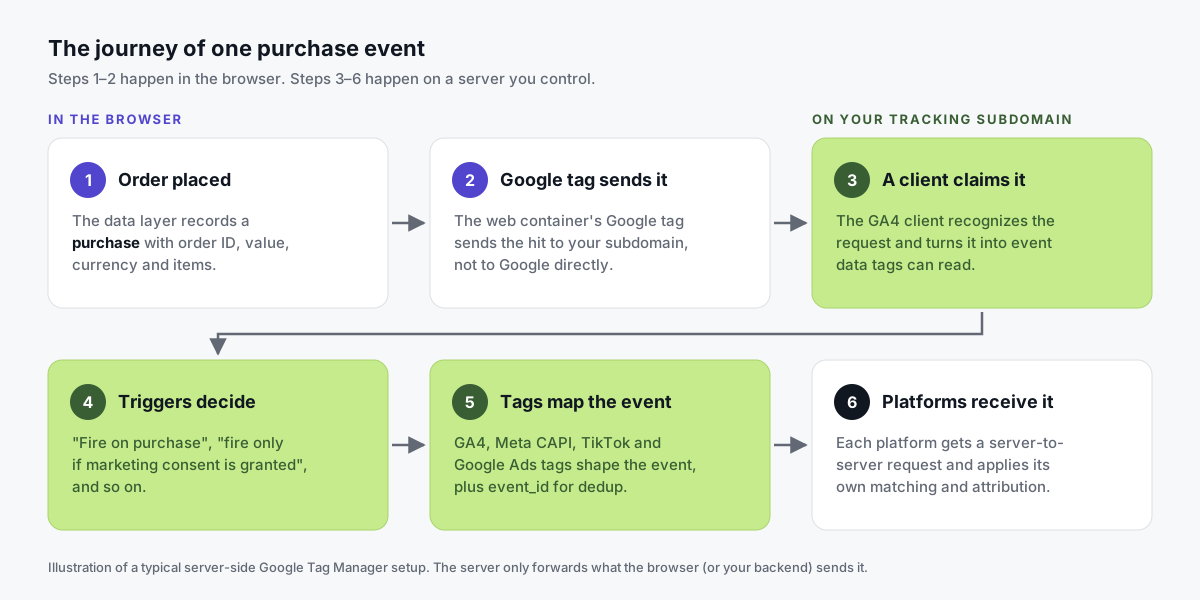
- The visitor places an order. Your thank-you page or data layer records a
purchaseevent with the order ID, value, currency and items. Where allowed, it can include customer details such as email. - The web container sends it to you. A Google tag in your web GTM container has a server container URL set. So instead of going to Google, the hit goes to your own subdomain.
- A client claims the request. Inside the server container, the GA4 client recognizes the request, claims it, and turns it into event data. Google calls clients "adapters between the software running on a user's device and your server container."
- Triggers decide. For example: "fire on every GA4 event" or "fire only on
purchasewhen marketing consent was granted". - Tags shape the event for each platform. A Meta CAPI tag maps it to
Purchasewith hashed match keys and anevent_id. TikTok and Google Ads tags do the same for their platforms. - Each platform receives a server-to-server request. From there, each one applies its own matching, consent and attribution rules.
The big shift happens in steps 3 to 5. You now have one place where every event passes before a vendor sees it. You can inspect it, enrich it, drop fields you don't want to share, and send it to several platforms from one incoming request.
Some setups add a second source next to the browser: the store's backend.
For example, the Tagioo for WooCommerce plugin fires a server-side purchase hit to your sGTM container when the order is created. So the purchase can still be recorded even if the thank-you page tag never fires. Both hits carry the same transaction ID, so the duplicate is removed.
What's the difference between client-side and server-side tracking?
Neither one is "good" or "bad". They solve different problems, and most production setups use both together.
| Client-side tracking | Server-side tracking | |
|---|---|---|
| Where tags run | In the visitor's browser | On a tagging server you control |
| Where data goes first | Straight to each vendor's domain | Your own subdomain (first-party) |
| Scripts on the page | One per tool | Often just the Google tag and your consent tool |
| Cookies | Mostly set by JavaScript | Can also be set by your server as HTTP cookies |
| Who decides what's shared | Each vendor's script | You, per vendor |
| Exposure to blockers and browser limits | Higher | Lower, but not zero |
| Setup effort | Low: paste a snippet | Higher: container, hosting, DNS, testing |
| Running cost | Usually free | Hosting (self-hosted or managed) |
| Debugging | Browser dev tools, Tag Assistant | Server preview mode plus browser tools |
| Consent rules | Apply | Apply in exactly the same way |
Look at that last row again. Moving tags to a server changes the technical path of the data. It doesn't change your legal obligations or your visitors' choices.
Analytics Mania explains the difference really well in this short video:

Does server-side tracking still use cookies?
Yes. People are often surprised by this one.
Server-side tracking doesn't remove cookies. It changes who sets them.
| JavaScript cookie | Server-set cookie | |
|---|---|---|
| Written by | A script in the browser (document.cookie) | Your server, in the HTTP response |
| Example | _ga, _fbp written by a tag | FPID written by a server container |
| Safari ITP limit | Capped at 7 days (WebKit) | Usually not capped the same way on a true first-party setup |
| Needs | Nothing extra | A server container on your own subdomain or same origin |
Why does that matter? Because Safari's Intelligent Tracking Prevention caps script-writable storage at seven days without user interaction. So a Safari shopper who clicks your ad today and buys on day 10 may look like a brand-new visitor.
Google's custom domain guide spells out the server-side side of it. On the default cloud domain, a server container "can only set Javascript cookies." On a subdomain or same-origin setup, you get "full access to security and durability benefits." Google labels same origin as best practice.
One honest catch: Safari can also cap server-set cookies at 7 days when your tracking subdomain is a CNAME pointing to another company's servers (WebKit's CNAME cloaking defense). Same-origin setups avoid this. So "longer-lived cookies" is a can, not a guarantee.
What are the benefits of server-side tracking?
The benefits below are real, but they're conditional. How much each one helps depends on your audience, your current setup and how carefully the server container is configured.
More reliable data delivery
Many ad blockers and privacy extensions work from lists of known tracking domains. A request to connect.facebook.net is easy to spot.
A request to your own subdomain isn't on those lists by default. So routing events through your own domain can recover events that some blockers would otherwise drop.
Be realistic, though. Some tools also inspect paths and scripts. Treat first-party delivery as reliability on your own domain, subject to each visitor's consent, never as a way around privacy tools. More in our ad blocker guide.
Longer-lived first-party cookies
As we just saw, a server can set cookies through HTTP headers. On a properly configured first-party setup, returning visitors can be recognized for longer.
That helps when your attribution window is longer than a week, or customers often come back days after their first visit. See first-party tracking for the details.
Lighter pages
Every vendor script you remove from the browser is code your visitor no longer downloads and runs.
With one or two tags, the difference is small. With eight marketing scripts, it can be noticeable.
Control over what each vendor receives
With browser tags, each vendor's script can read a lot about the page. With a server container, a vendor only receives what your tag sends.
You can strip IP addresses, remove query parameters that contain personal data, or send different detail to different platforms. That's both a data-quality benefit and a privacy one.
Better match quality for ad platforms
Ad platforms match conversions using identifiers like hashed email, phone, IP, user agent, and their own click and browser IDs (for Meta, fbc and fbp).
Meta's Conversions API is built to receive these from your server. When your server sends well-formed, hashed match keys, Meta can often match more events, which shows up as a higher Event Match Quality score.
Two conditions: the data must be there (for example, an email at checkout), and the visitor must have consented. And you need deduplication. If the Pixel and the server both send the same purchase, they must share the same event name and event_id. Meta then discards the duplicate when both arrive within 48 hours (Meta's deduplication guide).
What can't server-side tracking do?
Server-side tracking is often oversold. Here's the other side of the coin.
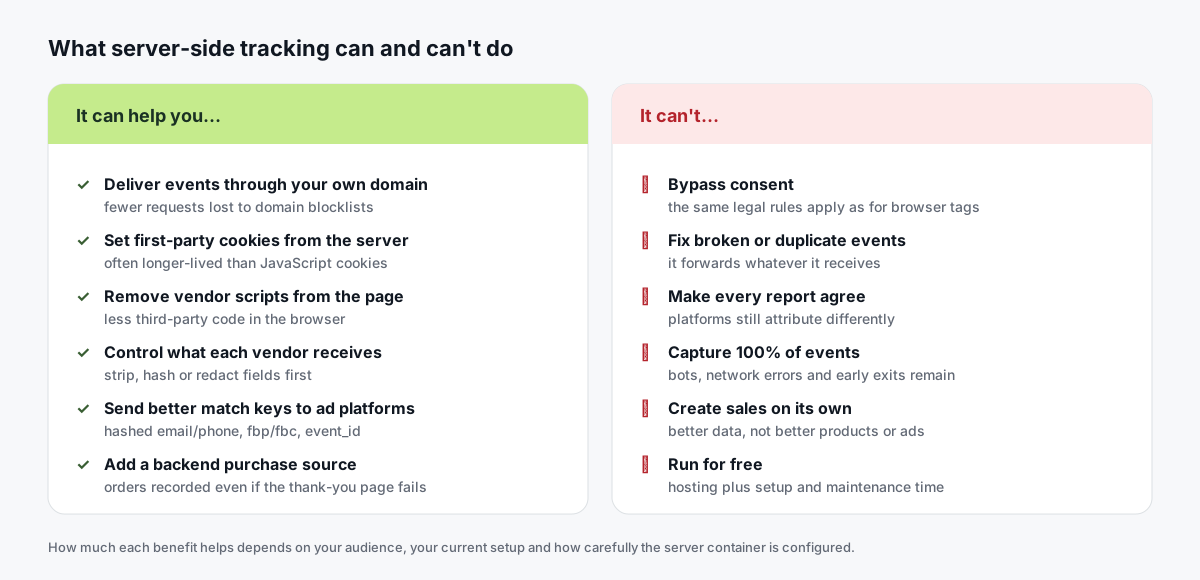
- It doesn't bypass consent. If a visitor declines marketing cookies, your server container must respect that, just like browser tags must.
- It doesn't fix broken events. A purchase that fires twice, or sends tax-inclusive value in one place and tax-exclusive in another, gets forwarded as-is. Start with our WooCommerce purchase tracking checklist.
- It doesn't make every report agree. GA4, Meta and Google Ads use different attribution models and windows. See why conversion numbers don't match.
- It doesn't track everything. Bots, network failures and visitors who leave before anything loads still exist. No setup captures 100% of events.
- It doesn't create sales. Better data can help ad platforms optimize. It doesn't change your product, prices or creative.
- It isn't free. You pay for hosting, plus setup and maintenance time.
Is server-side tracking legal? Consent and privacy
Yes. Server-side tracking is a way of moving data, not a legal basis for collecting it.
This section is general information, not legal advice. Please talk to a qualified lawyer about your situation.
Privacy laws care about what you collect, why, and whether the person was told or asked. Where the processing happens doesn't change that.
- In the United States, there's no single federal privacy law for this, but a growing number of states have comprehensive consumer privacy laws. California's is the best known (California Attorney General's CCPA page). Common themes are the right to know and the right to opt out of the sale or sharing of personal data, including for targeted ads. Sending data from your server to an ad platform is still sharing.
- In the EU, UK and similar regions, laws like the GDPR and ePrivacy rules generally require consent before non-essential cookies and tracking. A server-side setup still needs a consent banner, and still needs to act on the answer.
- Google Consent Mode passes consent choices to Google tags. The Google tag forwards them to your server container by adding consent parameters to the request (Google's server-side consent docs). Google's server tags then adjust, for example by not writing or reading Ads cookies when
ad_storageis denied. - Non-Google tags (Meta, TikTok) need their own rules. Set triggers so they only fire when the right consent was granted.
The good news? The data-control benefit is a privacy benefit too. A server container lets you choose to send less.
What are the different ways to do server-side tracking?
"Server-side tracking" isn't one product. Here are the main routes, and what each is good at:
| Approach | How it works | Best for | Watch out for |
|---|---|---|---|
| Server-side GTM, self-hosted | You run Google's tagging server on Cloud Run or your own Docker host | Teams with cloud skills who want full control | Hosting, scaling, updates and logging costs are on you |
| Server-side GTM, managed | A provider runs the tagging server; you keep your GTM containers | Stores and agencies that want sGTM without infrastructure work | Compare pricing units (events vs requests) |
| Direct platform APIs | Your backend calls Meta CAPI, TikTok Events API or GA4's Measurement Protocol | Developers, offline or backend-only events | One integration per platform to build and maintain |
| Google tag gateway | Serves Google's tag through your own domain via your CDN (Google's gateway docs) | Google-only advertisers who want first-party Google requests | Covers Google tags, not Meta or TikTok |
| Platform integrations and apps | A store app sends events from order webhooks | Simple setups on one platform | Less control over what's sent and how |
New to sGTM? This MeasureSchool video explains the concept from scratch. It's from 2020, so some screens have changed, but the idea hasn't:

How much does server-side tracking cost?
You pay for two things: the server that runs the container, and the time to set it up and keep it healthy.
- Self-hosting on Google Cloud Run: Google's Cloud Run setup guide estimates about $45 per server per month and recommends at least two servers in production. That's roughly $90 a month before logging and traffic costs.
- Managed hosting: Providers such as Tagioo, Stape, TAGGRS and Addingwell run the server for you and charge by plan, usually by monthly events or requests. Several have free tiers for low volume.
Tagioo's Free plan includes 15,000 events per 30 days with no card, and paid plans start at $30 a month. See pricing for each plan's limits.
Do you need server-side tracking?
Not always. Here's a quick way to read your own situation:
| What you see | What it usually means | Start here |
|---|---|---|
| No purchase event, or purchases counted twice | Broken basics | Fix your events first; sGTM won't help yet |
| Store orders well above both GA4 and ad platforms | Collection problem | Check tag firing, thank-you page and checkout flow |
| GA4 close to orders, Meta or Google Ads low | Attribution, consent or click-ID loss | Server-side tracking with CAPI and enhanced conversions |
| Ad platform above your real orders | Double counting | Deduplication (event_id, transaction_id) |
| Meta suggests the Conversions API or shows low match quality | Missing server events or match keys | Server-side Meta CAPI |
It's usually worth testing if:
- Your ads learn from conversions. You spend a meaningful amount on Meta, Google or TikTok, and bidding depends on that data.
- Your buyers take their time. Many use Safari or iOS, or buy days after their first visit.
- You want control. One place to decide and redact what each vendor receives, or one repeatable setup across client sites.
It's probably not your first priority if your basic events aren't working, you spend very little on ads, or nobody on your team will check the data after launch.
Not sure where you stand? Our free Website Tracking Checker scans a public page for tags, IDs, consent setup and whether tracking already goes through a first-party domain.
How do you get started with server-side tracking?
There are two broad paths, and the steps are similar either way:
- Take a baseline. Export two to four weeks of orders and compare them with GA4 and each ad platform.
- Pick one conversion. Usually the purchase or a qualified lead. Don't migrate everything at once.
- Create a server container in Google Tag Manager.
- Host it on Cloud Run, or paste the container config into a managed host.
- Map a subdomain like
track.yourstore.com, with SSL. - Route your Google tag to the server, then add server tags for each platform.
- Preview, publish, verify. Test a real order, publish both containers, and compare against your baseline after a few weeks.
Our server-side GTM setup guide walks through each step in detail, including the mistakes we see most.
Prefer not to run servers? With Tagioo, each account gets a dedicated, isolated sGTM container with preview and debug mode, and a custom tracking subdomain with DNS guidance and automatic SSL.
Our Setup Assistant then generates ready-to-import Web and Server GTM container files for GA4, Meta CAPI, TikTok Events API and Google Ads. You import, preview and publish. Afterwards, the dashboard shows real-time event counts, Event Logs, and a Run tracking test that checks your GA4 server container is published and your Meta CAPI credentials work.
Platform guides: WooCommerce, Shopify, GA4, Google Ads and lead generation.
Whichever path you pick, start small and verify one conversion end to end. When you're ready, create a free Tagioo account and follow the Tagioo setup walkthrough.
Sources and further reading
- Google: An introduction to server-side tagging
- Google: Server-side tagging overview
- Google: Custom domain for your tagging server
- Google: Server-side consent mode
- Google: Consent mode overview
- Google: Cloud Run setup guide for server-side tagging
- Google: Google tag gateway for advertisers
- Meta: Conversions API and deduplicating Pixel and server events
- WebKit: Full third-party cookie blocking and more and CNAME cloaking and bounce tracking defense
- California Attorney General: California Consumer Privacy Act (CCPA)
- Simo Ahava: Server-side tagging in Google Tag Manager
Related questions
Is server-side tracking worth it?
It usually is if you spend meaningfully on paid ads, rely on platform bidding, and see a consistent gap between your real orders and what the platforms report.
It's less likely to be worth it if your basic events aren't working yet or your ad spend is small. Start with one conversion and compare before and after on your own data.
Does server-side tracking bypass ad blockers?
Not as a goal, and not completely.
Because events go to your own subdomain, blockers that work from lists of known tracking domains often won't catch them, so you can recover events that would otherwise be dropped. Some tools inspect paths and scripts too. And visitors who decline tracking in your consent banner must still be respected.
Is server-side tracking GDPR compliant?
It can be, but not automatically. GDPR compliance depends on your legal basis, consent, notices and what you share, not on where the tags run.
Server-side tracking can help, because you can redact fields and send less. It still needs a consent banner and tags that respect the visitor's choice. This isn't legal advice.
Do I still need a cookie banner with server-side tracking?
Generally yes, wherever the law requires consent for tracking or advertising cookies.
Pass consent choices through Google Consent Mode, and make sure non-Google tags in your server container respect them too.
Does server-side tracking use cookies?
Yes. It still uses first-party cookies to recognize returning visitors, but the server can set them through HTTP headers instead of JavaScript.
On a true first-party setup, those cookies can last longer than script-set cookies in Safari. Browser rules and consent still apply.
Can I do server-side tracking without Google Tag Manager?
Yes. Your backend can send events straight to Meta's Conversions API, TikTok's Events API or GA4's Measurement Protocol. CDPs and store apps can do it too.
Server-side GTM is popular because it reuses tags marketers know and feeds many platforms from one stream. It's just not the only way.
Is server-side tracking the future?
For ad-driven businesses, it's quickly becoming the standard way to deliver conversions. Browsers keep tightening limits on scripts and cookies, and ad platforms keep asking for server events.
That said, the browser isn't going away. The likely future is hybrid: the browser notices, the server delivers, and consent decides what's allowed.
See your own events, server-side.
Tagioo hosts your server-side GTM container on your own domain and generates the GA4, Google Ads, Meta and TikTok setup for you. Free for 15,000 events a month, no card needed.