
Server-Side Tracking for Lead Generation: Track the Leads That Actually Close
Server-side tracking for lead generation: track form submissions in Google Ads and Meta, stop duplicate leads, and send CRM stages back as offline conversions.
 Tagioo teamUpdated 14 min read
On this page
- Why is lead tracking harder than ecommerce tracking?
- What should count as a lead?
- How do you track form submissions for Google Ads and Meta?
- Why send lead events server-side?
- How do you stop duplicate leads?
- What is offline conversion tracking for leads?
- What data should you send, and what should you keep out?
- How do you test your lead tracking?
- 7 common lead tracking mistakes
- How do you set this up with Tagioo?
- Sources and further reading
- Related questions
Google Ads says you got 40 leads this month. Your CRM shows 31.
Your sales team says six of them were any good.
So which number should your campaigns learn from? And why don't the first two even match?
Ahh, so many questions. Let's sort them out.
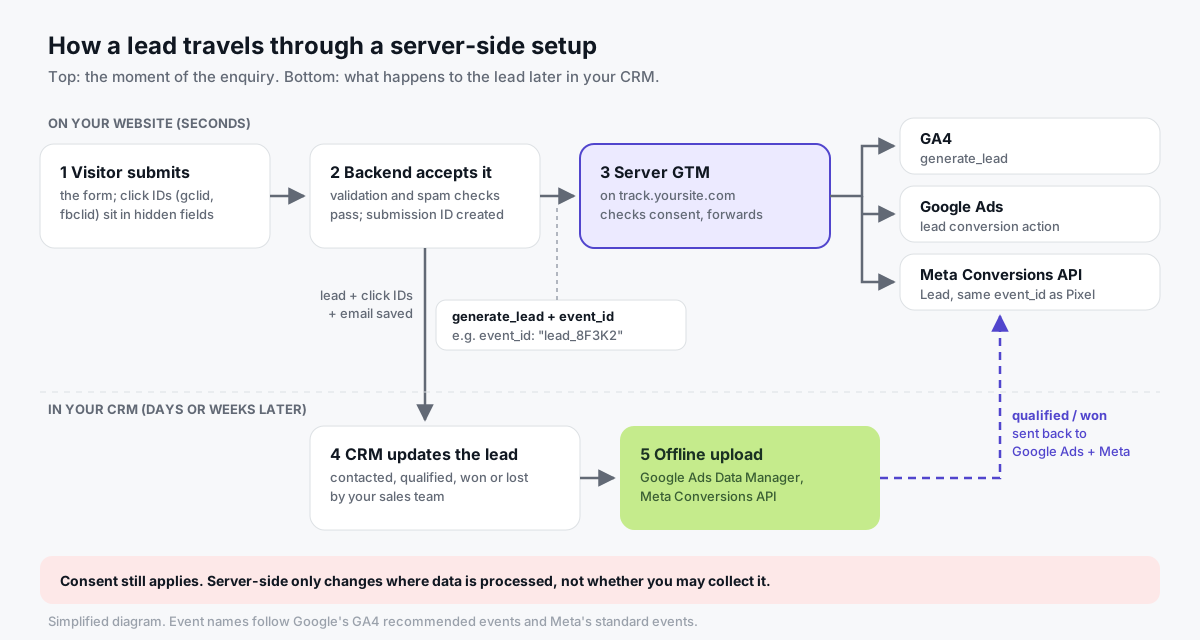
What is server-side tracking for lead generation? Server-side tracking for lead generation sends your form submissions, and later CRM stages, to Google Ads, Meta and GA4 through a server you control, such as a server-side GTM container on your own subdomain. It records confirmed leads more reliably and lets ad platforms learn which leads become customers.
Some of that 40-vs-31 gap is usually a counting problem. A tag that fires on the button click, not on a successful submission. A thank-you page someone refreshed.
The rest is a learning problem. Your ads are optimizing for form fills, not for customers.
In this guide, you'll find out how lead tracking differs from ecommerce, how to track form submissions in Google Ads and Meta, how to stop duplicates, and how to send CRM outcomes back with offline conversions. We'll also answer questions like "Do I still need the Meta Pixel?" and "How late can I upload a lead?"
So, why the wait? Let's begin.
Why is lead tracking harder than ecommerce tracking?
A store knows the value of a sale the moment it happens. A lead business doesn't.
That one difference changes almost everything:
| Ecommerce | Lead generation | |
|---|---|---|
| When value is known | At checkout | Days or weeks later, if ever |
| Natural unique ID | Order number | Only if you create one (a submission ID) |
| Where success is confirmed | Payment provider and order system | Your form backend, then your CRM |
| When the real outcome happens | Immediately | After calls, demos and proposals |
| Junk risk | Low (people pay) | High: spam, bots, wrong numbers, students |
| Best signal for ad platforms | Purchase with value | Qualified or won lead, sent back later |
So for leads, server-side tracking is really two jobs.
Job one: record the enquiry reliably, once, with the right IDs.
Job two: tell the ad platforms what happened next.
Most guides only cover job one. We'll do both.
What should count as a lead?
Start here, before you touch a tag. Agree with your sales team on one definition.
A lead is a submission your system accepted. It passed validation and spam checks, and it reached your inbox or CRM. A button click is not a lead. A failed validation is not a lead.
Then name the later stages. Google already has names for them. Its GA4 recommended events include a lead generation set, and sending them populates GA4's Lead acquisition report:
| Stage | GA4 recommended event | Meta event | Google Ads |
|---|---|---|---|
| Accepted enquiry | generate_lead | Lead (standard event) | Website conversion action, e.g. "Submit lead form" |
| Contacted | working_lead | Usually not sent | Usually not sent |
| Qualified | qualify_lead | Custom event from your CRM | Offline conversion action (qualified lead) |
| Won | close_convert_lead | Custom event or Purchase, with value | Offline conversion action (converted lead), with value |
| Disqualified or lost | disqualify_lead, close_unconvert_lead | Not sent | Not sent |
Meta's standard events reference also lists Contact, Schedule, SubmitApplication and CompleteRegistration. Pick the one that matches your action, and use it consistently.
Why bother with all the stages? Because of this:
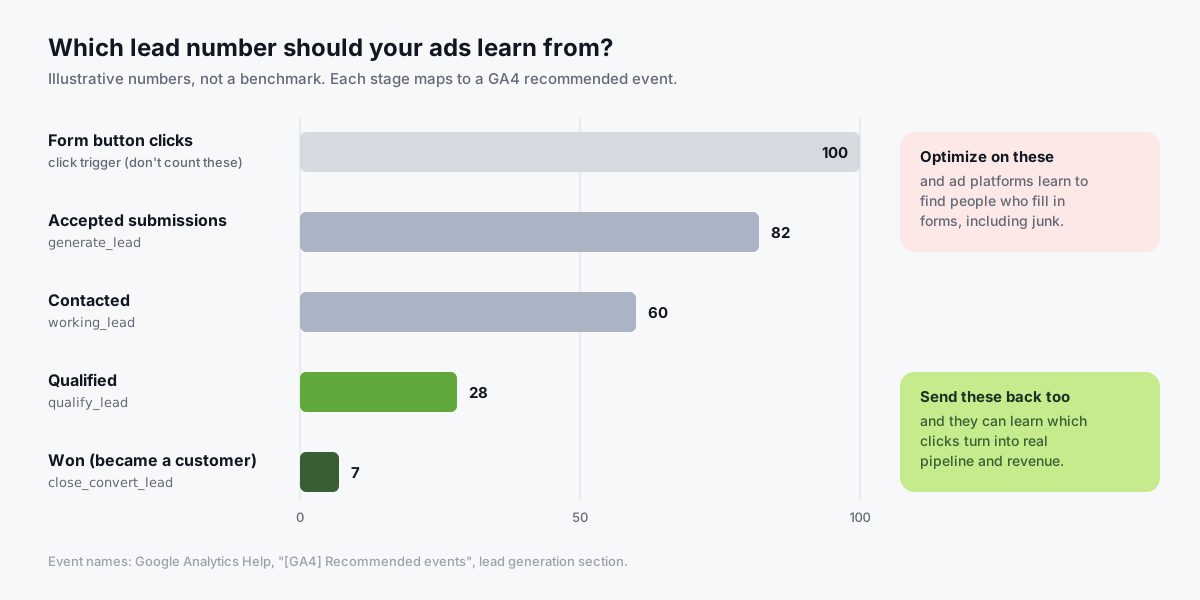
If your ads only ever hear about form fills, they'll get very good at finding people who fill in forms. Including the junk.
How do you track form submissions for Google Ads and Meta?
There are several ways to detect a submission. They're not equally reliable.
| Method | How it works | Reliability | Use it when |
|---|---|---|---|
| Button click trigger | Fires when someone clicks Send | Low: counts failed attempts | Never, for conversions |
| GTM Form Submission trigger | Listens for the browser's submit event | Medium: many AJAX forms never fire one | Simple HTML forms |
| Thank-you page view | Fires when /thank-you loads | Medium: refreshes and direct visits count | Forms that redirect |
| Success message visible | GTM Element Visibility trigger | Medium: depends on the markup | AJAX forms that show a message |
| dataLayer push after success | Your site pushes generate_lead once the backend accepts | High | The best default |
| Backend event | Your server sends the event itself | High, but you must pass browser IDs along | You control the backend |
If you do use GTM's Form Submission trigger, turn on Check Validation. Google's form trigger help says it then fires only on successful submissions, instead of every attempt.
Here's the setup we recommend:
- Create the conversions. In Google Ads, add a website conversion action for your lead form (for example, the "Submit lead form" goal). In Meta, plan to use the
Leadstandard event. - Push one event after success. When your backend accepts the form, push a
generate_leadevent with the submission ID. Not before. - Route GA4 to your server container. Set
server_container_urlon your Google tag to your own subdomain, such astrack.yoursite.com. - Add the server tags. In the server container, trigger GA4, the Google Ads conversion tag and the Meta Conversions API tag on
generate_lead. - Fire the browser Pixel with the same ID. The Meta Pixel's
Leadevent gets the sameeventID, so Meta can merge the two. - Test it properly. See the test table further down.
The dataLayer push in step 2 can be this small:
window.dataLayer = window.dataLayer || [];
// Run this only after the backend confirms it accepted the submission.
dataLayer.push({
  event: "generate_lead",
  event_id: "lead_8F3K2",       // your submission ID
  lead_source: "contact_form"   // optional: which form
});
Notice what's not there: no name, no message, no email in plain text. More on that below.
Loves Data covers the browser side of form tracking, and the mistakes to avoid, in this video:
Why send lead events server-side?
You don't have to. A browser tag that fires on an accepted submission is already a big step up from a click trigger.
But a server container on your own subdomain helps in a few specific ways:
- More reliable delivery. The lead event goes to your own domain first, and the server forwards it to each platform. That can recover events that blocked third-party scripts would otherwise drop.
- Longer-lived click IDs. A server-set first-party cookie can hold the ad click ID longer than a JavaScript cookie that Safari may cap at 7 days. That matters when leads take a while to convert. See our Safari ITP guide.
- One event, many platforms. The same
generate_leadcan feed GA4, Google Ads, Meta's Conversions API and TikTok. - Control over what leaves. You decide which fields each vendor receives, and can strip the rest.
And the honest limits:
- It won't fix a bad trigger. If the browser never notices the success, the server never hears about it.
- It doesn't bypass consent. Consent state travels from the web container to the server, and server tags respect it (Google's server-side consent docs).
- It won't filter spam for you. Do that in your backend, before you push the event.
How do you stop duplicate leads?
Duplicates are the most common lead tracking bug we see. A double click, a slow form, a refreshed thank-you page, or a Pixel and a server event that never get merged.
The fix is the same everywhere: create one ID per accepted submission, and send that same ID with every copy of the event.
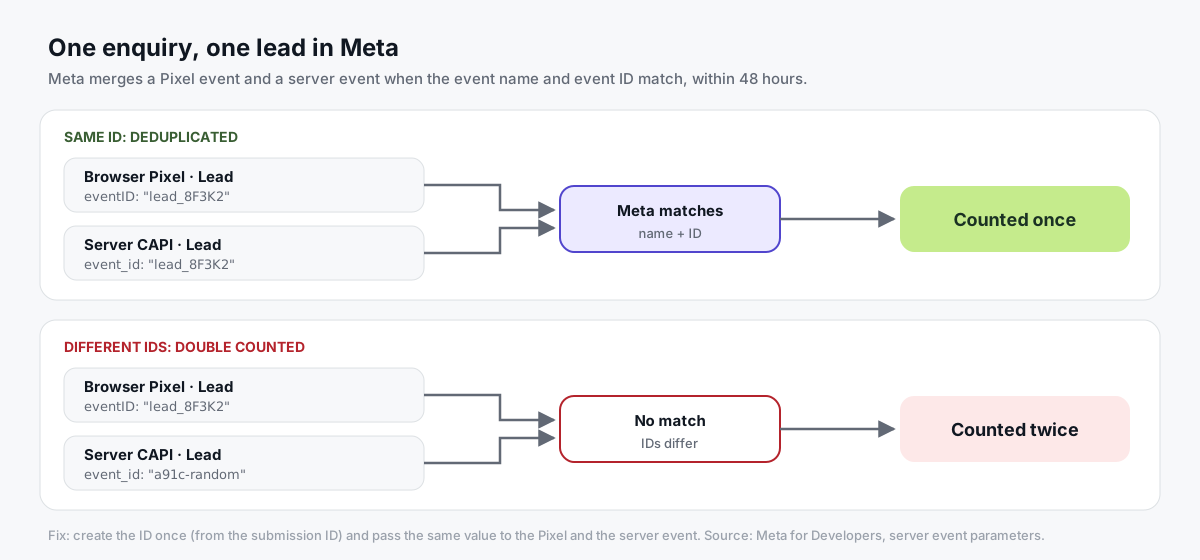
Here's how each platform uses it:
- Meta. Meta deduplicates a browser and a server event when the
event_nameandevent_idmatch, for events sent within 48 hours of each other (Meta's server event parameters). Its deduplication guide covers the setup. - Google Ads. If two conversions in the same conversion action carry the same transaction ID, Google counts only the first (Google's transaction ID help). Send your submission ID as the transaction ID on lead conversions too.
- GA4. Don't count on GA4 to merge repeated
generate_leadevents. Fire it once per accepted submission.
And two rules that save a lot of pain:
- Don't run two primary lead actions (one browser, one server) in Google Ads for the same form. Retire or demote the old one.
- Don't merge real repeats. Two genuinely separate enquiries from the same person are two submissions. They should get two IDs.
What is offline conversion tracking for leads?
Offline conversion tracking sends what happens to a lead after the form, like "qualified" or "won," from your CRM back to the ad platform. The platform matches it to the original ad click, using a stored click ID or hashed customer details.
It only works if you keep the right details at the moment of the enquiry:
- Capture click IDs on landing. Save
gclid(orwbraid/gbraid) for Google andfbclidfor Meta when the visitor arrives. Meta turnsfbclidinto thefbcvalue (Meta's fbp and fbc guide). - Pass them in hidden form fields. Store them with the lead in your CRM, next to the email and phone.
- Keep the submission ID. It ties the CRM record back to the original
generate_lead. - Upload stage changes regularly. Daily is a good habit, and Meta requires it for some features (below).
Google Ads: offline imports and enhanced conversions for leads
Google offers two routes, described on its offline conversion imports page:
- GCLID import. You store the click ID with the lead, then upload it with the conversion later (Google's GCLID import guide).
- Enhanced conversions for leads (Google's recommended option). Your Google tag captures a hashed email or phone from the lead form. Later, you upload the qualified or converted lead with the same hashed data, and Google matches it to the ad interaction (Google's setup guide). Google suggests still sending the GCLID when you have it.
Two things to know before you build anything:
- Use Data Manager. Google's help page says that from June 15, 2026, offline conversion imports and enhanced conversions for leads uploads move to the Data Manager API, and are blocked in the Google Ads API. Google Ads Data Manager also has no-code connectors.
- Mind the window. Google Ads' default click-through conversion window is 30 days (Google's conversion window help). Long sales cycles may need a longer window on the offline action.
Google's own channel has a short intro:
Meta: the Conversions API for CRM and offline events
Meta now recommends the Conversions API for offline events. Its older Offline Conversions API is described as legacy.
How you use it depends on where the lead came from:
- Leads from your website. Send
Leadthrough the Conversions API when the form is accepted. Later, send the CRM stage (for exampleQualifiedLeadorPurchase) with the same hashed email or phone so Meta can match it. Each event'sevent_timecan be at most 7 days old when you send it, or Meta rejects the whole request (Meta's server event parameters). So upload daily. - Leads from Meta Lead Ads (instant forms). Meta's Conversions API for CRM lets you optimize campaigns for the "Conversion Leads" goal. Meta says it's currently only compatible with Lead Ads, and lists minimums: at least 200 leads a month, uploads at least once a day, and a target stage that happens within 28 days of the lead with a 1% to 40% conversion rate. Store Meta's lead ID in your CRM and send it with each stage.
Meta for Business explains the CRM integration here:

Put the clocks side by side, and the case for daily uploads is obvious:
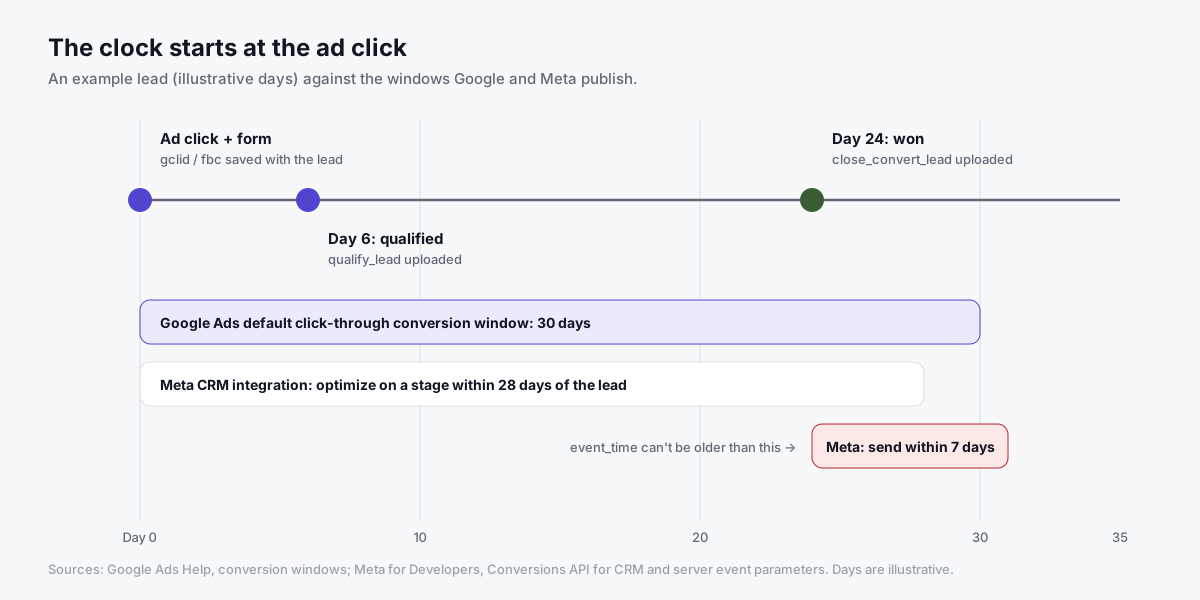
What data should you send, and what should you keep out?
Lead forms collect a lot of personal data. Your tracking needs very little of it.
Send:
- Event facts. Event name, time, submission ID, which form, and value if you use one.
- Click IDs and browser IDs.
gclid,fbc,fbp, so platforms can match the click. - Hashed match keys, where consent allows. Email and phone, normalized and SHA-256 hashed, for enhanced conversions and Meta matching.
Keep out:
- Free text. The message box, notes and "tell us about your project" answers.
- Sensitive answers. Health, finance, or anything your privacy notice doesn't cover.
- Personal data in URLs. Thank-you pages like
/thanks?email=...leak into analytics. Google's PII best practices explain how to avoid that.
Moving a tag to a server doesn't change any of these decisions. The same privacy laws and consent rules apply, whatever sends the data.
How do you test your lead tracking?
Use test data, open GTM preview in both containers, and run through every case:
| Test | What you do | What should happen |
|---|---|---|
| Valid submission | Submit with real-looking test data | One generate_lead, one Meta Lead (browser + server merged), one Google Ads conversion |
| Validation error | Leave a required field empty | Nothing fires |
| Double click | Click Send twice quickly | Still one lead (same submission ID) |
| Refresh | Reload the thank-you page | No new lead |
| Two real enquiries | Submit twice with different details | Two leads, two IDs |
| Consent denied | Reject marketing cookies, then submit | Tags follow your consent setup |
| Ad click | Visit with ?gclid=test123 and submit | Click ID saved in the hidden field and CRM |
Then check the destinations: GA4 DebugView, Google Ads conversion diagnostics, and Meta Events Manager's Test Events (look for "deduplicated").
A free scan with our Website Tracking Checker can also show which tags and IDs your public pages load.
7 common lead tracking mistakes
- Counting clicks: the conversion fires on the Send button. Fix: fire after the backend accepts the form.
- Thank-you page refreshes: every reload is a new lead. Fix: trigger on the event, not the page view.
- Random event IDs: the Pixel and server generate their own IDs, so Meta counts twice. Fix: one ID from the submission.
- Two primary actions: an old browser lead action and a new server one both count. Fix: retire or demote one.
- Lost click IDs: nobody saved
gclidorfbcwith the lead. Fix: hidden fields from day one. - Form content in tracking: messages and answers sent to vendors. Fix: send event facts and hashed keys only.
- Stopping at the form: ads never hear about qualified or won leads. Fix: set up offline uploads.
If your form counts still don't match, our conversion discrepancy guide walks through the usual causes.
How do you set this up with Tagioo?
Tagioo hosts a dedicated server GTM container on your own tracking subdomain, with DNS guidance and automatic SSL. It's not a shared proxy.
For lead and signup flows, here's what it does today:
- Generated containers. In the Setup Assistant, the SaaS / Subscription business type generates Web and Server GTM files that map your
generate_leaddataLayer event to GA4, MetaLeadand TikTokSubmitForm, carrying yourevent_idfor deduplication. You import, preview and publish. - Your site sends the event. Installing GTM doesn't detect a successful submission on its own. Your form or backend pushes
generate_leadafter it accepts the enquiry, as shown above. - Event Logs. You can confirm the lead reached your server container, with the right ID, before you go hunting in Meta or Google Ads.
- Offline conversion upload. Upload a CSV of offline events (for example, qualified or won leads with email or phone) and Tagioo sends them to Meta's Conversions API, hashing the customer details first. For Google Ads offline imports, use Google's Data Manager.
Not every form builder, CRM or booking tool connects automatically. Check our docs for your setup, or email hello@tagioo.com and we'll tell you honestly what will and won't work.
There's a free plan with 15,000 events per 30 days and no card needed. See pricing, how it works, or create a free account.
Sources and further reading
Everything in this guide is backed by these primary sources:
- Google Analytics Help: Recommended events (lead generation)
- Google Analytics Help: Best practices to avoid sending PII
- Tag Manager Help: Form submission trigger
- Google: Server-side consent mode
- Google Ads Help: About offline conversion imports, GCLID imports and enhanced conversions for leads
- Google Ads Help: Transaction IDs and duplicate conversions and conversion windows
- Google: Data Manager API
- Meta for Developers: Conversions API for CRM
- Meta for Developers: Server event parameters, deduplication and fbp and fbc
- Meta for Developers: Standard events reference
Related questions
Can you track form submissions server-side?
Yes. The browser still has to notice the successful submission, usually through a dataLayer event, and then sends one request to your server container. The server forwards it to GA4, Google Ads and Meta.
You can also send the event straight from your backend, as long as you pass along browser details like click IDs and fbp so platforms can match it.
Do I still need the Meta Pixel if I use the Conversions API for leads?
Meta recommends running both, with deduplication. The Pixel catches browser signals, the Conversions API is more reliable, and a shared event_id makes sure each lead counts once.
How do I track leads from Meta Lead Ads instant forms?
Those leads never touch your website, so a website tag can't see them. Use Meta's Conversions API for CRM: store Meta's lead ID in your CRM, and send each lead stage back at least once a day. Meta lists a minimum of 200 leads a month for its Conversion Leads optimization.
What's the difference between offline conversion import and enhanced conversions for leads?
A classic offline import matches on the stored click ID (GCLID). Enhanced conversions for leads adds hashed email or phone captured on your form, so Google can match conversions even when the click ID is missing. Google recommends enhanced conversions for leads for new setups.
How late can I upload an offline lead conversion?
It depends on the platform. For Meta, each event's event_time can be at most 7 days old when you send it. For Google Ads, the GCLID import page lists a click-to-conversion cycle of less than 14 or 90 days depending on the data source, and your conversion window still applies. Daily uploads keep you safe on both.
How do I keep UTMs and click IDs with a lead?
Read them from the landing page URL, store them in a first-party cookie, and copy them into hidden form fields on submit. Your CRM then saves them with the lead, ready for offline uploads later.
Is server-side lead tracking GDPR compliant?
It can be, but server-side is a way of moving data, not a legal basis for collecting it. You still need consent where the law requires it, a clear privacy notice, and data minimization. Consent Mode passes the visitor's choice to your server container.
Does server-side tracking stop spam leads?
No. It sends what your site tells it to. Filter spam with validation, honeypots or a captcha in your form backend, and only push generate_lead for submissions that pass.
See your own events, server-side.
Tagioo hosts your server-side GTM container on your own domain and generates the GA4, Google Ads, Meta and TikTok setup for you. Free for 15,000 events a month, no card needed.
Keep reading
Google Ads Server-Side Tracking: The Complete 2026 Setup Guide
How Google Ads conversions work through a server container, when it's worth it, and an 8-step setup you can test today.
What Is Server-Side Tracking? How It Works, Benefits & Setup (2026)
How server-side tracking works, how it compares to browser tags, what it can and can't fix, and how to decide if you need it.