
Google Ads Server-Side Tracking: The Complete 2026 Setup Guide
Set up Google Ads server-side tracking with server GTM: Conversion Linker, conversion tag, enhanced conversions, Consent Mode v2, dedup and testing.
 Tagioo teamUpdated 17 min read
On this page
- What does server-side tracking mean for Google Ads?
- How does it work? Click IDs, cookies and the GA4 client
- Is server-side tracking necessary for Google Ads?
- Server-side tracking vs enhanced conversions vs Google tag gateway: what's the difference?
- Before you start: take a 15-minute baseline
- How do you set up Google Ads server-side tracking? (8 steps)
- Does Google Ads deduplicate conversions?
- How does Consent Mode v2 work with server-side Google Ads?
- What about iOS, wbraid and gbraid?
- 8 common mistakes (and how to avoid them)
- How do you know it worked?
- How do you set this up with Tagioo?
- Sources and further reading
- Related questions
Your store shows 100 orders this week. Google Ads shows 71 conversions.
So where did the other 29 go?
Did those people never click an ad? Did an ad blocker eat the tag? Or did Smart Bidding just learn from 29 fewer sales than you actually made?
Ahh, so many questions. Let's sort them out.
What is Google Ads server-side tracking? Google Ads server-side tracking sends your conversions to Google Ads through a server-side Google Tag Manager (sGTM) container on your own domain, instead of only from a tag in the visitor's browser. The server keeps the ad click ID in a first-party cookie and fires the conversion tag, so fewer conversions get lost.
Some of that 100-vs-71 gap is normal. Not every buyer clicked an ad.
But part of it is often plain data loss. A blocked script, a Safari cookie that expired, or a customer who closed the tab before the thank-you page loaded.
In this guide, you'll find out how it works, whether you actually need it, and how to set it up in 8 steps. We'll also answer the questions people ask most, like "Is server-side tracking legal?" and "Is $20 a day enough for Google Ads?"
So, why the wait? Let's begin.
What does server-side tracking mean for Google Ads?
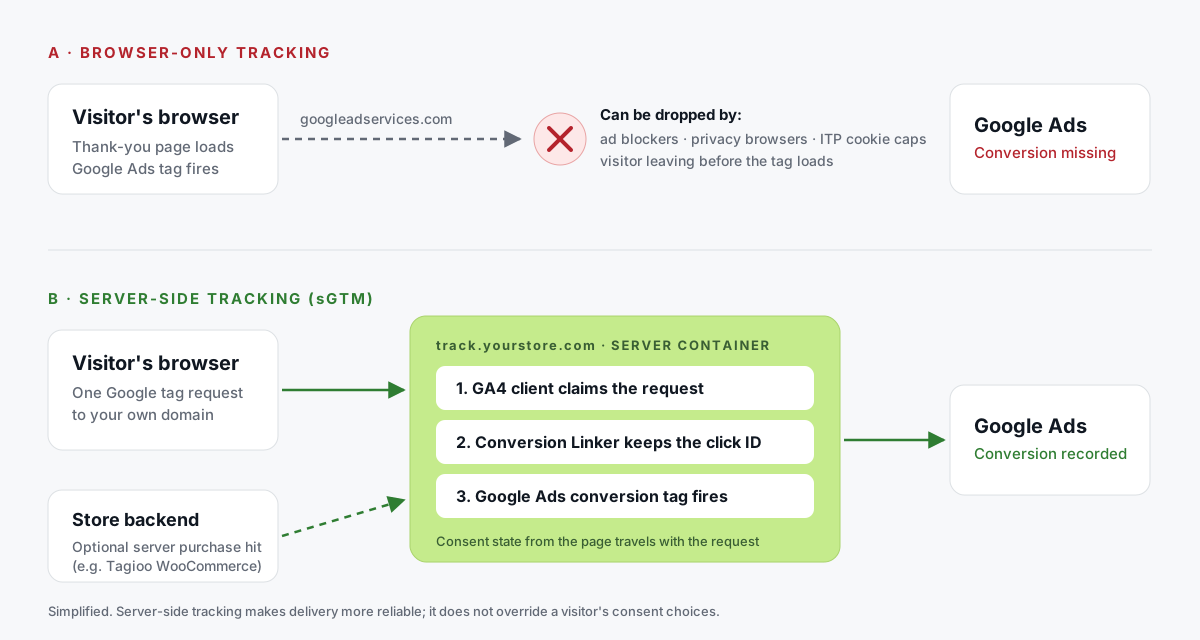
Google describes server-side tagging as processing data "on a server you control, rather than in the user's browser." (Google's introduction to server-side tagging)
For Google Ads, it works like this:
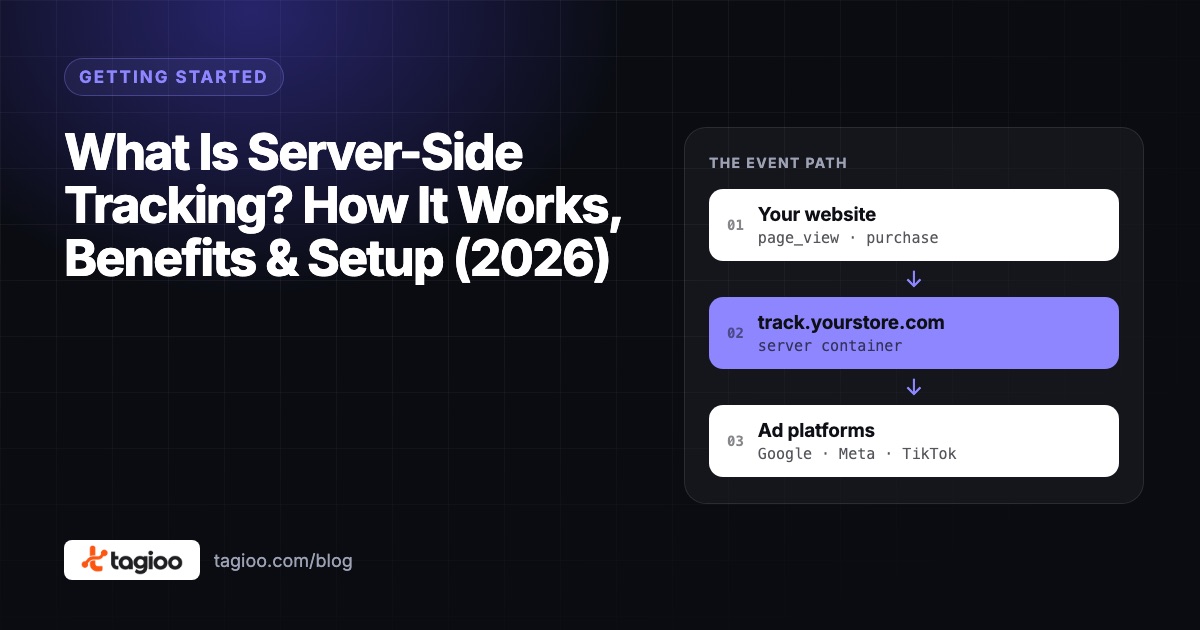
- Your website sends one Google tag (GA4) request to a tracking subdomain you own, like
track.yourstore.com. - A server container receives it. Its GA4 client turns the request into event data.
- Server-side tags read that data. The Conversion Linker handles the click ID, and the Google Ads Conversion Tracking tag reports the conversion.
You still need a tag on the page. Something has to notice the purchase.
What changes is everything after that: where the request goes, which cookies hold the click ID, and who decides what gets forwarded.
Here's a detail most guides skip. The server tag isn't purely server-to-server.
As Simo Ahava explains in his guide to Google Ads with server-side tagging, the server can ask the browser to send a pixel to Google, so Google's own cookies still get used where they're available.
So it's a hybrid. Your first-party path gets more reliable, and Google still receives whatever signals it can use.
How does it work? Click IDs, cookies and the GA4 client
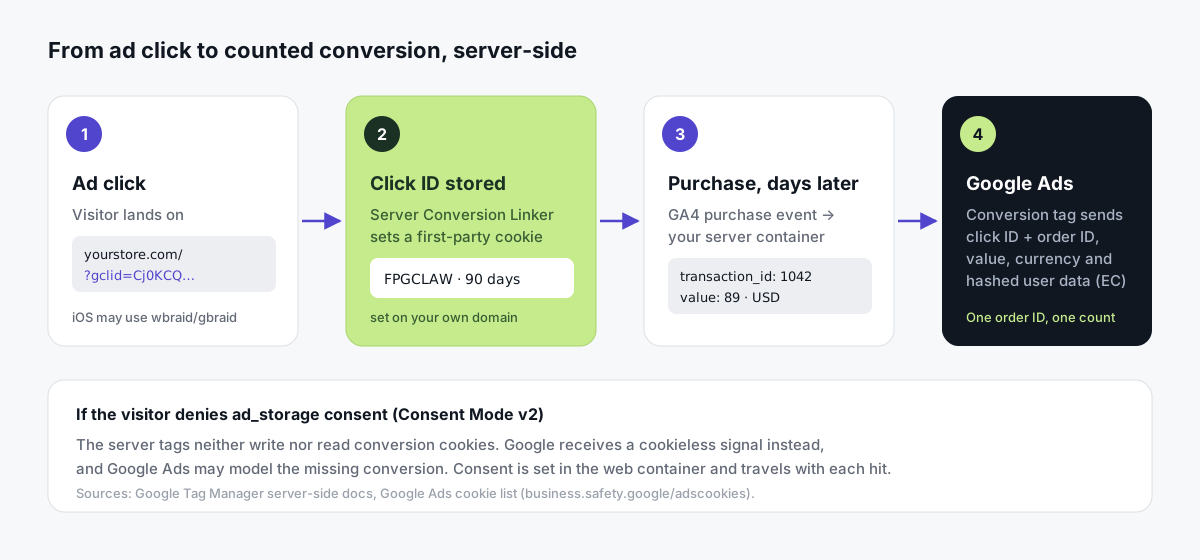
When someone clicks your ad, Google adds a click ID to the landing page URL. Usually that's gclid. On iOS, it's sometimes wbraid or gbraid.
Conversion tracking only works if that ID survives until the visitor buys. And that might be days later.
Here's where it's stored:
| Browser-only setup | Server-side setup | |
|---|---|---|
| Cookie name | _gcl_aw | FPGCLAW |
| Written by | JavaScript in the browser (web Conversion Linker) | Your server container (server Conversion Linker) |
| Lives on | Your domain | Your domain |
| Max lifetime | 90 days, but Safari can cap it at 7 days or 1 day | Up to 90 days |
| Sources | Conversion Linker help | Google Ads cookie list |
Why does lifetime matter so much?
Because Google Ads' default click-through conversion window is 30 days (Google's conversion window help).
If a Safari shopper clicks your ad today and buys on day 10, a 7-day JavaScript cookie is already gone. That sale can't be linked to the click.
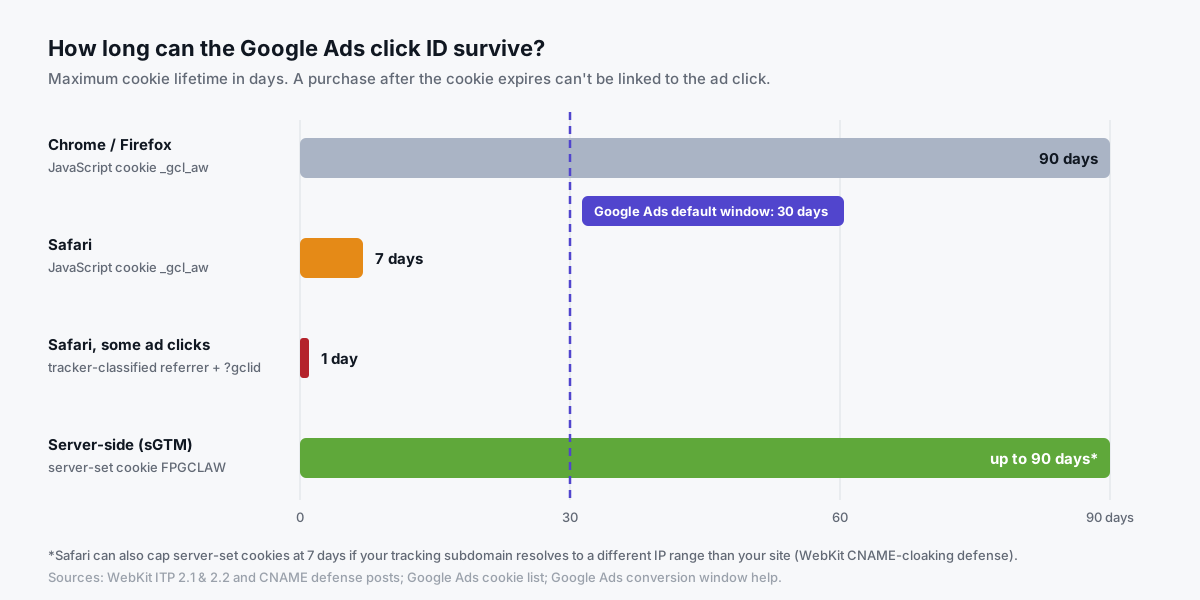
The Safari limits come straight from WebKit: ITP 2.1 caps JavaScript cookies at 7 days, and ITP 2.2 cuts that to 1 day when the visitor arrives from a domain Safari classifies as a tracker, with a click ID in the URL.
One honest catch: Safari can also cap server-set cookies at 7 days if your tracking subdomain points to a different IP range than your main site (WebKit's CNAME-cloaking defense). Same-origin setups avoid this.
There's one more prerequisite people miss.
In server GTM, Google Ads tags read data from the GA4 client. So your web container must send hits through a Google tag to the server container. That's why the setup below starts with GA4.
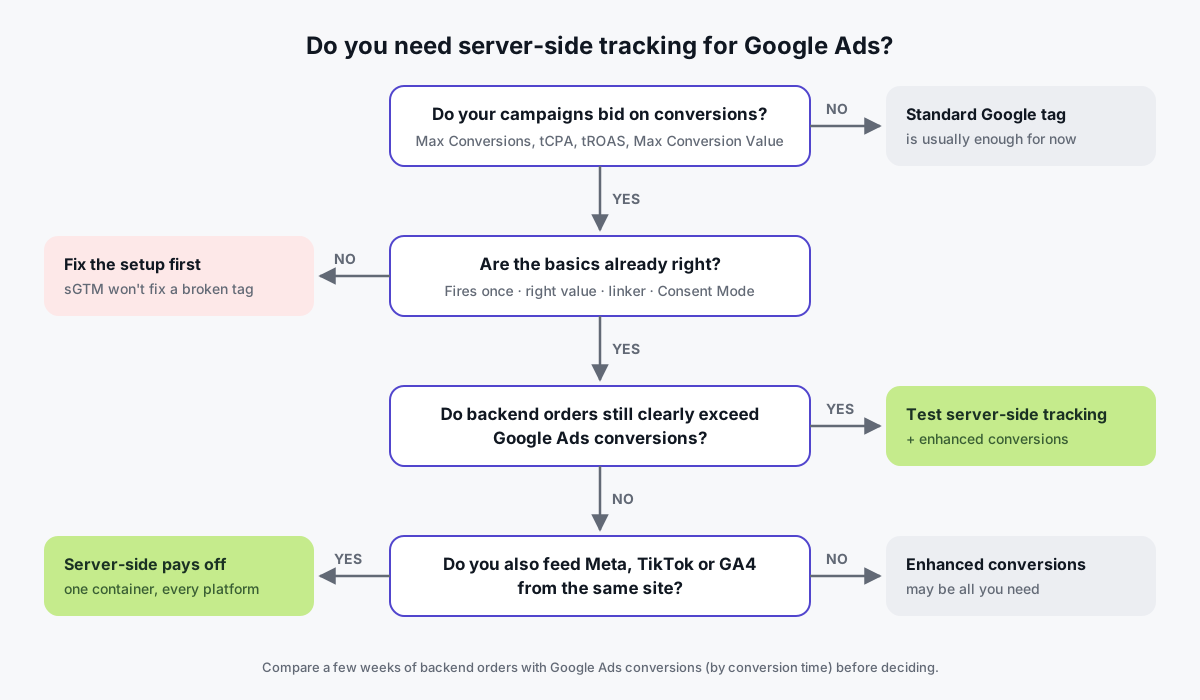
Is server-side tracking necessary for Google Ads?
No, not for every account.
People who run ads genuinely disagree on this, and honestly, both sides have a point.
Why you might not need it (yet):
- The standard Google tag, with enhanced conversions and Consent Mode v2 set up properly, already recovers a lot of signal.
- Google models conversions it can't observe directly (Google's conversion modeling explainer).
- It adds hosting, a DNS record and one more container to look after.
- Most "uplift" numbers you'll see online come from vendors. Your result depends on your own traffic.
Why it often pays off:
- A first-party subdomain is less exposed to blocklists and short JavaScript cookie lifetimes.
- One server container can feed Google Ads, GA4, Meta's Conversions API and TikTok from the same purchase event.
- You control what gets forwarded, and you can strip data a vendor doesn't need.
- On WooCommerce, a backend purchase hit can still record orders when the thank-you page never loads (our WooCommerce guide).
We see one pattern again and again in store owners' forum threads.
Google Ads shows about half the orders, and GA4 is low too.
When both are low, it's usually a collection problem, not attribution. A tag that only fires on a thank-you page some customers never see. A purchase that fires twice. A half-removed old setup.
Server-side tracking can help. But only after the basics are right.
Server-side tracking vs enhanced conversions vs Google tag gateway: what's the difference?
These get mixed up all the time.
They solve different problems, and the strongest setups combine a few of them:
| Approach | What it does | Where it runs | Helps with blocked scripts? | Effort |
|---|---|---|---|---|
| Standard Google tag | Sends conversions from the browser | Browser | No | Low |
| Enhanced conversions | Adds hashed email/phone so Google can match conversions to signed-in users | Browser or server | No, but improves matching | Low |
| Consent Mode v2 | Tells tags what the visitor agreed to; enables modeling when denied | Browser, passed to server | No (and it shouldn't) | Low–medium |
| Google tag gateway | Serves Google's tag and requests through your own domain via your CDN | Your CDN or load balancer | Partly: requests become first-party | Low–medium |
| Server-side GTM | Processes events on your server, then forwards them to Ads, GA4, Meta and more | Your server container | Partly, plus data control and multi-platform | Medium |
What's Google tag gateway? Launched in May 2025, it loads Google's tag through your own domain. Cloudflare was the first one-click partner.
In its announcement, Google reported an average 11% uplift in signals. Google also calls the gateway complementary to server-side tagging, not a replacement (tag gateway docs).
In plain words:
- Only advertising on Google? The gateway is the lighter option.
- Also running Meta or TikTok, or want control over your data? Server-side GTM does more.
Analytics Mania explains the difference really well in this video:

Before you start: take a 15-minute baseline
Please don't skip this one.
Without a baseline, you'll never know whether server-side tracking actually helped.
- Export your orders. Two to four weeks from your store or CRM, with order ID, value and date.
- Add the right column. In Google Ads, add Conversions (by conv. time) for your purchase action. It counts conversions by the day they happened, not the day of the click.
- Export GA4 purchases with
transaction_idfor the same dates. - Write down three numbers: backend orders, GA4 purchases, Google Ads conversions.
Now read the numbers:
| What you see | What it usually means | Start here |
|---|---|---|
| GA4 and Google Ads both far below backend | Collection problem | Tag firing, thank-you page, duplicate plugins |
| GA4 close to backend, Google Ads low | Attribution, consent or click-ID loss | Server-side tracking + enhanced conversions |
| Google Ads above backend | Double counting | Deduplication section below |
How do you set up Google Ads server-side tracking? (8 steps)
These steps follow Google's own server-side Google Ads setup guide.
You'll need a Google Ads account, a web GTM container on your site and a server GTM container.
Here's the whole setup at a glance:
| Step | Where | What you add | Trigger |
|---|---|---|---|
| 1 | Google Ads | Manual website conversion action → Conversion ID + label | — |
| 2 | DNS / hosting | Server container on track.yourstore.com with SSL | — |
| 3 | Web container | Google tag sending to the server + GA4 purchase event | Purchase |
| 4 | Server container | Conversion Linker | All Pages |
| 5 | Server container | Google Ads Conversion Tracking (ID + label) | Event name = purchase |
| 6 | Web container | User-provided data → user_data (enhanced conversions) | — |
| 7 | Server container | Google Ads Remarketing (optional) | All Pages |
| 8 | Both + Google Ads | Preview, publish, Tag Assistant | — |
Step 1: Create a conversion action and copy the ID and label
In Google Ads, go to Goals → Conversions → New conversion action → Website.
Create it manually. Automatically created actions don't give you a conversion label.
Pick Use Google Tag Manager as the setup method, then copy the Conversion ID and Conversion label (Google's GTM conversion help).
For purchases, set Count: Every and use transaction-specific values.
Step 2: Host the server container on your own subdomain
Point a subdomain like track.yourstore.com at your server container, and turn on SSL. Google's custom domain guide lists the options.
This step matters more than people think.
If the container runs on a default cloud URL, it's on a third-party domain, so it can't set the FPGCLAW cookie on your site. That's the root cause behind the common "no FPGCLAW cookie" support question.
New to server containers? This walkthrough from MeasureSchool covers the basics:

Step 3: Send your Google tag and purchase event to the server
In your web container:
- Route the Google tag to your server. Use server_container_url ("Send to server container") with your subdomain.
- Send complete purchase data. Your GA4
purchaseevent needstransaction_id,valueandcurrencyfrom your data layer. The server-side Google Ads tag reads these fields. - Add
user_dataif you'll use enhanced conversions (step 6).
Step 4: Add the Conversion Linker to the server container
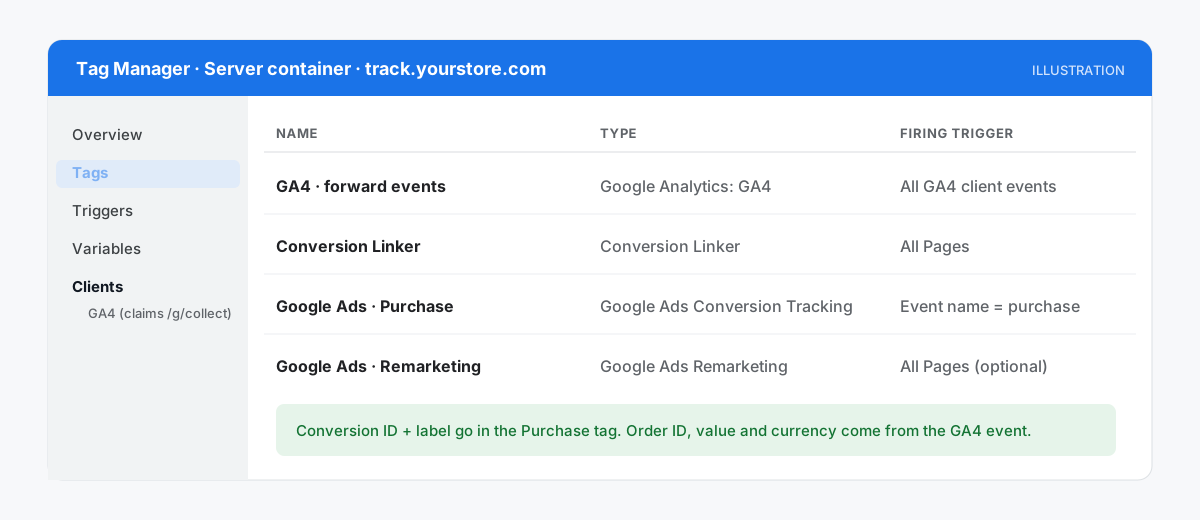
In the server container, create a Conversion Linker tag and trigger it on All Pages.
Already have one? Don't add a second.
Without it, the click ID is never stored or read, so conversions can't be tied to ad clicks.
Step 5: Add the Google Ads Conversion Tracking tag
Still in the server container, create a Google Ads Conversion Tracking tag.
- Paste the Conversion ID and label from step 1.
- Trigger it on a Custom Event where the event name equals
purchase(or whatever your GA4 conversion event is called). - Leave the defaults: the tag picks up transaction ID, value and currency from the incoming ecommerce data.
Track leads or sign-ups too? Repeat this step for each conversion action, each with its own label and trigger.
When you're done, your server container's tag list should look roughly like this:
Step 6: Turn on enhanced conversions
Enhanced conversions send a hashed email address or phone number with the conversion. This helps Google match it to a signed-in Google user.
Here's how to use it with server-side tagging:
- Turn it on in Google Ads, in your conversion settings.
- Create a User-Provided Data variable in the web container (automatic, CSS selectors, or code). The code method needs at least an email or phone. Pre-hashed values need the
sha256_prefix. - Assign it to
user_dataon your Google tag. The server-side Google Ads tag forwards it.
Only collect and send this data where your privacy notice and consent allow it.
Google's own Google Ads channel shows the setup in GTM:

Step 7 (optional): Add server-side remarketing
Want remarketing audiences? Add a Google Ads Remarketing tag in the server container with your Conversion ID, triggered on All Pages.
Stores can turn on dynamic remarketing and pass product data from the web container.
When ad_storage consent is denied, the remarketing tag blocks its requests and cookies (Google's remarketing setup).
Step 8: Test, publish and confirm in Google Ads
This is where most setups fail quietly. Go slowly:
- Open Preview in both the web and server containers.
- Fake an ad click. Visit
https://yourstore.com/?gclid=test123. In server preview, check that the Conversion Linker fired. In your browser's dev tools, check for anFPGCLAWcookie on your domain. - Place a test order. In server preview, confirm the purchase event arrived with the right transaction ID, value and currency, and that the Google Ads tag fired (Google's debugging guide).
- Publish both containers. Publishing only the web container is one of the most common mistakes.
- Check Google Ads. Open the conversion action and run Troubleshoot with Tag Assistant.
How long until you see results?
| When | What to expect | Source |
|---|---|---|
| Right away | Tags fire in server preview | — |
| ~30 minutes after a Tag Assistant session | Conversion action status updates | Google help |
| Up to 48 hours after a fix | Status reflects the fix | Google help |
| 2–4 weeks | Enough data to compare with your baseline | Your own reports |
Prefer to watch first? Here's a full walkthrough for a Shopify store:

Does Google Ads deduplicate conversions?
Yes, within limits.
You'll sometimes read "Google Ads doesn't deduplicate, so use either the web tag or the server tag." That's only half right.
If two conversions in the same conversion action carry the same transaction ID, Google counts only the first one (Google's transaction ID help).
What it won't do is merge two different conversion actions. So:
- Don't run two primary purchase actions (one browser, one server) for the same sale.
- Retire the old tag. Once the server action is verified, pause the browser purchase tag or set its action to secondary.
- Always send a stable
transaction_id. Use the order number from every source. It must match exactly, even across offline uploads.
Watch out for native integrations as well. Shopify's Google channel and older WooCommerce plugins can fire their own Google Ads conversions. List every source before you switch.
How does Consent Mode v2 work with server-side Google Ads?
First things first: server-side tracking is not a way around consent.
Here's how it works with Google's setup:
- Consent is set in the web container, usually by your consent banner (CMP) through Consent Mode. The Google tag passes that state to the server with every hit (Google's server-side consent docs).
- If
ad_storageis denied, server tags don't write or read conversion cookies. A cookieless signal is sent instead. - Consent Mode v2 added
ad_user_dataandad_personalization. Google requires them for EEA traffic (Google's consent overview). - With advanced Consent Mode, Google can use cookieless pings to model conversions from visitors who said no (Google Ads consent help).
For US traffic, follow your privacy policy and the state laws that apply to you. Many consent tools can apply opt-out rules by region.
What about iOS, wbraid and gbraid?
Since Apple's App Tracking Transparency arrived in April 2021, some iOS clicks arrive without a gclid.
Instead, Google uses wbraid (web) and gbraid (app), plus conversion modeling (Google's iOS measurement help).
The server Conversion Linker handles these too. Just make sure your site doesn't strip unknown URL parameters on redirect.
Selling offline? For leads that close later (a sales call, a signed contract), store the click ID with the lead and upload the conversion afterwards, or use enhanced conversions for leads. Google has moved offline imports to its Data Manager API, so check the current import guidance before building anything new.
8 common mistakes (and how to avoid them)
- Default cloud URL: the container runs on a cloud URL, so
FPGCLAWis never set on your domain. Fix: use your own subdomain. - Old tag still live: a second primary purchase action double-counts. Fix: retire or demote it.
- Incomplete purchase data: missing
transaction_id,valueorcurrencybreaks dedup and ROAS. Fix: check the data layer. - No
page_location: server-side GA4 events can get attributed to your homepage. Fix: see our GA4 guide. - One container published: the web container is live, the server isn't (or the other way round). Fix: publish both.
- Firing on page view: the purchase tag fires on the thank-you page view, so every refresh is a new sale. Fix: trigger on the purchase event.
- Empty
user_data: enhanced conversions are on but receive nothing. Fix: check the variable in preview. - Judging too early: three days isn't enough. Fix: compare 2–4 weeks against your baseline.
How do you know it worked?
Repeat your baseline for the same length of time after launch: backend orders, GA4 purchases and Google Ads conversions (by conversion time).
Then look for three things:
- Coverage holds or rises. Google Ads conversions as a share of backend orders should go up or stay steady. It should never go above 100% for a purchase action. If it does, you're double counting.
- Value tracks revenue. Conversion value in Google Ads should follow your real revenue more closely.
- No new duplicates. Spot-check a few order IDs in your Google Ads reports.
Remember, not every order came from an ad.
You're not chasing 100%. You want a consistent, honest signal that Smart Bidding can learn from.
How do you set this up with Tagioo?
Tagioo hosts a dedicated server GTM container on your own tracking subdomain, with DNS guidance and automatic SSL.
Our Setup Assistant generates the Web and Server container files for you, including the Conversion Linker, the Google Ads purchase conversion and dynamic remarketing tags, plus GA4, Meta CAPI and TikTok.
You just import, preview and publish.
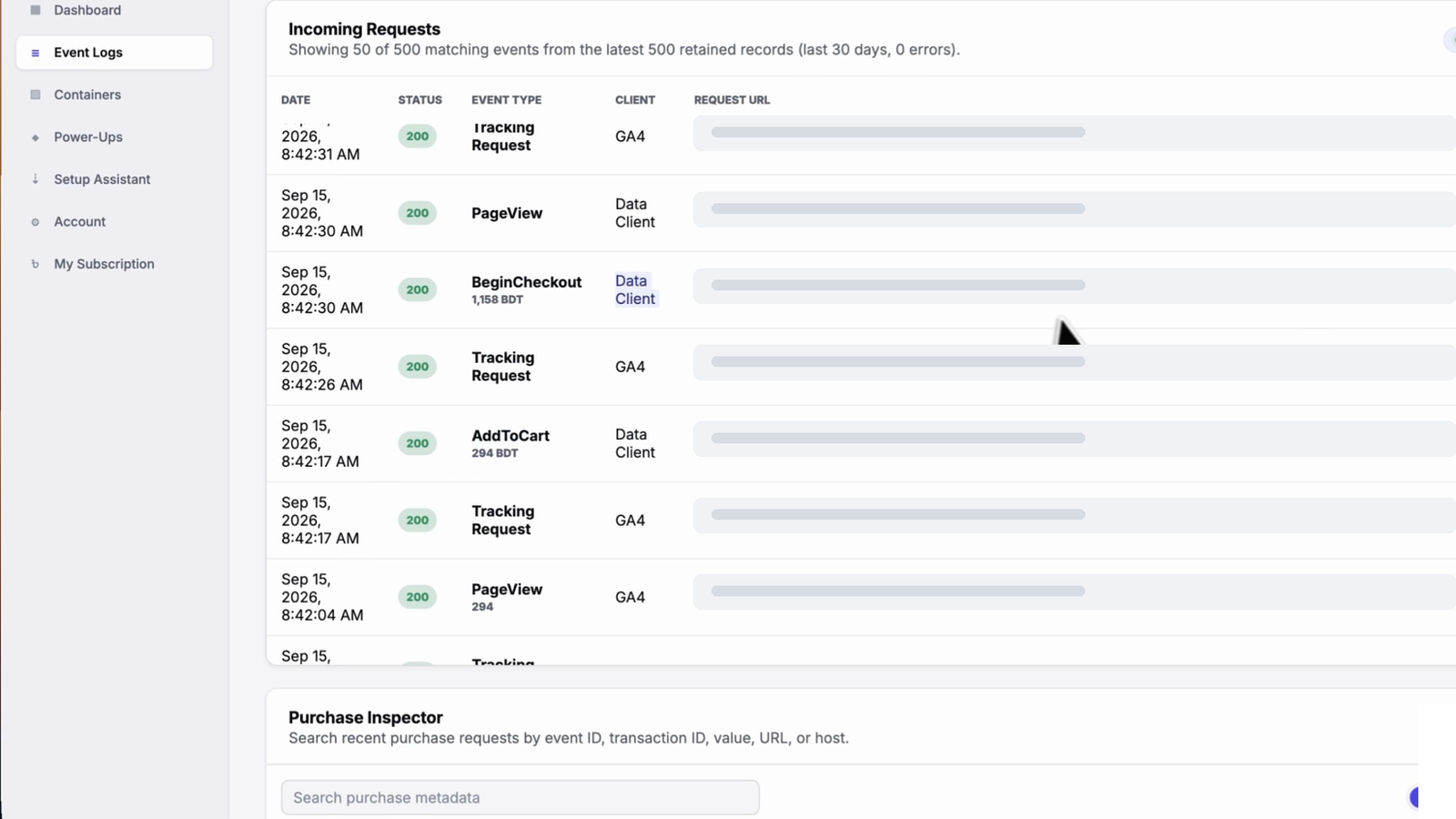
Then check Event Logs and Purchase Inspector to confirm a test order reached your server with the right order ID and value, before you go hunting in Google Ads.
There's a free plan with 15,000 events a month, and no card is needed. See pricing, or set it up for WooCommerce or Shopify.
Sources and further reading
Everything in this guide is backed by these primary sources:
- Google: Set up Google Ads conversions in server-side Tag Manager
- Google: Server-side consent mode
- Google: Google Ads remarketing in server containers
- Google: Custom domain for your tagging server
- Google: Google tag gateway for advertisers
- Google Ads Help: Transaction IDs and duplicate conversions
- Google Ads Help: Conversion windows
- Google: Cookies used by Google advertising
- WebKit: ITP 2.1, ITP 2.2, CNAME cloaking defense
- Simo Ahava: Google Ads conversion tracking with server-side tagging
Related questions
Is server-side tracking legal?
Yes. Server-side tracking is a way of moving data, not a legal basis for collecting it.
The same rules apply as for browser tags: consent under GDPR and ePrivacy in the EU, notice and opt-out rights under US state laws like the CCPA/CPRA, and limits on sharing sensitive data. The FTC has warned that tracking which leaks personal or health information can break the law, whatever technology sends it.
Respect your visitors' choices, and check with a qualified lawyer for your situation. This isn't legal advice.
What does server-side tracking mean?
It means your website sends tracking data to a server you control, usually on your own subdomain. That server then forwards it to platforms like Google Ads, GA4 or Meta.
Want the basics? Read our guide to what server-side tracking is and how it works.
Is $20 a day good for Google Ads?
It can work for testing, but it depends on your cost per click and cost per conversion.
At $20 a day (about $600 a month) and a $40 cost per acquisition, you'd get roughly 15 conversions a month. That's thin data for Smart Bidding. Google suggests evaluating Target CPA over about 30 days with at least 30 conversions (Google's bidding help).
With a small budget, every recorded conversion matters more, so accurate tracking helps. But it can't make up for a budget that's too small for your market.
How do I set up server-side tracking for Google Ads?
In short:
- Create a manual website conversion action.
- Host a server GTM container on your own subdomain.
- Route your GA4 Google tag through it.
- In the server container, add a Conversion Linker and a Google Ads Conversion Tracking tag, triggered on your purchase event.
- Test with a
?gclid=URL and a test order, publish both containers, and confirm in Google Ads.
The 8 steps above walk through each one.
Does server-side tracking bypass ad blockers?
Not completely, and that shouldn't be the goal.
Serving tracking from your own subdomain makes it less likely to be caught by blocklists that target Google's domains, but some tools block first-party endpoints too. And server-side tracking never overrides consent. More in our ad blocker guide.
What is the Google Ads conversion tracking extension?
People usually mean Tag Assistant, Google's Chrome extension for checking that tags fire correctly.
Google has merged its Legacy and Companion versions into one extension (Tag Assistant help). You can also open it from the Troubleshoot option on any conversion action in Google Ads.
Does Google Ads deduplicate conversions from browser and server tags?
Within the same conversion action, yes. Conversions with the same transaction ID are counted once.
Across two different conversion actions, no. So don't run a browser purchase action and a server purchase action side by side as primary goals.
How long until Google Ads shows the conversion status?
About 30 minutes after a Tag Assistant troubleshooting session, and up to 48 hours after you fix a problem.
Test conversions appear in reports once Google processes them. Use the conversion-time column when you compare.
See your own events, server-side.
Tagioo hosts your server-side GTM container on your own domain and generates the GA4, Google Ads, Meta and TikTok setup for you. Free for 15,000 events a month, no card needed.
Keep reading
Conversion Tracking Discrepancies: Why GA4, Google Ads, Meta and Your Store Never Match
Not every reporting gap is a broken tag. How to tell normal attribution differences from missing or duplicate conversions.
What Is Server-Side Tracking? How It Works, Benefits & Setup (2026)
How server-side tracking works, how it compares to browser tags, what it can and can't fix, and how to decide if you need it.