Best Stape Alternatives for Server-Side GTM Hosting (2026)
The best Stape alternatives for server-side GTM hosting in 2026: TAGGRS, Addingwell, Tracklution, Elevar, Cloud Run and Tagioo, with pricing units explained.
 Tagioo teamUpdated 17 min read
On this page
- Which Stape alternative should you pick? (Quick answer)
- What does Stape do well?
- Is Stape free? And how much does Stape cost?
- Why do teams look for a Stape alternative?
- What should you compare in a server-side GTM host?
- How do requests, events and orders differ?
- What happens when you go over your limit?
- How do Stape and its alternatives compare?
- Stape vs TAGGRS: what's the difference?
- Which Stape alternative is best for what?
- Tagioo: an honest look
- How do you migrate from Stape without losing data?
- Sources and further reading
- Related questions
You set up Stape. The server container runs.
Then a busy sale week pushes you past your request limit, and the container pauses.
Or maybe you're staring at an empty server container, wondering which tags go where.
So is there a better fit? Which hosts are cheaper, which are easier, and which bill in a way you can actually predict?
Ahh, so many questions. Let's sort them out.
What is a Stape alternative? A Stape alternative is any other way to run your server-side Google Tag Manager (sGTM) container. That could be another managed host such as TAGGRS, Addingwell or Tagioo, a tracking tool such as Tracklution or Elevar, or self-hosting on Google Cloud Run. The right pick depends on your pricing unit, platform and setup effort.
Stape is one of the best-known names in server-side tagging. For many teams, it's the right answer.
But "best known" doesn't mean "best for you." Different hosts count usage differently, help in different ways, and suit different store platforms.
In this guide, you'll find a quick-pick table, an honest look at what Stape does well, a side-by-side comparison, Stape vs TAGGRS, and an 8-step migration plan. We'll also answer the questions people ask most, like "Is Stape free?" and "How much does Stape cost?"
So, why the wait? Let's begin.
Which Stape alternative should you pick? (Quick answer)
Short on time? Start here:
| If you want… | Look at | Why |
|---|---|---|
| The closest like-for-like swap from an EU provider | TAGGRS | Request-based, with monitoring and platform integrations listed on every plan |
| A big free tier to test at real volume | Addingwell | Free up to 100,000 requests |
| No GTM containers to build at all | Tracklution | A tracking tool with its own connectors, priced by events |
| A Shopify-native tool priced by orders | Elevar | Shopify app with a free Base plan for 100 orders a month |
| Full control, with an engineer to run it | Google Cloud Run | You pay Google Cloud directly and own the servers |
| Ready-made containers plus order-level checks | Tagioo | Generated GTM files, WooCommerce plugin, Purchase Inspector |
| The biggest add-on catalog at a low entry price | Stay on Stape | Many "power-ups" and a $20/month Pro plan |
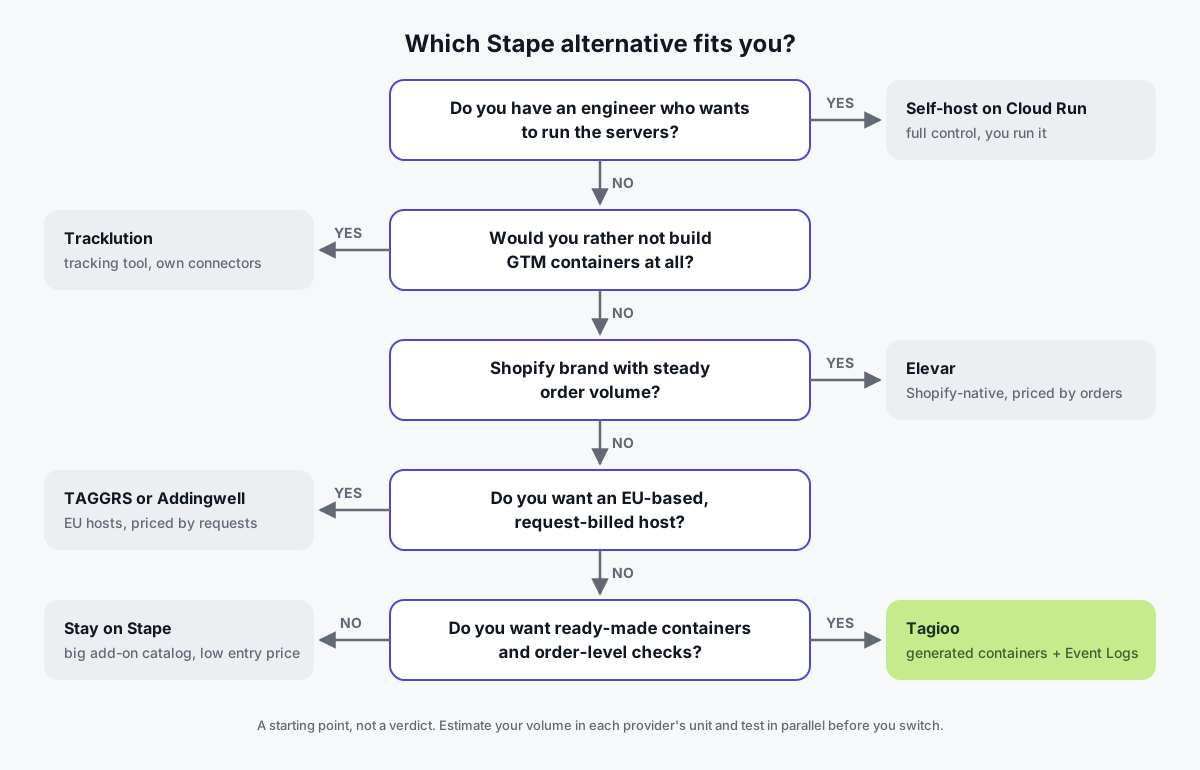
Not sure which row is you? Follow the flow:
What does Stape do well?
It's worth being clear about why Stape is popular before looking anywhere else.
- A free tier to get started. As of October 2026, Stape's pricing page lists a Free plan with up to 10,000 requests a month, including Custom Loader, request analytics, a setup wizard and a global CDN. No card is required.
- A low entry price. The same page lists Pro at $20/month, or $17/month billed annually, for up to 500,000 requests, with 3 days of logs, Cookie Keeper and bot detection.
- A deep feature catalog. Stape offers a long list of power-ups (Cookie Keeper, Data Store, File Proxy, request scheduling and more), plus multi-domain support and monitoring on Business and above.
- Enterprise and compliance options. Stape's Custom plan lists a custom DPA, a BAA for HIPAA compliance, a dedicated IP, a private cluster and single sign-on (SSO).
- Platform integrations. Stape publishes a WordPress plugin with a WooCommerce data layer and a custom loader, and a Shopify app.
Its help desk also documents setups like the Custom Loader in real detail.
Honestly? If you're comfortable in Google Tag Manager and want a large toolbox, Stape is a strong default.
Want to see what a Stape setup looks like before comparing? Conversion Uplift walks through it here:

Is Stape free? And how much does Stape cost?
Yes, Stape has a free plan. But read the fine print on limits.
As of October 2026, Stape's pricing page lists these plans:
| Plan | Price (monthly / per month billed annually) | Requests | Highlights | Help desk response |
|---|---|---|---|---|
| Free | $0 | Up to 10,000/month | Custom Loader, request analytics, setup wizard, CDN | Community |
| Pro | $20 / $17 | Up to 500,000 | Logs (3 days), Cookie Keeper, bot detection | Up to 3 business days, plus 24/7 email and chat |
| Business | $100 / $83 | Up to 5,000,000 | Multi-zone, logs (10 days), monitoring, up to 20 domains | Up to 2 business days |
| Enterprise | $200 / $167 | Up to 20,000,000 | Account manager, up to 50 domains, log export to S3/GCS | Up to 1 business day, call support |
| Custom | Contact sales | Unlimited | Custom DPA, HIPAA BAA, dedicated IP, private cluster, SSO | Priority SLA |
Here's the part most comparisons skip.
Stape's help desk article on request limits and pause logic says a Free container that reaches its limit is disabled, and the limit doesn't reset next month. You need a paid plan to restart it.
On Pro, the container is paused at 110% of the limit until the next billing cycle. Business and above get a one-time 30-day grace period. If you turn on auto-upgrade, Stape moves you up a tier instead of pausing.
So Stape's free plan is genuinely useful for testing and small sites. Just don't let a live store run on it unwatched.
Why do teams look for a Stape alternative?
These are questions of fit, not flaws. The common reasons:
- Pricing units. Stape, TAGGRS and Addingwell bill by requests to the server container. Tagioo and Tracklution bill by events. Elevar bills by orders. The same traffic can land on very different tiers.
- Setup effort. A host gives you a running server container. You still have to build the tags, triggers and variables in both your web and server containers. For a store owner without GTM experience, that build is the hard part.
- Support model. Stape lists help desk response times of up to 3 business days on Pro. Some teams want hands-on setup help on a small plan.
- Platform needs. A Shopify brand might prefer a Shopify-native tool. A WooCommerce store might want a plugin with a server-side purchase backstop.
- Where the company is based. Some EU teams prefer a European provider. TAGGRS, for example, leads with its European ownership on its own Stape comparison page.
What should you compare in a server-side GTM host?
Use the same yardstick for every option, so the comparison stays fair:
| Criterion | What to ask |
|---|---|
| Pricing unit | Requests, events, orders or compute? |
| Over-limit behavior | Does the container pause, stop sending, or bill overage? |
| Free tier | How much volume, and is a card required? |
| Setup help | Ready-made container files, a wizard, or people? |
| Custom domain | Can the container run on track.yourstore.com with SSL? |
| First-party loader | Can gtm.js and gtag.js load from your own domain? |
| Platform plugins | WooCommerce, Shopify, other CMSs? |
| Monitoring and logs | Can you see incoming events and spot drops? How long are logs kept? |
| Support | Channels, response times, and whether setup help is included |
Why does the custom domain matter? On a default cloud URL, the container sits on a third-party domain. Serving it from your own subdomain lets it set first-party cookies (Google's custom domain guide).
Monitoring is the criterion people forget until something breaks. Simmer's short video explains why you want alerts on your server container:

How do requests, events and orders differ?
This is the single biggest source of confusion in sGTM pricing.
- A request is an incoming hit to your server container. Depending on the host, script downloads can count too.
- An event is a tracked action, such as a page view, add to cart or purchase.
- An order is a completed purchase. Nothing else counts.
One visit can be several requests, a few events and one order:
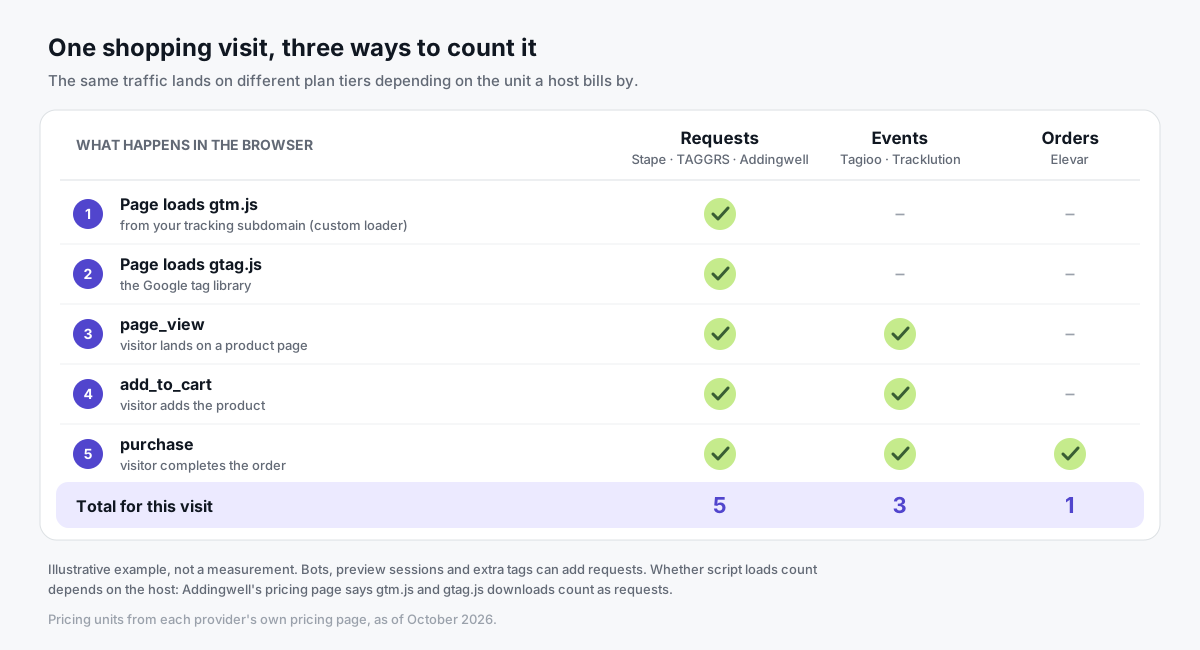
Addingwell's pricing page is explicit here. It says only incoming requests to your GTM container count, including script downloads such as gtm.js and gtag.js. Outgoing requests to Google, Meta and others don't.
So free tiers aren't like-for-like. 15,000 events, 10,000 requests and 100 orders measure different things.
Our server-side tagging cost guide shows how to estimate your own volume in each unit.
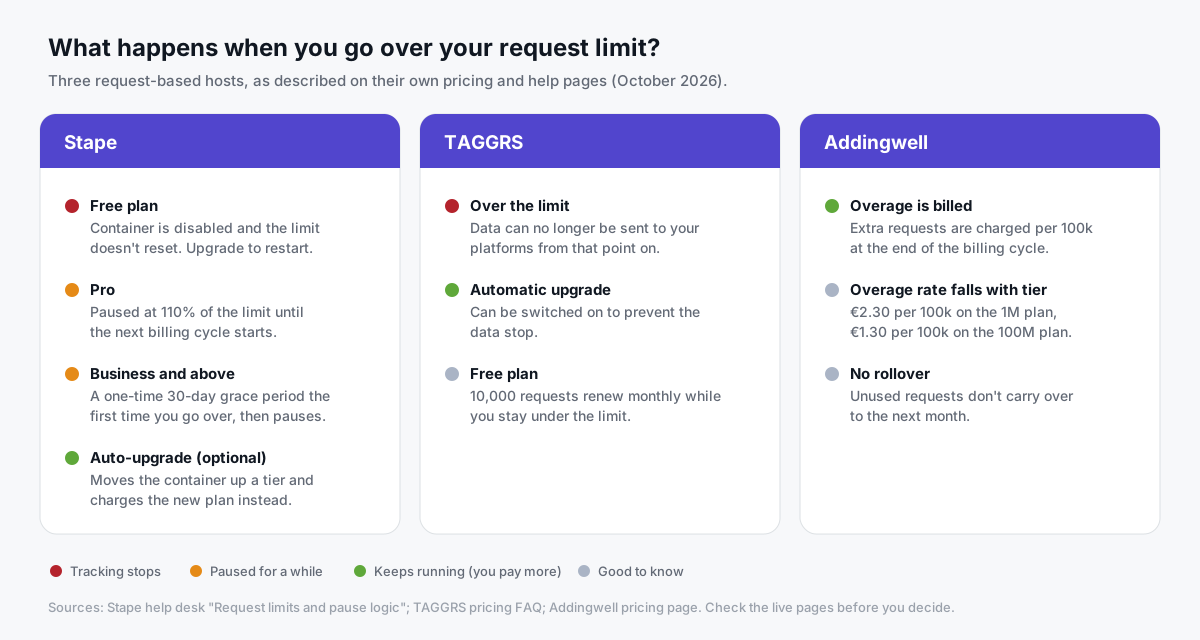
What happens when you go over your limit?
Please check this before you pick a plan. It matters most during a sale or launch, when you can least afford a tracking gap.
In short:
- Stape pauses or disables (see above), unless auto-upgrade is on.
- TAGGRS' pricing FAQ says that once you exceed your limit, data can no longer be sent to your platforms. You can turn on automatic upgrades to prevent that.
- Addingwell bills extra requests per 100,000 at the end of the billing cycle, from €2.30 per 100k on its 1M plan down to €1.30 on its 100M plan.
Whichever host you choose, set a usage alert. Know what happens at 100% before it happens.
How do Stape and its alternatives compare?
All competitor details are as of October 2026, from the linked pages. "Not listed" means we couldn't confirm it on the provider's public pricing page, not that the feature is missing.
| Provider | Pricing unit | Free tier | Entry paid plan | Custom domain / loader | Platform plugins | Monitoring and logs |
|---|---|---|---|---|---|---|
| Stape | Requests | Up to 10,000 requests/month | Pro $20/month ($17 billed annually), up to 500K requests | Custom domain; Custom Loader on Free | WordPress/WooCommerce plugin, Shopify app | Logs from Pro (3 days); monitoring from Business |
| TAGGRS | Requests | Up to 10,000 requests/month | Basic, 750,000 requests, listed at 22 to 26/month depending on billing and site type | Custom subdomain and "Enhanced Tracking Script" on all plans | Shopify, WooCommerce, Magento and others listed on all plans | "Analytics and monitoring" on all plans |
| Addingwell | Requests | Up to 100,000 requests | €90/month for 1,000,000 requests | Extra domain add-on €10/month | Not listed on pricing page | Not listed on pricing page |
| Tracklution | Events | Up to 5,000 events/month | Grow from €39.20/month billed annually (50K events) | First-party tracking on all tiers | Plug-and-play apps listed | Tracking dashboard on all tiers |
| Elevar | Orders | Base: 100 orders/month | Core $225/month, 2,000 orders | Not listed | Shopify app | Monitoring and alerts listed |
| Google Cloud Run | Compute (you pay Google Cloud) | None specific to sGTM | About $45/month per server by Google's estimate | You map the domain yourself | None | You build it |
| Tagioo | Events | 15,000 events per 30 days, no card | Starter $30/month (3-day free trial) | Custom subdomain with automatic SSL; Custom Loader for WooCommerce | WooCommerce plugin; Shopify Custom Pixel guide | Event Logs, Purchase Inspector, tracking test |
Stape vs TAGGRS: what's the difference?
People compare these two a lot, because they're so similar.
Both are request-based sGTM hosts with a 10,000-request free tier. The differences are in the details. As of October 2026, from Stape's pricing page and TAGGRS' pricing page:
| Stape | TAGGRS | |
|---|---|---|
| Entry paid plan | Pro: $20/month ($17 annually), 500,000 requests | Basic: 750,000 requests, listed at 22 to 26/month |
| Next tier | Business: $100/month, 5M requests | Pro: 3M requests, listed at 57 to 68/month |
| Monitoring | From Business | On all plans |
| Multi-domain | From Business (up to 20) | From Pro |
| Platform integrations | WordPress plugin, Shopify app | Shopify, WooCommerce, Magento, PrestaShop, Shopware, Lightspeed listed |
| Support on free plan | Community | Live chat and help desk listed on all plans |
| SSO | Custom plan | Enterprise plan |
| Compliance extras | Custom DPA and HIPAA BAA on Custom | Positions itself on European ownership |
| Extras | Large catalog of power-ups, some by plan | Core features bundled into every plan |
Is TAGGRS cheaper than Stape? Per request, TAGGRS' entry plan includes more requests (750K vs 500K) for a similar listed price. But Stape's Pro is the lower sticker price, and the right answer depends on which tier your traffic lands in.
Who should pick which? Stape suits teams that want the widest toolbox. TAGGRS suits teams that want monitoring from day one and prefer a European provider.
Which Stape alternative is best for what?
TAGGRS: best for EU teams wanting a request-based host with monitoring on every plan
TAGGRS is a Netherlands-based sGTM host. Beyond the plans in the table above, its pricing page lists Ultimate (10,000,000 requests) and custom Enterprise, with data enrichment and platform integrations on every plan.
Best for: teams that like Stape's model but prefer an EU provider and want monitoring included from the start.
Addingwell: best for higher-volume brands that want a generous free tier and EU support
Addingwell's pricing page is branded "Addingwell by Didomi." Didomi, a consent management company, announced in April 2025 that it would acquire Addingwell.
As of October 2026, the page lists a free plan up to 100,000 requests, then tiers from €90/month for 1,000,000 requests up to €1,190/month for 100,000,000. Add-ons cover extra containers (€30), domains (€10) and regions (€20). Support is listed by email, live chat and phone.
Best for: larger European brands, especially those already using or evaluating Didomi for consent.
Tracklution: best for teams that want a tracking tool rather than a GTM host
Tracklution positions itself as a complete tracking solution rather than sGTM hosting, with its own connectors.
As of October 2026, its pricing page lists a Free plan with up to 5,000 events a month and Meta and Google Ads connectors, and a Grow plan from €39.20/month billed annually with all connectors and a 14-day trial. Enterprise and Agency plans list SOC 2 and ISO 27001, SSO and a white-label option.
Best for: marketers who'd rather not manage GTM containers at all, and agencies wanting white-label tooling.
Elevar: best for established Shopify brands
Elevar is a Shopify app. As of October 2026, its Shopify App Store listing shows a free Base plan with 100 orders a month, then Core at $225/month for 2,000 orders, Advanced at $650/month for 10,000 and Premium at $1,250/month for 30,000. Paid plans have a 15-day trial, and extra orders are billed per order.
Destinations are limited by plan, and the listing includes monitoring and alerts.
Best for: Shopify brands with meaningful order volume that want a Shopify-native data layer and are fine with order-based pricing.
Google Cloud Run: best for teams with engineering resources
You can run sGTM yourself on Google Cloud. Google's Cloud Run setup guide estimates about $45/month per server (1 vCPU, 0.5 GB memory, CPU always allocated).
It also recommends at least 2 instances in production to reduce the risk of data loss. Add a preview server, a domain mapping and someone to keep it all updated.
Best for: teams with a developer or DevOps owner who want direct infrastructure control.
Other names you'll see on these lists
A few tools come up often but solve a slightly different problem:
- Cloudflare Zaraz. Cloudflare's Zaraz docs describe it as a way to load third-party tools in the cloud, at Cloudflare's edge. It isn't an sGTM host, but it can suit Cloudflare-first sites.
- JENTIS. JENTIS calls itself a managed server-side tracking platform and targets enterprise brands. It doesn't publish prices.
- Google tag gateway. Google's tag gateway serves Google's tag through your own domain via your CDN. Google calls it complementary to server-side tagging, not a replacement.
Tagioo: an honest look
Tagioo is a managed sGTM host for store owners and agencies who don't want to build containers from scratch.
- Generated containers. The Setup Assistant produces ready-to-import Web and Server GTM files for GA4, Meta Conversions API, TikTok Events API and Google Ads (Conversion Linker, purchase, dynamic remarketing). You import, preview and publish. See how it works.
- A dedicated container per customer. Your own isolated sGTM container, not a shared proxy, with preview mode, on a subdomain like
track.yourstore.comwith DNS guidance and automatic SSL. - WooCommerce plugin. Tagioo for WooCommerce pushes a GA4 ecommerce data layer and fires a server-side purchase hit, so purchases can still be recorded when the thank-you page tag never fires (deduplicated on transaction ID). An optional Custom Loader serves gtm.js and gtag.js from your own domain, subject to the visitor's consent choices.
- Shopify. A guided Shopify setup uses a Custom Pixel to send purchases to Meta and GA4 from your own tracking domain.
- Meta CAPI deduplication. Server events carry hashed match keys, fbp/fbc and an event_id that matches the Pixel (for purchases, the order ID). See our deduplication checklist.
- Visibility. Real-time event counts, Event Logs, a Purchase Inspector, and a "Run tracking test" that checks your GA4 server container is published and your Meta CAPI credentials work.
- Pricing. Free with 15,000 events per 30 days and no card. Starter $30/month, Pro $50, Enterprise $100, with a 3-day free trial on paid plans. See pricing.
Server-side tracking with Tagioo doesn't bypass consent. Your consent banner and Consent Mode settings still decide what's collected.
Where Tagioo is not the best fit
To be straightforward:
- You want a large catalog of add-ons. Tagioo is newer and has a smaller ecosystem. If you rely on a broad marketplace of power-ups like Stape's, Stape is likely the better fit.
- You need formal enterprise compliance items. Tagioo's published plans don't list SSO, a HIPAA BAA, SOC 2 reports or multi-region infrastructure. Stape's Custom plan, Tracklution's Enterprise plan and Addingwell's region add-on list some of these.
- You want full infrastructure control. If you have DevOps resources, Cloud Run gives you complete control.
- Lowest entry price is all that matters. Stape Pro and TAGGRS Basic list lower entry prices than Tagioo Starter, though the units differ.
How do you migrate from Stape without losing data?
Moving hosts is mostly DNS and configuration. Your GTM containers live in your Google account, not at the host.
The trick is to run both hosts side by side, so tracking never goes dark:
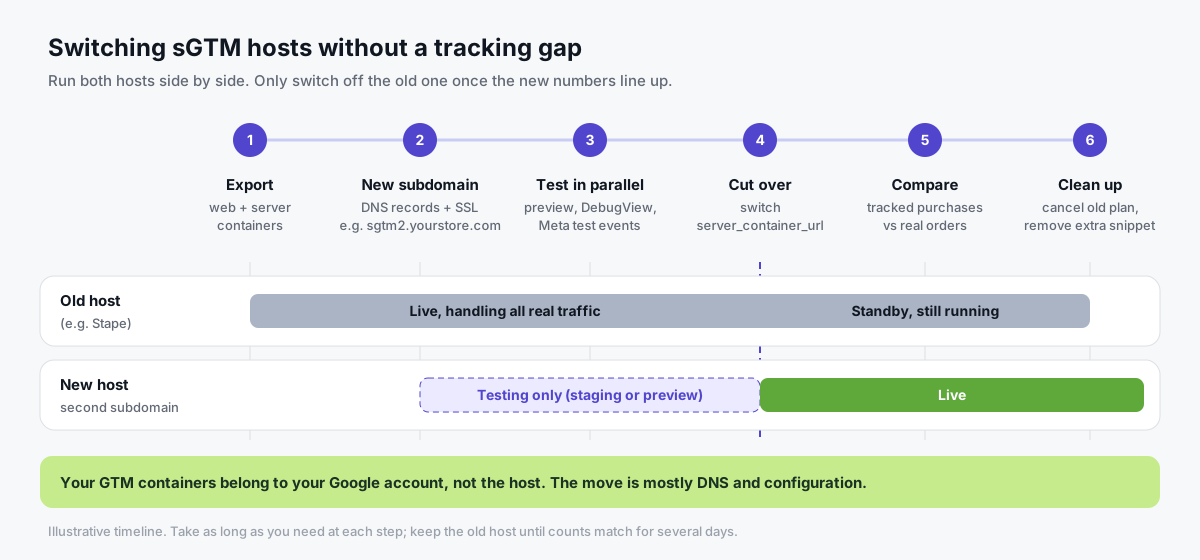
- Export your containers. Export both the web and server containers as a backup (Admin, Export Container). Google's export and import guide covers Overwrite and Merge.
- List host-specific pieces. Power-ups, Custom Loader paths, Stape templates or variables, and webhooks from the Stape plugin or app. Each needs an equivalent on the new host, or it needs to go.
- Provision the new server container. Use the same server container config, or import a generated container.
- Add a second tracking subdomain. Something like
sgtm2.yourstore.com, so old and new run in parallel. Add the DNS records and wait for SSL. - Test in parallel. Point a staging site or preview workspace at the new
server_container_url. Use GTM preview, GA4 DebugView and Meta's test events to confirm events arrive with the right parameters and event IDs. Our free Website Tracking Checker shows what your public pages load. - Cut over. Update
server_container_url(or your plugin settings) and publish. To keep the original subdomain for cookie continuity, repoint its DNS to the new host instead. - Compare for several days. Check tracked purchases against real orders and keep the old host running until they line up. Our conversion discrepancy guide helps if they don't.
- Clean up. Remove any old plugin that injects a second GTM snippet (to avoid double counting), then cancel the old plan.
Do you still need Google Tag Manager after leaving Stape? If you move to another sGTM host, yes: you keep your web and server containers. If you move to a tool like Tracklution or Elevar, you'll follow that tool's own setup, so plan for a rebuild rather than a DNS swap.
Moving to Tagioo? Email hello@tagioo.com before you change live tracking, and we'll walk through your container and DNS cutover with you. You can also start on the Free plan and test in parallel first.
Sources and further reading
Competitor facts come from these pages (checked October 2026):
- Stape: Pricing, Request limits and pause logic, WordPress plugin and Shopify app
- TAGGRS: Pricing and FAQ and Stape alternative page
- Addingwell: Pricing; Didomi: Addingwell acquisition announcement
- Tracklution: Pricing
- Elevar: Shopify App Store listing
- Google: Cloud Run setup guide for server-side tagging
- Google: Custom domain for your tagging server
- Google: Google tag gateway for advertisers
- Google Tag Manager Help: Export and import containers
Related questions
What is the best Stape alternative?
It depends on your setup. TAGGRS and Addingwell are the closest request-based hosts, Elevar suits higher-volume Shopify brands, Tracklution suits teams that want a tool instead of GTM, Cloud Run suits teams with engineers, and Tagioo suits stores and agencies that want generated containers and event visibility.
Is Stape free?
Partly. As of October 2026, Stape's pricing page lists a Free plan with up to 10,000 requests a month, with no card required.
But Stape's help desk says a Free container that hits the limit is disabled and the limit doesn't reset, so you'd need to upgrade to restart it. Paid plans start with Pro at $20/month, or $17/month billed annually.
How much does Stape cost?
As of October 2026, Stape lists Pro at $20/month (500,000 requests), Business at $100/month (5 million) and Enterprise at $200/month (20 million), with lower per-month prices on annual billing. The Custom plan is priced by sales.
Stape vs TAGGRS: which is cheaper?
It depends on your volume. Stape's Pro has the lower listed entry price, while TAGGRS' Basic includes more requests (750,000 vs 500,000) for a similar amount. Estimate your monthly requests, then compare the tier you'd actually land in on each pricing page.
What is the difference between requests and events in sGTM pricing?
A request is an incoming hit to your server container, and one page view can produce more than one, depending on your clients, tags and loader. An event is a tracked action such as a page view or purchase. Compare plans using your own estimated volume in each provider's unit.
Can I switch from Stape without losing data?
Yes, if you run the new host in parallel before cutting over. Export your containers, set up the new host on a separate subdomain, verify events, then switch the server container URL. Keep the old host running until counts match.
Does switching hosts change my consent requirements?
No. Server-side tracking on any host doesn't bypass consent. You still need a consent banner and Consent Mode configured correctly, whichever provider runs your container.
See your own events, server-side.
Tagioo hosts your server-side GTM container on your own domain and generates the GA4, Google Ads, Meta and TikTok setup for you. Free for 15,000 events a month, no card needed.