
Ad Blocker Tracking Loss: How Much Data You Lose and How to Measure It
Ad blocker tracking loss explained: what blockers stop in GA4 and Meta, why published numbers vary, and a 1-hour method to measure your own tracking gap.
 Tagioo teamUpdated 13 min read
On this page
- How do ad blockers block Google Analytics and tracking pixels?
- How can you see an ad blocker blocking your tags?
- How big is ad blocker tracking loss, really?
- How do you measure your own ad blocker gap?
- What does first-party, server-side tracking change?
- What does first-party serving NOT change?
- Is it OK to "bypass" ad blockers?
- Why is a server-side purchase hit the best backstop?
- How do you set this up with Tagioo?
- Sources and further reading
- Related questions
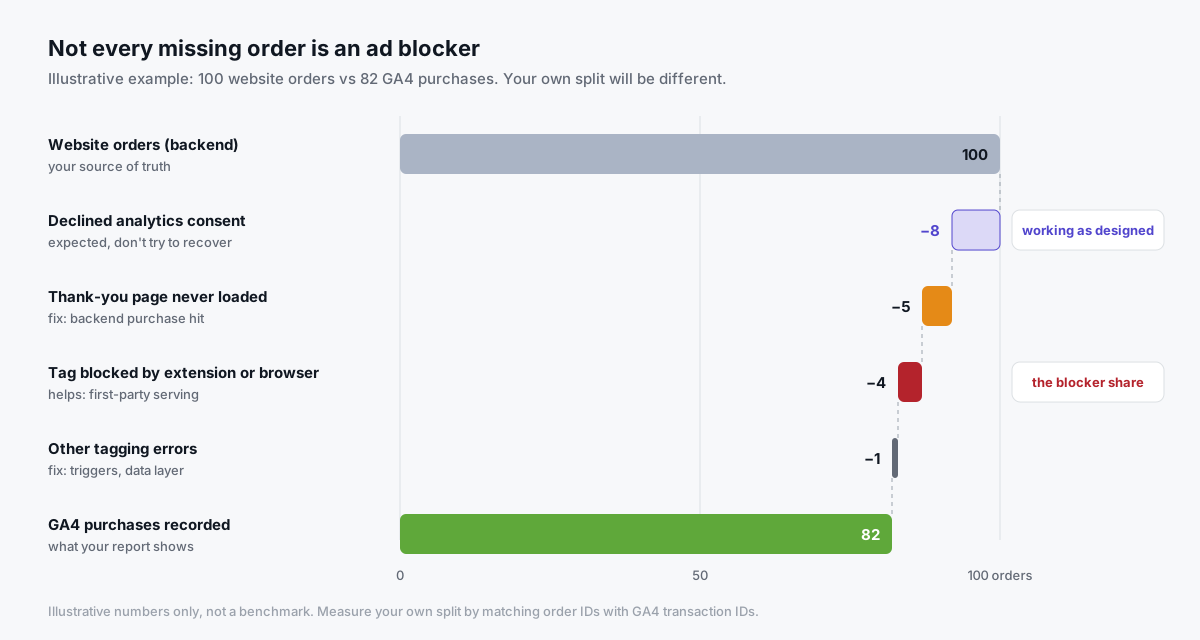
Your store shows 100 orders last week. GA4 shows 82 purchases.
So where did the other 18 go?
Was it ad blockers? Brave? A customer who paid by bank redirect and never came back to the thank-you page? Or people who simply clicked "Reject" on your cookie banner?
Ahh, so many questions. Let's sort them out.
What is ad blocker tracking loss? Ad blocker tracking loss is the share of real visits and conversions that never reach GA4 or your ad platforms because a browser extension, privacy browser or network blocker stopped the tag. It differs from site to site, so the only useful number is the one you measure: your backend orders matched against what GA4 recorded.
Some of that 18-order gap is probably blockers. But some of it is consent working as designed, and some is plain tagging trouble.
Each cause needs a different fix. So the first job is to tell them apart.
In this guide, you'll find out what blockers actually stop, how to see it happen in your own browser, a one-hour method to measure your real gap, and what first-party serving can and can't fix. We'll also answer questions like "Does server-side tracking bypass ad blockers?" and "What does ERR_BLOCKED_BY_CLIENT mean?"
So, why the wait? Let's begin.
How do ad blockers block Google Analytics and tracking pixels?
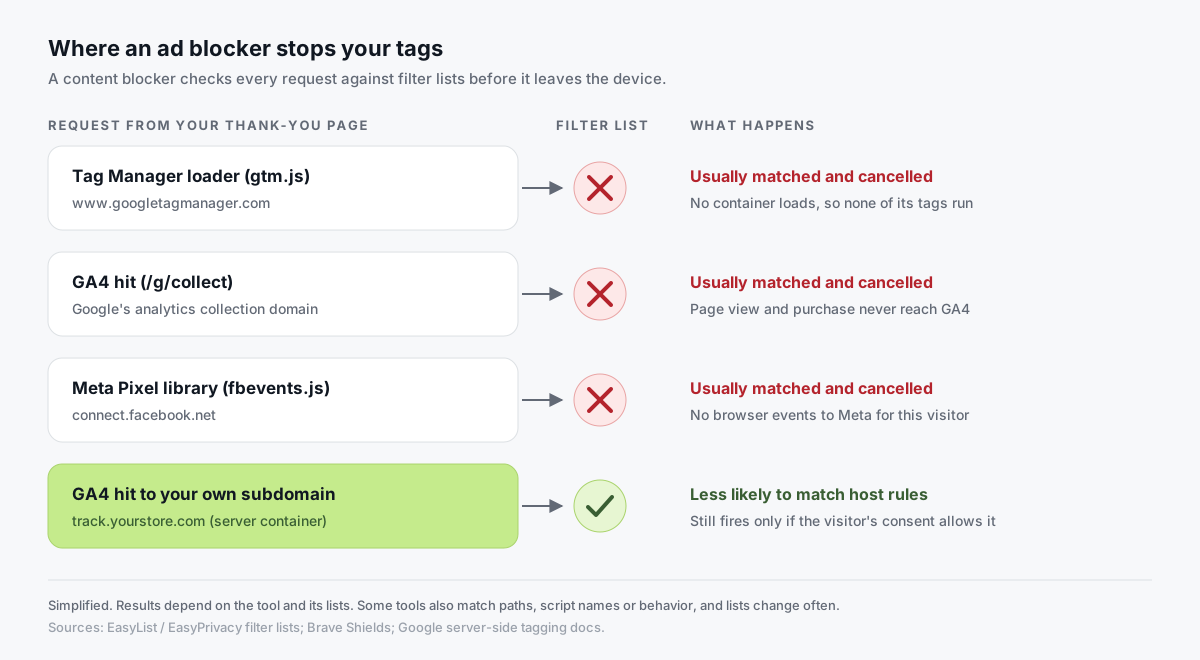
Most content blockers work from filter lists.
A filter list is a public set of rules that match request URLs, domains and page elements. Lists such as EasyList and EasyPrivacy include rules for well-known advertising and analytics hosts.
When a page asks the browser to load something that matches, the extension cancels the request before it ever leaves the device.
For a typical store, these are the requests that get matched most often:
| Request | Typical host | What you lose if it's blocked |
|---|---|---|
Tag loader (gtm.js, gtag/js) | www.googletagmanager.com | The whole container: GA4, Google Ads, and any Meta or TikTok tags you run in GTM |
GA4 hit (/g/collect) | Google's analytics collection domains | Page views, events and purchases in GA4 |
| Meta Pixel library | connect.facebook.net | Every browser event to Meta for that visitor |
| Meta Pixel endpoint | facebook.com/tr | Events, even if the library loaded |
| Other ad pixels | Each platform's own host | That platform's browser events |
The first row is the painful one.
If the loader is blocked, it doesn't matter how perfect your tags are. None of them run.
Extensions, browsers and network blockers
Blocking happens at three levels, and they behave differently:
- Browser extensions. Tools like uBlock Origin apply filter lists inside the browser. Usually desktop, usually opt-in.
- Privacy browsers. Brave Shields are on by default and block third-party ads and trackers, plus cross-site cookies. Nothing is broken on your side. The browser is doing what its users chose it for.
- Network-level blockers. Tools like Pi-hole block tracking domains for every device on a home network, by refusing to resolve them.
What about Safari and Firefox?
Safari and Firefox mostly limit cookies and storage, rather than blocking Google Analytics outright in normal browsing.
Safari's Intelligent Tracking Prevention blocks third-party cookies and caps how long some first-party cookies live. Firefox isolates cookies per site with Total Cookie Protection.
Safari's Private Browsing goes further. WebKit says it uses an automatically enabled content blocker for known trackers, built from DuckDuckGo and EasyPrivacy rules, that only blocks entries both sources flag (WebKit: Private Browsing 2.0).
So in Safari you see two kinds of loss. Sometimes the event never arrives. More often, it arrives but the visitor looks brand new, so attribution weakens.
How can you see an ad blocker blocking your tags?
Don't take anyone's word for it, including ours. You can watch it happen in five minutes:
- Install a common blocker in a spare Chrome profile, or open your store in Brave with default Shields.
- Open DevTools → Network and reload a product page. Chrome's Network panel reference explains the columns.
- Filter for
gtm,collectandfacebook. Blocked requests show as failed, with the reasonnet::ERR_BLOCKED_BY_CLIENT. - Check the Console. Blocked scripts often show the same error there.
- Repeat with the blocker off. Now the same requests should load. That difference is your blocked path.
What does ERR_BLOCKED_BY_CLIENT mean? It means something on the visitor's side, the "client," refused the request. Usually that's an extension. It isn't a server error, and you can't fix it from your server.
One extra tip: turn the blocker off in your own browser profile when you QA your tags. A lot of "tracking is broken" reports start with a developer's own ad blocker.
Analyzify shows that exact trap in GA4:

How big is ad blocker tracking loss, really?
Honestly? Nobody can tell you that for your store without measuring it.
You'll find plenty of published figures. They disagree, sometimes by a factor of three. Here's why:
- Method. Some surveys ask people whether they ever used a blocker. Others measure blocked requests on real traffic.
- Device. Desktop users block far more than mobile users, and many stores sell mostly on mobile.
- Audience. A developer audience blocks far more than a general retail audience.
- Who's publishing. Many of the biggest numbers come from vendors that sell a fix. That doesn't make them wrong, but it's worth knowing.
So we won't quote an industry average here. A national survey can't tell you how many of your buyers block.
There's another catch. "Visitors with a blocker" isn't the same as "lost conversions."
Some blocked buyers still show up in ad platforms through other signals. And some visitors without blockers decline analytics consent, which lowers your count in a way that's correct and expected.
Can't GA4 just model the missing people? Only partly.
GA4's behavioral modeling for consent mode estimates users who decline analytics cookies, based on similar users who accept. It needs a property with enough traffic, such as at least 1,000 events a day with analytics_storage denied for 7 days. And it relies on the cookieless pings consent mode sends. If a blocker stops the tag entirely, there's no ping to learn from.
How do you measure your own ad blocker gap?
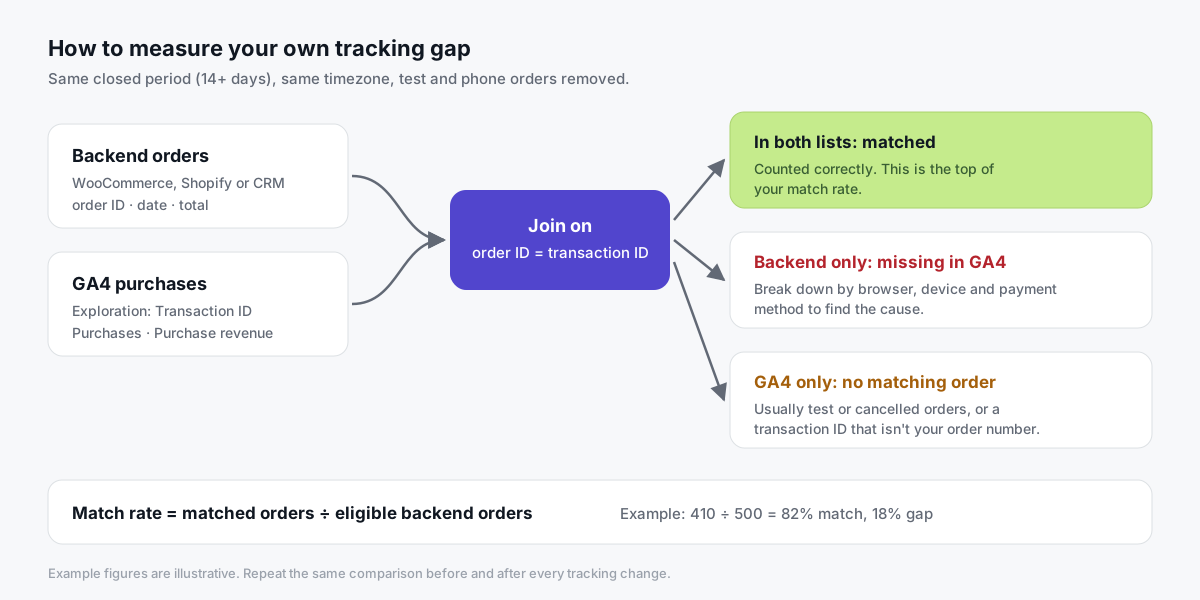
The cleanest test compares your source of truth, your store's order database, with what GA4 recorded for the same orders.
It takes about an hour:
- Pick a closed period. At least 14 full days that ended a few days ago, so GA4 has finished processing. Avoid big promotions and tracking changes.
- Export backend orders. Completed or paid orders with order ID, date and total. Remove test orders, phone orders and anything without a website checkout.
- Export GA4 purchases. Build an exploration with the dimension Transaction ID and the metrics Purchases and Purchase revenue. Use your store's timezone.
- Match by order ID. Join the two lists where order ID equals transaction ID.
- Calculate the match rate. Matched orders ÷ eligible backend orders. If 410 of 500 orders appear in GA4, your match rate is 82% and your gap is 18%.
- Break the gap down. Group missing orders by browser, device and payment method, where your store records them.
- Account for consent. If you use a consent banner, estimate the share of visitors who decline analytics. That part of the gap is working as designed. Don't try to recover it.
Now read the missing orders:
| What you see in the missing orders | What it usually means | Start here |
|---|---|---|
| Concentrated in Brave or desktop Firefox | Blocking | First-party loader and endpoint |
| Concentrated in one payment gateway | Customers never return to the thank-you page | Backend purchase hit |
| Spread evenly, matches your consent decline rate | Consent working as designed | Nothing to fix |
| Mostly iPhone, but GA4 has the order | Attribution, not collection | Safari ITP guide |
| GA4 has more purchases than orders | Duplicates or reloads | Dedup on transaction_id |
Repeat the same comparison after every tracking change. A before-and-after match rate on comparable periods is far more convincing than any vendor's headline number, including ours.
What does first-party, server-side tracking change?
Most filter rules match third-party hosts.
If your tags load from, and send data to, a subdomain you control, such as track.yourstore.com, fewer of those host rules match. That's the main reliability benefit of first-party tracking.
In practice it has two parts. You need both:
- A first-party collection endpoint. Your Google tag sends hits to your own server container instead of straight to Google. The container then forwards them to GA4, Meta and other destinations. Google's introduction to server-side tagging describes the model.
- A first-party loader. The endpoint alone doesn't help if the browser never loads
gtm.jsfromgoogletagmanager.com. The loader has to come from your domain too.
Here's how the common options compare:
| Approach | Loader from your domain? | Hits to your domain? | Feeds Meta / TikTok server-side? | Effort |
|---|---|---|---|---|
| Standard Google tag | No | No | No | Low |
| Google tag gateway | Yes | Yes | No | Low–medium |
| Server-side GTM on a subdomain | Optional | Yes | Yes | Medium |
| Server-side GTM + first-party loader | Yes | Yes | Yes | Medium |
What's Google tag gateway? Announced in May 2025, it serves Google's tag through your own domain via your CDN. Google reported an 11% uplift in signals, measured as Google tag script loads. It's a good option if you only advertise on Google.
Not sure how server-side and client-side tracking differ in the first place? Analytics Mania explains it clearly:

What does first-party serving NOT change?
This part matters as much as the last one.
First-party serving is about reliable delivery on your own domain. It isn't a way around a visitor's privacy decisions, and you shouldn't treat it as one.
- Consent still applies. If a visitor declines analytics or ad cookies, your tags must respect that, whether they load from Google or from your subdomain. With Google's setup, consent state travels from the web container to the server (Google's server-side consent mode docs).
- Opt-outs still apply. Honor the browser signals and opt-outs your policy and local law recognize. An endpoint that ignores them is a compliance risk, not a feature.
- Some blocking remains. Many tools also match paths, script names or behavior, and lists change all the time. Some visitors will stay unmeasured. That's fine.
- Browser pixels may stay blocked. Moving the GTM loader doesn't make the Meta Pixel library load from your domain. Meta and TikTok coverage for those visitors comes from server events, sent only when consent allows it.
Be open about it, too. Your privacy policy should say you use a first-party tracking subdomain and which vendors receive data from it.
Is it OK to "bypass" ad blockers?
We'd put it differently, and so should you.
The goal isn't to beat anyone's blocker. The goal is that people who did agree to measurement get measured reliably, without your data depending on a third-party domain that half the internet blocks for unrelated reasons.
Here's the line we draw:
| Fine | Not fine |
|---|---|
| Serving tags from your own subdomain, disclosed in your privacy policy | Renaming scripts or rotating paths specifically to dodge filter lists |
| Sending server events only for visitors who consented | Firing server events for visitors who declined |
| A backend purchase hit that respects the order's consent state | Fingerprinting visitors to replace blocked cookies |
| Accepting that some visitors stay unmeasured | Treating "100% of events" as the target |
The legal side follows the same logic. What makes tracking lawful is what you collect and your basis for it, not which hostname receives it.
Why is a server-side purchase hit the best backstop?
The most valuable event is also the most fragile one.
A purchase tag usually fires on the thank-you page. But some customers pay through an external gateway and never come back. Some close the tab. Some thank-you pages break after a theme update.
None of those are ad blocker problems. But in your gap analysis they look exactly the same.
A server-side purchase hit sends the order from your store's backend when it's created or paid. It doesn't depend on the thank-you page loading at all.
Two rules keep it clean:
- Deduplicate on
transaction_id. If the browser and the backend send the same order, both must carry the same order number. GA4 deduplicates purchases with the same transaction ID on web streams. - Respect consent. Pass the visitor's consent state with the order, and only forward the event to destinations they allowed.
After you turn it on, rerun the order comparison. A higher match rate on a comparable period, with no duplicate transaction IDs, is your evidence that it works.
How do you set this up with Tagioo?
Tagioo gives each customer a dedicated, isolated server-side GTM container on your own tracking subdomain, with DNS guidance and automatic SSL.
On WooCommerce, the Tagioo plugin does two things that matter for this guide:
- Server-side purchase hit. Orders reach your sGTM container even if the thank-you page tag never fires, deduplicated on
transaction_id. - Optional Custom Loader. It serves
gtm.jsandgtag.jsfrom your own domain, so browsers and extensions that blockgoogletagmanager.com, such as Brave with default Shields, can still load your tags. Your consent setup still decides what fires.
Then use Event Logs and Purchase Inspector to see what actually reached your server, and run the free Website Tracking Checker to confirm your site routes through a first-party domain.
There's a free plan with 15,000 events per 30 days, and no card is needed. See pricing or how it works.
Sources and further reading
- EasyList: EasyList and EasyPrivacy filter lists
- Brave: Brave Shields
- WebKit: Private Browsing 2.0
- Mozilla: Total Cookie Protection by default
- Chrome for Developers: Network features reference
- Google: An introduction to server-side tagging
- Google: Server-side consent mode
- Google Analytics Help: Behavioral modeling for consent mode
- Google Analytics Help: Minimize duplicate key events with transaction IDs
- Google Ads: Google tag gateway for advertisers announcement
Related questions
Does server-side tracking bypass ad blockers?
Not in the way the phrase suggests, and bypassing them shouldn't be your goal.
Server-side tracking moves collection to a domain you control, so requests are less likely to match host-based filter rules. Consenting visitors who'd otherwise go unmeasured because of a blocked Google host can be measured. It doesn't override consent, and it won't catch every privacy tool.
Do ad blockers block Google Analytics 4?
Many do. Common filter lists include Google Tag Manager and Google Analytics hosts, so the loader, the GA4 hit, or both get cancelled.
Brave blocks them by default. Safari and Firefox mostly limit cookies in normal browsing instead, which makes returning visitors look new.
What does ERR_BLOCKED_BY_CLIENT mean?
It means something on the visitor's device refused the request, almost always an ad blocker or privacy extension. You'll see it in Chrome DevTools next to blocked gtm.js, collect or pixel requests.
It isn't a server error. Test with the extension turned off to confirm.
Can GA4 model visitors who use ad blockers?
Not directly. GA4's behavioral modeling covers visitors who decline analytics consent, using cookieless pings from consent mode, and only on properties that meet Google's traffic thresholds.
If a blocker stops the tag entirely, no ping is sent, so there's nothing to model.
Do ad blockers affect the Meta Pixel and TikTok pixel?
Yes. Filter lists commonly match connect.facebook.net and other ad pixel hosts, and Brave blocks them by default.
For those visitors, server events through the Meta Conversions API or the TikTok Events API can still provide a signal, sent only when consent allows it.
Is it legal to serve tracking from my own subdomain?
Serving tags from your own domain is a normal setup that Google documents for server-side tagging. What makes it lawful is what you collect and whether you have consent or another valid basis, not the hostname.
Disclose the setup in your privacy policy and keep your consent banner in control. For specific legal questions, ask a privacy lawyer. This isn't legal advice.
What match rate between orders and GA4 should I expect?
There's no universal benchmark. It depends on your audience, consent rate, checkout flow and payment gateways.
Use your own baseline, fix tagging problems first, then compare the same period length before and after each change.
See your own events, server-side.
Tagioo hosts your server-side GTM container on your own domain and generates the GA4, Google Ads, Meta and TikTok setup for you. Free for 15,000 events a month, no card needed.
Keep reading
Conversion Tracking Discrepancies: Why GA4, Google Ads, Meta and Your Store Never Match
Not every reporting gap is a broken tag. How to tell normal attribution differences from missing or duplicate conversions.
What Is Server-Side Tracking? How It Works, Benefits & Setup (2026)
How server-side tracking works, how it compares to browser tags, what it can and can't fix, and how to decide if you need it.