
Shopify Server-Side Tracking: How It Works and How to Set It Up (2026)
How server side tracking on Shopify works with Customer events and Custom Pixels, what changed in 2025-2026, your options, and how to avoid duplicate purchases.
 Tagioo teamUpdated 14 min read
On this page
- How does Shopify tracking work in 2026?
- What changed in Shopify tracking in 2025 and 2026?
- Why does browser-only tracking still fall short on Shopify?
- What are your Shopify server-side tracking options?
- Is server-side tracking worth it for Shopify?
- How do you set up Shopify server-side tracking with a Custom Pixel?
- How do you avoid double counting with Shopify's native apps?
- How does consent work with Shopify server-side tracking?
- How do you test Shopify server-side tracking?
- 7 common Shopify tracking mistakes
- How do you know it worked?
- How can Tagioo help?
- Sources and further reading
- Related questions
Your Shopify admin shows 120 orders this month. Meta Ads Manager shows 94. GA4 shows 101.
So where did the rest go?
Did the old script in "Additional scripts" stop running? Did Shopify pause a pixel? Or are three apps all sending Purchase, and the numbers only look low because you're not sure which one to trust?
Ahh, so many questions. Let's work through them.
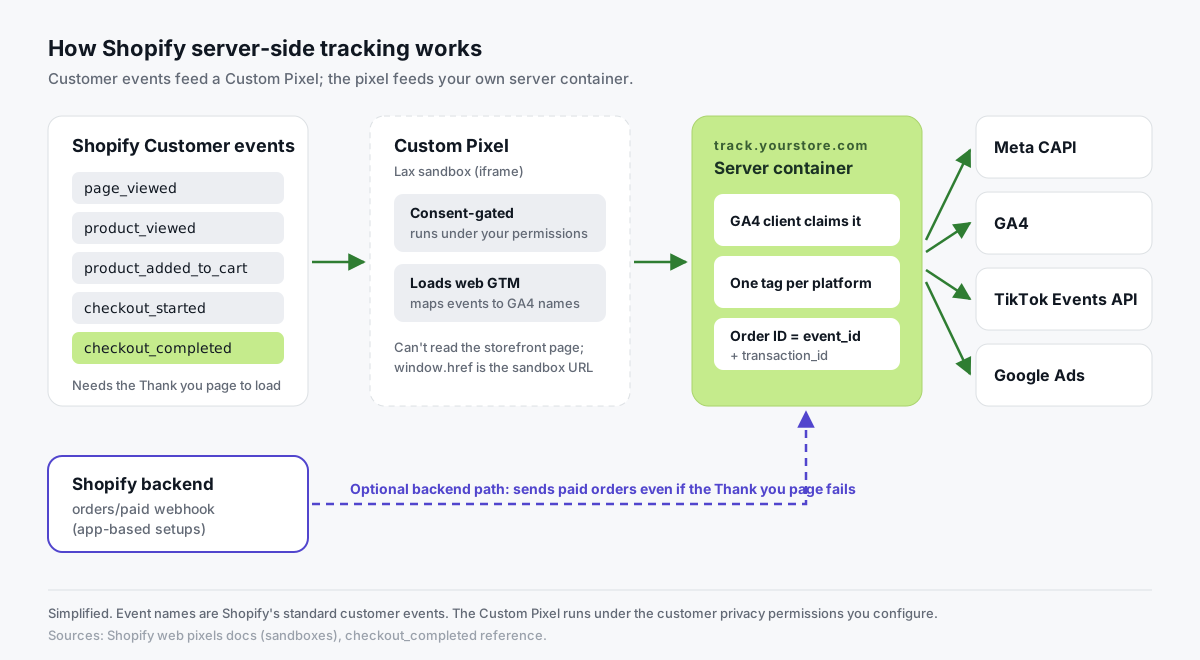
What is Shopify server-side tracking? Shopify server-side tracking sends your store's events, such as checkout and purchase, through a server you control before they reach Meta, GA4, TikTok or Google Ads. On Shopify, events start in Customer events, through an app pixel or a Custom Pixel, and are forwarded by a server, often a server-side Google Tag Manager container on track.yourstore.com.
Shopify tracking has changed a lot since 2025. Scripts pasted into checkout settings are gone, pixels run in a sandbox, and Shopify can now pause app pixels it thinks aren't helping.
Plenty of stores found out only when their ad platforms stopped seeing purchases.
In this guide, you'll learn how Shopify tracking works today, what changed, your server-side options, a step-by-step setup and how to avoid double counting. We'll also answer questions like "Do I need Shopify Plus?" and "Will the Facebook & Instagram channel double count my purchases?"
So, why the wait? Let's begin.
How does Shopify tracking work in 2026?
Shopify no longer lets you paste tracking scripts into checkout. Instead, it publishes standard customer events, and pixels subscribe to them.
You'll find them under Settings → Customer events in your Shopify admin.
Here are the ones that matter for ecommerce tracking:
| Shopify event | When it fires | Usual GA4 event | Usual Meta event |
|---|---|---|---|
page_viewed | Every page view | page_view | PageView |
product_viewed | Product page | view_item | ViewContent |
product_added_to_cart | Add to cart | add_to_cart | AddToCart |
checkout_started | Checkout begins | begin_checkout | InitiateCheckout |
payment_info_submitted | Payment details entered | add_payment_info | AddPaymentInfo |
checkout_completed | Order placed | purchase | Purchase |
The purchase event deserves a closer look.
Shopify's checkout_completed reference says it fires once per checkout, typically on the Thank you page. If you use post-purchase upsells, it fires on the first upsell page instead.
And here's the key line: if the page that should trigger it fails to load, the event isn't triggered at all.
App pixels vs Custom Pixels
There are two kinds of pixel, as Shopify's web pixels documentation explains:
| App pixels | Custom Pixels | |
|---|---|---|
| Installed by | An app from the App Store | You, by pasting code |
| Sandbox | Strict (a web worker) | Lax (a sandboxed iframe) |
| Page access | No DOM access | Can't access the top page; window.href returns the sandbox URL |
| Consent | Callbacks run after consent, where consent is required | Runs under the privacy settings you choose |
| "Optimized" data sharing | Yes, for marketing app pixels | Not covered by it |
| Who maintains it | The app developer | You |
Shopify's Custom Pixels help page is blunt about the trade-off: not all pixel functionality works in the sandbox, and compliance, consent, code security and updates are the merchant's responsibility.
Want to see Customer events in action with GTM? Alessandro Colarossi's walkthrough is one of the clearest:

What changed in Shopify tracking in 2025 and 2026?
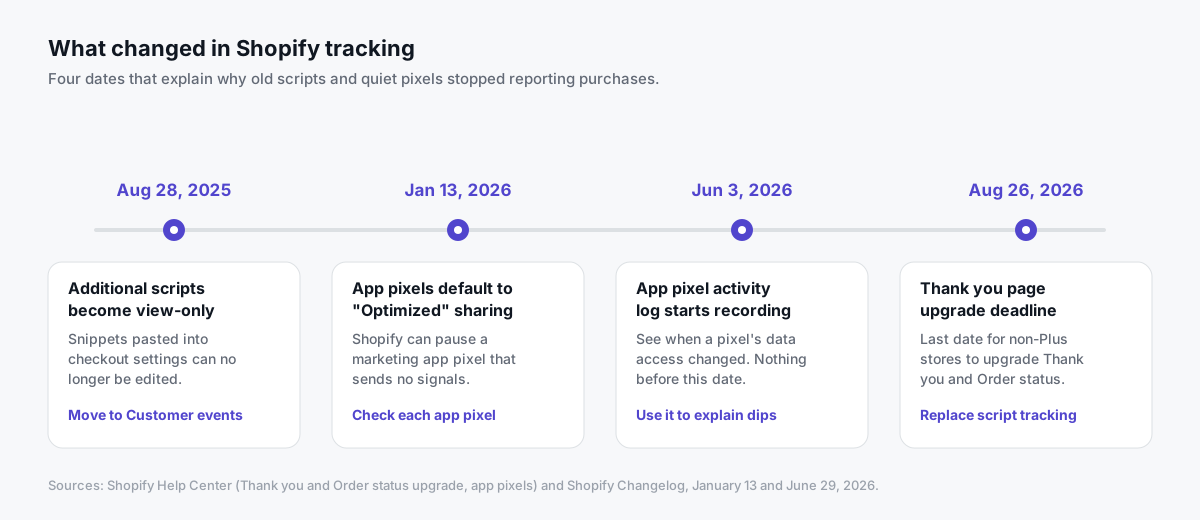
Four dates explain most of the "my purchases disappeared" stories we hear.
Additional scripts are gone
According to Shopify's Thank you and Order status upgrade page, Additional scripts became view-only on August 28, 2025. August 26, 2026 was the deadline for non-Plus stores to upgrade their Thank you and Order status pages.
If your purchase tracking lived in a snippet there, don't assume it still runs. Check that it was rebuilt in Customer events.
App pixels default to "Optimized" data sharing
On January 13, 2026, Shopify changed the default for marketing pixel data sharing.
Per Shopify's app pixels help page, app pixels now default to Optimized. When Shopify sees no signals from a marketing pixel over days or weeks, it can pause that pixel's data sharing until signals return. Some analytics app pixels can't be optimized and stay on Always on.
So if an app pixel matters to you, open Settings → Customer events → App pixels and check its data setting.
You can now see when it happened
Since June 3, 2026, Shopify's app pixel activity log records data access changes for each app pixel. Changes before that date aren't recorded.
That's your first stop when an app pixel's numbers suddenly drop.
Why does browser-only tracking still fall short on Shopify?
Even with Customer events, a pixel is still code running in the shopper's browser. That brings the usual limits:
- The Thank you page has to load. If a customer closes the tab, loses signal or an offsite payment doesn't return cleanly,
checkout_completedmay never fire, even though Shopify recorded the order. - Blocked requests. Ad blockers and privacy browsers often block well-known tracking domains. See ad blocker tracking loss.
- Short-lived cookies. Safari restricts cookies set by JavaScript, so returning visitors can look new. See Safari ITP and iOS tracking.
- Sandbox limits. Pixels can't read the storefront page directly, so old scripts that scraped the page behave differently.
- Quiet failures. If a pixel stops sending, you usually find out from the ad account, weeks later.
None of this makes browser tracking useless. It carries the cookies and page context the server copy relies on.
It just means a second, server-side path is worth having for the events that matter most.
What are your Shopify server-side tracking options?
There are four realistic routes. Each one is fine for someone.
| Option | Platforms | Strengths | Watch out for |
|---|---|---|---|
| Native Facebook & Instagram channel (Enhanced or Maximum data sharing) | Meta | Built in; catalog, Shops and CAPI in one place | Meta only; little visibility into the payload |
| Tracking apps | Varies | Quick install; some send orders from Shopify's backend | Overlap with native channels; check each app's data settings |
| Server GTM fed by a Custom Pixel | Meta, GA4, TikTok, Google Ads | One first-party server for every platform; full control | You choose which tool owns each event |
| Server GTM plus order webhooks | Same, plus backend orders | Purchases even if the Thank you page fails | Needs an app or custom code |
Native Meta channel. Shopify's Meta data sharing page describes three levels. Standard uses the Pixel only. Enhanced adds the Conversions API, sending purchase events server to server. Maximum adds Meta's latest advertising technology on top. If Meta is your main platform and results look right, this may be enough.
Apps. Many apps send server events to one or more platforms. Before you install one, list what's already sending events, so you don't end up with two apps reporting the same purchase.
Server GTM via a Custom Pixel. A Custom Pixel subscribes to Shopify's events and sends them to a server container on your own subdomain, which forwards them to each platform's API. One place to see and control what leaves your store.
Order webhooks. Shopify can notify an app when an order is paid. That's how some apps send purchases from the backend, so a failed Thank you page doesn't mean a missing sale.
Is server-side tracking worth it for Shopify?
It's usually worth it if:
- You spend real money on Meta, TikTok or Google Ads and bid on purchases.
- You use more than one ad platform, and want one consistent event stream for all of them.
- Your platform numbers keep drifting from Shopify's order count, and you can't explain why.
- You want visibility. A live event log shows you a broken pixel the same day.
It can wait if you only advertise on Meta and the native channel at Enhanced or Maximum already matches your orders closely.
Not sure what your storefront runs today? The free Website Tracking Checker scans a public site for tags, IDs, consent setup and first-party routing.
How do you set up Shopify server-side tracking with a Custom Pixel?
Here's the setup with Tagioo, which runs a dedicated server GTM container for your store and generates the Custom Pixel and container files. No theme edits or app install are needed. A Tagioo Shopify app is coming soon.
You'll need a Google account with a Web and a Server GTM container.
| Step | Where | What you do |
|---|---|---|
| 1 | Google Tag Manager + Tagioo | Copy the server container config; create a Tagioo container |
| 2 | DNS provider | Add one CNAME for track.yourstore.com |
| 3 | Setup Assistant | Choose Shopify, pick destinations, import web.json and server.json |
| 4 | Shopify admin | Add the Custom Pixel and set its permissions |
| 5 | GTM, Meta, Tagioo | Test one order, then publish |
Step 1: Create your container
In Google Tag Manager, open your Server container, click its container ID, choose Manually provision tagging server and copy the Container Config.
Then sign up for Tagioo, create a container, paste the config and choose a tracking subdomain such as track.yourstore.com. The Free plan includes 15,000 events per 30 days and needs no card.
Step 2: Point your subdomain at Tagioo
Add the CNAME record shown in your dashboard at your DNS provider. SSL is issued automatically once it resolves.
Step 3: Generate and import your GTM files
In the Setup Assistant, choose Shopify, enter your Web GTM container ID and pick your destinations: Meta Pixel and Conversions API, GA4, TikTok, Google Ads.
Generate web.json and server.json, then import each into the matching GTM container using Merge.
Step 4: Add the Custom Pixel
In Shopify admin, go to Settings → Customer events → Add custom pixel. Name it "Tagioo" and paste the code from the Setup Assistant.
Set the pixel's customer privacy permissions (for example, require Analytics and Marketing consent where applicable). Click Save, then Connect.
The pixel loads your web container inside Shopify's sandbox and sends the full funnel, from page_view and view_item to begin_checkout, add_payment_info and purchase. The Shopify order ID is used as both transaction_id and Meta's event_id.
Step 5: Test one order, then publish
Use the testing checklist below. When the order shows up correctly, publish both containers.
The Shopify page has the overview, and the docs have the step-by-step reference.
One honest limit: this manual pixel covers browser and checkout events. Backend order recovery from Shopify's orders/paid webhook will come with the Tagioo Shopify app. Until then, purchases still need checkout_completed to fire.
Prefer to watch a full build first? Analytics Mania walks through server-side tagging for Shopify end to end:

How do you avoid double counting with Shopify's native apps?
This is where most Shopify server-side setups go wrong.
A typical store already has the Facebook & Instagram channel, Google's app and a TikTok app, each with its own pixel and maybe its own server events.
Add server GTM on top without a plan, and you get two independent integrations reporting the same purchase with different IDs. The platforms can't merge those, so the sale counts twice.
The fix is simple: choose one owner per event, per platform.
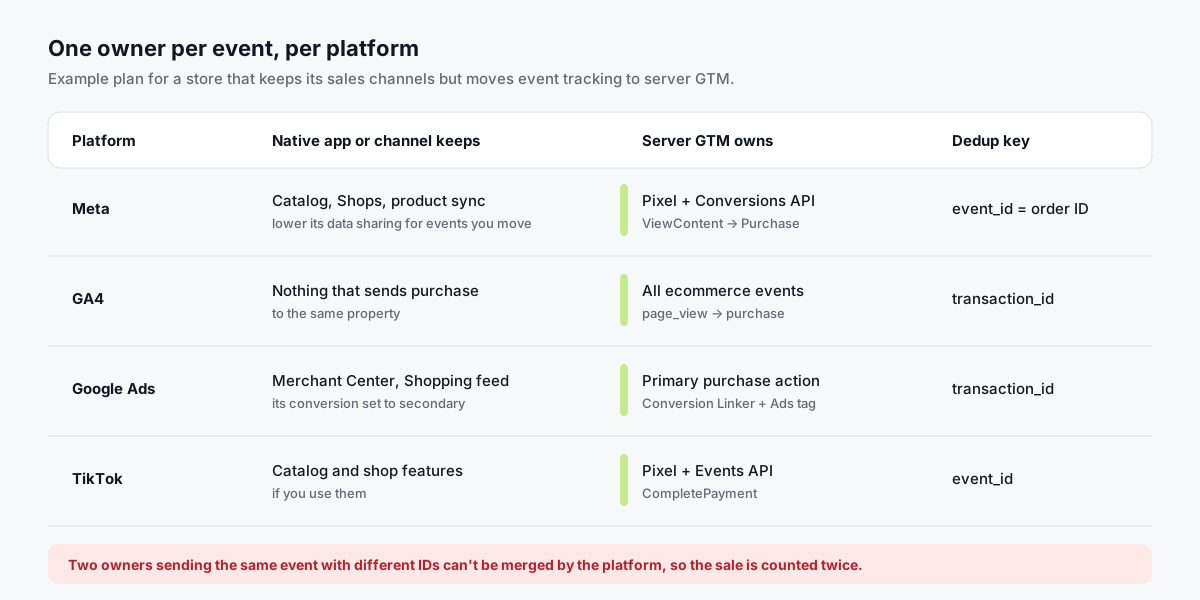
- Meta. Either the native channel sends Pixel and CAPI events, or your server GTM setup does. If you move events to server GTM, lower the channel's data sharing for those events, and keep the channel for catalog and Shops. Meta only merges a browser and server event when the event name and ID match (Meta's deduplication docs).
- GA4. Only one source should send
purchaseto the same GA4 property. GA4 deduplicates purchases with the same transaction ID (Google's help article), but two sources with different IDs still double count. - Google Ads. Keep one primary purchase conversion action. Set any other to secondary.
- TikTok. One pixel and one server path per event, sharing an event ID.
Before changing anything, write down every app pixel and Custom Pixel in Customer events, and every connected sales channel.
How does consent work with Shopify server-side tracking?
Server-side tracking does not bypass consent.
- Pixels respect Shopify's consent signals. Shopify's docs say that in regions where customers must consent to tracking, app pixel callbacks run only after consent is given.
- Custom Pixels run under the privacy permissions you set on each pixel.
- Your consent banner should use Shopify's Customer Privacy API, so the choice reaches your pixels.
- Your server container should only forward what that consent allows.
You remain responsible for your consent configuration. This isn't legal advice.
How do you test Shopify server-side tracking?
- Check Customer events. Confirm your Custom Pixel shows as connected, and note its permissions.
- Open server container Preview. Browse your store: view a product, add to cart, start checkout. Requests should arrive and the Meta, GA4 and TikTok tags should fire (Google's debugging guide).
- Place a controlled test order you can cancel or refund.
- Meta Test Events. Browser and server Purchase events should share the order ID as
event_idand show as deduplicated. - GA4 DebugView. The purchase should arrive once, with the right value, currency and transaction ID.
- Tagioo dashboard. Find the order in Event Logs and Purchase Inspector, then run Run tracking test to confirm your GA4 server container is published and your Meta credentials work.
- Look for second copies. Check each ad platform for a duplicate from a native app.
A tip: web container preview inside Shopify's pixel sandbox can be unreliable, because the code runs in an iframe. The server container preview, which shows what actually arrived, is the dependable check.
7 common Shopify tracking mistakes
- Old Additional scripts still trusted: tracking that lived there no longer runs. Fix: rebuild it in Customer events.
- Two Meta senders: the native channel at Enhanced plus server GTM. Fix: one owner.
- A paused app pixel: "Optimized" sharing paused it. Fix: check the data setting and activity log.
- Purchase only on page view: the tag fires on every Thank you page reload. Fix: trigger on
checkout_completed. - Wrong page URL: the Custom Pixel reports the sandbox URL. Fix: read the page location from the event's context, not
window.location. - Default cloud URL: the server container isn't on your own subdomain. Fix: map
track.yourstore.com. - Consent left at defaults without checking: Fix: decide which permissions each pixel needs, and test both choices.
How do you know it worked?
Compare two to four weeks of Shopify orders, GA4 purchases and ad platform purchases, before and after.
- Coverage holds or rises, and never goes above 100% of orders for a purchase event.
- Values follow Shopify revenue, using the same tax and shipping rule.
- Spot-checked order IDs appear once in each platform.
Some gap stays normal. Not every buyer clicked an ad, and consent and attribution windows differ. Conversion tracking discrepancies explains which differences to expect.
How can Tagioo help?
Tagioo hosts a dedicated server GTM container on your own tracking subdomain, with DNS guidance and automatic SSL.
The Setup Assistant generates the Custom Pixel plus Web and Server containers for Meta CAPI, GA4, TikTok and Google Ads. Purchases go to Meta and GA4 from your own domain, with the order ID as event_id.
You also get a live event log and a purchase gap alert when today's tracked purchases drop well below your 7-day average.
The Free plan includes 15,000 events per 30 days, with no card. Paid plans start at $30 a month with a 3-day free trial. See pricing.
Sources and further reading
- Shopify Help Center: Thank you and Order status page upgrade
- Shopify Help Center: Custom pixels and App pixels
- Shopify Help Center: Meta data sharing
- Shopify Changelog: New default setting for pixel data sharing and App pixel activity log
- Shopify.dev: Web pixels, checkout_completed and Customer Privacy API
- Meta for Developers: Deduplicate Pixel and server events
- Google Analytics Help: Minimize duplicate key events with transaction IDs
Related questions
Does Shopify support server-side tracking natively?
Partly. The Facebook & Instagram channel can send purchase events through Meta's Conversions API at the Enhanced or Maximum data-sharing level.
For one server that feeds several platforms from your own domain, stores usually use server GTM fed by a Custom Pixel, or an app.
Do I need Shopify Plus for server-side tracking?
No. A server GTM setup connected through a Custom Pixel under Settings → Customer events doesn't require Plus.
Will my purchases be counted twice if I keep the Facebook & Instagram channel?
They can be, if both the channel and your server GTM setup send Meta purchase events with different IDs.
Pick one owner for Meta events. You can keep the channel for catalog and Shops while server GTM handles events.
Does "Optimized" data sharing affect Custom Pixels?
Shopify's help center describes Optimized data sharing as a setting for app pixels, and specifically marketing app pixels. Custom Pixels you add yourself aren't described as covered by it.
Check each app pixel's data setting under Settings → Customer events.
Can server-side tracking capture purchases if the Thank you page doesn't load?
Only if something sends the order from Shopify's backend, such as an app using order webhooks.
A Custom Pixel relies on checkout_completed, which Shopify says isn't triggered if the page fails to load.
What happened to Additional scripts on the Thank you page?
Shopify made Additional scripts view-only on August 28, 2025, and moved tracking to Customer events and apps as part of the Thank you and Order status page upgrade.
Does a Custom Pixel respect customer consent?
Yes. Each Custom Pixel runs under the customer privacy permissions you set in Shopify, such as Analytics and Marketing. You remain responsible for your consent configuration.
How much does Shopify server-side tracking cost with Tagioo?
The Free plan includes 15,000 events per 30 days with no card. Paid plans are $30, $50 and $100 a month, each with a 3-day free trial. See pricing.
See your own events, server-side.
Tagioo hosts your server-side GTM container on your own domain and generates the GA4, Google Ads, Meta and TikTok setup for you. Free for 15,000 events a month, no card needed.
Keep reading
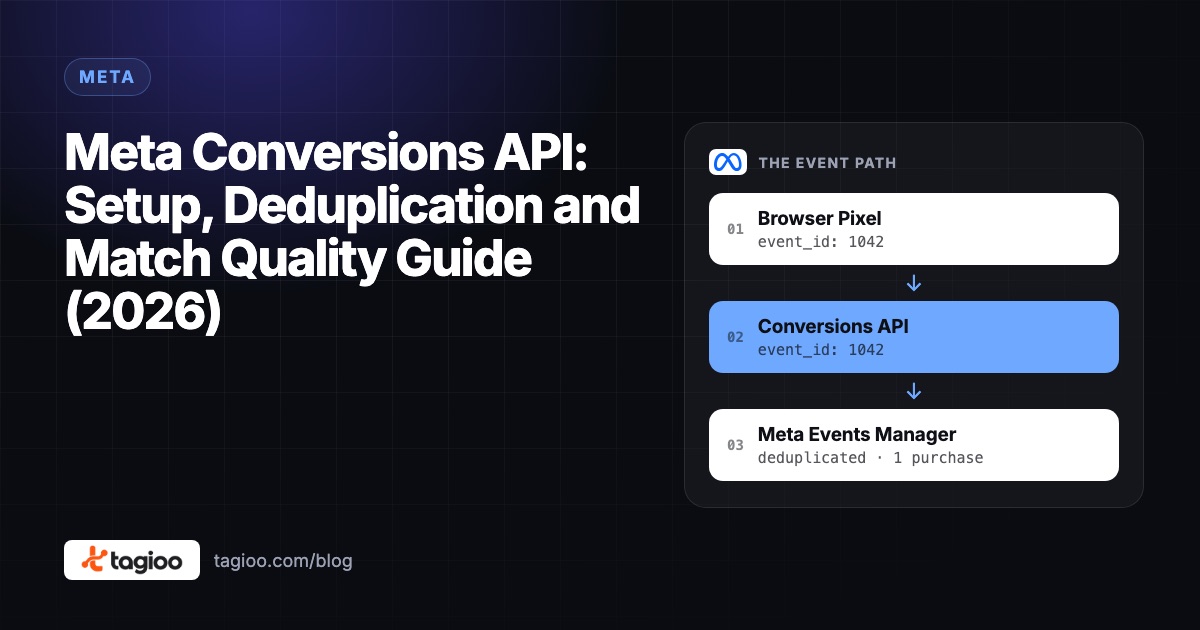
Meta Conversions API: Setup, Deduplication and Match Quality Guide (2026)
How the Meta Conversions API works, the five ways to set it up, and how to get deduplication and match quality right.
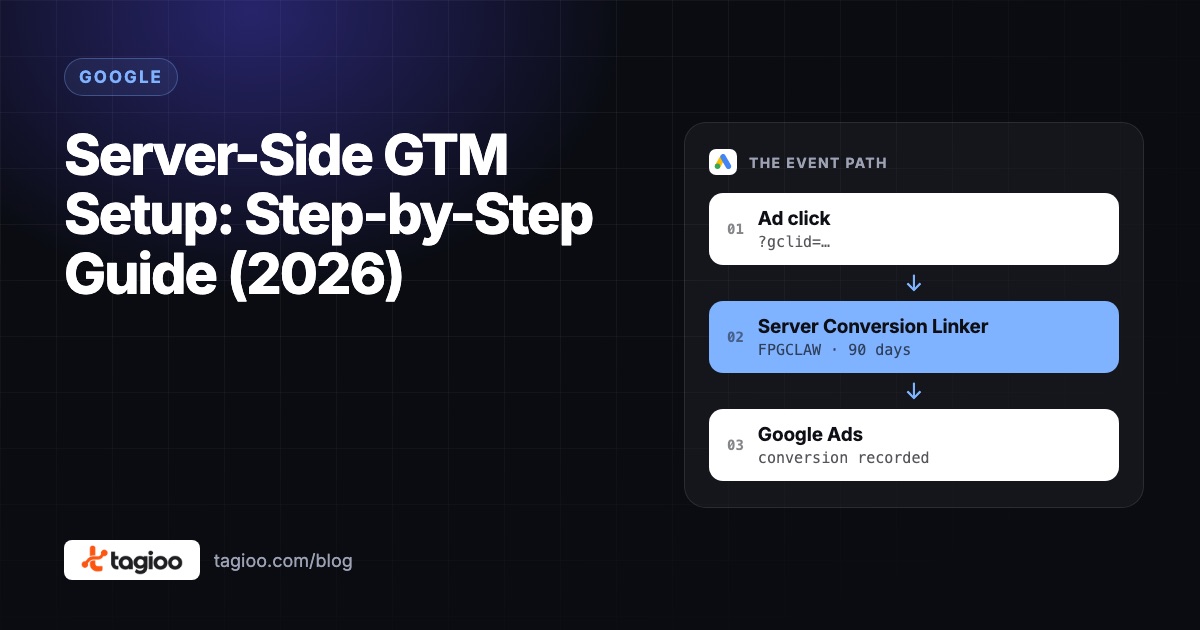
Server-Side GTM Setup: Step-by-Step Guide (2026)
A step-by-step server-side GTM setup, from creating the server container to hosting, DNS, GA4, Meta CAPI, debugging and publishing.
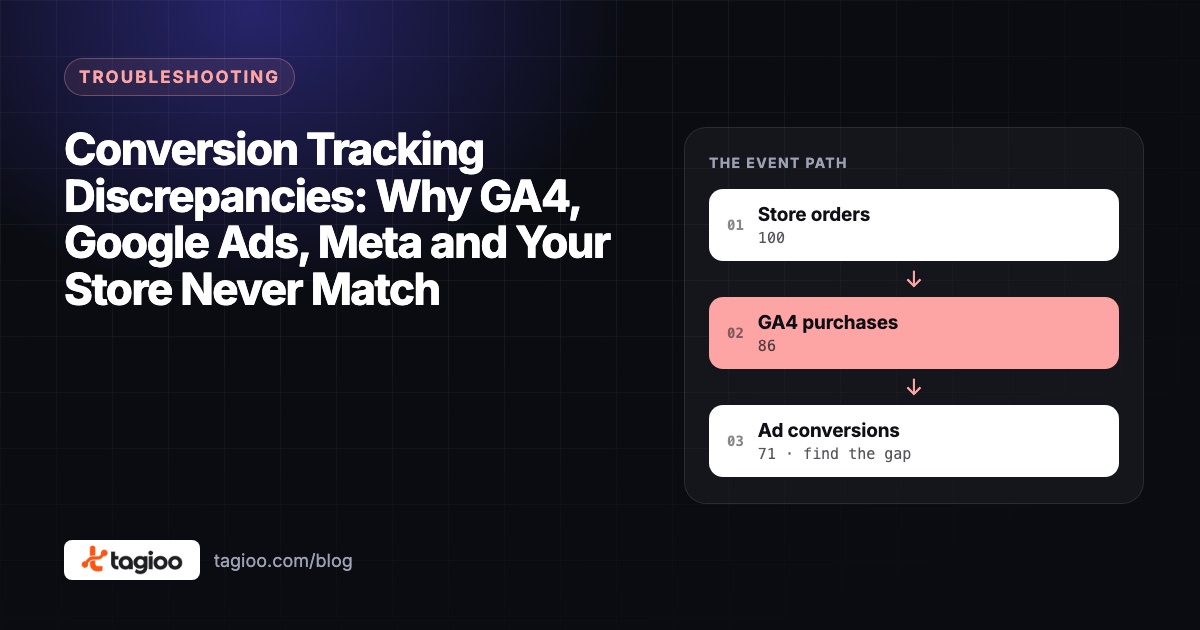
Conversion Tracking Discrepancies: Why GA4, Google Ads, Meta and Your Store Never Match
Not every reporting gap is a broken tag. How to tell normal attribution differences from missing or duplicate conversions.